Enterprise resource planning (ERP) systems bring disparate parts of a business into one secure, centralized place. Procurement professionals and managers with the proper access can tap into a plethora of data and resources that help improve procurement process efficiency, reduce costs, and pinpoint contract or order status in just a few clicks.
What Is ERP in Procurement?
ERP in procurement refers to the unified software platform that connects the procurement department to the rest of the business, including accounting, order management, inventory management, logistics, supply chain, and HR. With one centralized system, procurement teams can access real-time data across all business functions to make strategic procurement decisions.
Key Takeaways
- ERP platforms link procurement to the rest of the business, replacing data silos with real-time visibility.
- Automation features handle routine tasks, such as generating purchase orders, matching invoices, and analyzing vendor performance so that staff can focus on strategic work.
- Centralizing vendor data helps procurement teams manage supplier relationships more efficiently and negotiate better terms.
- ERP systems link purchasing decisions directly to budgets, inventory levels, and demand planning, differentiating them from standalone procurement tools.
Why Is the Right ERP Important in the Procurement Process?
Anyone who works in procurement knows how deeply interconnected this function is with the rest of the business. Successful procurement processes involve operations, finance, logistics, supply chain, and vendor relationships. With an ERP platform in place, procurement teams can view information about those and other parts of the business in a centralized location.
Whether for a simple purchase or a more complex contract, procurement professionals can use an ERP system to enter quote and order details and track purchase orders (POs) as they’re generated and fulfilled. Many of these steps can be automated. Teams can maintain lists of approved vendors and suppliers, automate quote requests, compare quotes, and analyze them to make informed procurement and relationship decisions. Once a quote is accepted, the ERP links related transactions, such as invoices, shipments and payments.
Procurement teams can monitor inventory levels, set automated order thresholds, and plan future orders.
Over time, this shared access helps procurement teams spot cost-saving opportunities while improving efficiency, accuracy, and productivity.
What Are the Benefits of Using an ERP for Procurement?
The biggest benefits of using an ERP for procurement come from better process automation paired with advanced data, reporting, and analysis tools. For example, an ERP can help you send out better requests for quotes (RFQs) and make the best choice from the responses in less time.
-
Procurement automation:
Once you’re up and running, much of the procurement process can be fully automated. You can set up systems to track inventory and send out orders when needed. Whether you’re keeping retail shelves full or need parts for just-in-time manufacturing, this can help you while cutting down on working capital requirements.
-
Cost tracking:
Precise cost tracking that considers ordering, shipping, taxes, and any other necessary expenses can keep your financial projections on target while giving you insights to whittle away at your cost per unit over time. A small improvement in cost per unit can add up to thousands or millions of dollars in savings over time.
-
Relationship management:
As your business grows in complexity, you may find it hard to keep all of your vendors and suppliers straight. An ERP keeps data on every vendor relationship, including contracts, pricing, POs, orders, and payments, in one place, so all team members are synced up on relationship status. Just as many businesses use a CRM (customer relationship management) platform to track customers, it’s important to use a system to track your vendors. That’s already built into most quality ERPs.
-
Centralized Data Source:
When every department uses its own system to track business information, it’s possible to have two sets of numbers that don’t agree, leading to miscommunication and ultimately mistakes and poor business decisions. With an ERP, everyone involved in ordering has one data set that is the business’s undisputed information source.
-
Reporting and analysis:
Business data is only useful when it influences business planning and decisions. An ERP can automatically generate reports and dashboards that include cost, delivery, and other analyses when used effectively. For example, a report could compare costs, defective rates, and delivery times among vendors to help you make informed relationship and ordering decisions.
What Are the 7 Stages of Procurement in an ERP System?
Procurement involves techniques and structured methods that are designed to help organizations follow a standard process. These seven steps help procurement teams save on costs and time:
- Need Identification
The procurement process begins when a business delineates a plan for procuring goods or services at a reasonable cost and pace.
- Purchase Requisition
Purchase requisitions are documents that contain important information on project requirements to help the procurement team fill an existing need. They’re created by either customers or internal users.
- Requisition Review
After the purchase requisition is approved and checked for budget availability, the review stage allows managers and leaders to confirm that there’s a need for the goods or services.
- Solicitation Process
Once the requisition is approved, you can generate a purchase order (PO). After the PO is generated, the procurement team develops a procurement plan and confirms the budget before sending out requests for quotations (RFQs) to vendors.
- Evaluation and Contract Process
Once the solicitation process is closed, the procurement team reviews supplier bids to decide which will best fit the existing need. After the vendor is selected and the contract completed, the purchaser forwards a PO to the vendor, the vendor accepts it, and the contract is activated.
- Order Management
The vendor delivers the goods or services, and the purchaser reviews the order and alerts the vendor of any issues they may find.
- Record Keeping
Purchasers review their invoices and either approve or dispute them before sending them to payment processing, keeping records for accounting and auditing.
What ERP Modules and Features Improve Procurement?
While procurement managers and team members may need to tap into other ERP modules, like human resources, from time to time, the main work in procurement comes from a dedicated procurement module and several others that closely relate to procurement processes.
When choosing an ERP or looking for ways to improve how you use the one you already have, look to these additional modules to enhance your procurement operations:
- Finance: Finance and accounting modules help you track the costs related to procurement and the accounts payable (AP) process for paying invoices. An ERP can automatically match purchase orders to invoices and fulfillment tracking to automate payments based on your company’s rules and policies.
- Manufacturing: If your company manufactures any physical products, you can get insights into materials requirements planning (MRP) and track the status of goods-in-progress to give manufacturing teams what they need at the right time.
- Inventory management: Inventory management helps you track what’s sitting on the shelves, both incoming and outgoing, and how much cash is tied up in that inventory. Small companies handle POs and shipping in this module, while larger organizations may want to use a more robust procurement module for this purpose.
- Order management: This module tracks orders from order generation or receipt through delivery. This can lead to significant time savings for procurement teams, as anyone with access can check order status independently with just a few clicks.
- Supply chain management: Supply chain relationships are essential in procurement. With this module, you can track goods and supplies through the entire supply chain. It may also contain order details and other information you need, such as typical shipping costs and times, to track this critical process effectively.
- Service resource management: This project management module may give you important information regarding one-time projects that fall outside your recurring procurement processes.
When these modules and their features are used to their fullest extent, they can help you integrate and automate many parts of the business while giving leaders key data and reports to improve efficiency and profitability.
7 Ways to Optimize Procurement With ERP
So far, we’ve discussed some high-level benefits of using ERPs for efficiency and cost management. Here’s a more detailed look at seven ways to optimize procurement with ERP systems.
- Supplier relationship management: Tracking all supplier relationships, including communication, contracts, and pricing details, can help with future negotiations and order decisions. When a new team member takes over a relationship or joins your department, the ERP gives them the information to get up and running quickly.
- Sourcing: When supplies are needed, a procurement team member can log into the ERP to look at past purchases and compare sourcing options. The ERP could do the math and compare quotes as well.
- Contract management: The ERP can send out notifications when contracts are expiring. You can also input contract details to compare available options and performance history when preparing for negotiations.
- Order management: Match orders with POs, shipping data, and payments for end-to-end tracking and order management. Large companies with many incoming orders have a much easier time using automated matching than manual processes.
- Requisitioning: When going through an RFP process for an internal requisition, the ERP can automatically process quotes and store communications to help you best choose a winner.
- Payment processing: The connection between order and payment systems can completely automate payments using digital payment tools. This eliminates the need for signatures and mailing paper checks for payment approvals. If something doesn’t match, the system can be set up to send out a notice to accounting or AP teams for further review.
- Purchase planning: Insights into cost and inventory help with future purchase planning for seasonal needs, one-time projects, and recurring purchases.
ERP vs. E-Procurement: Is There a Difference?
Both ERP and e-procurement systems help businesses purchase materials and process payments, but they differ in scope. E-procurement platforms focus exclusively on procurement tasks—sourcing, bid management, supplier communication, and purchase workflows—and often make up just one aspect of a larger business platform with more diverse capabilities, including ERPs. Some sophisticated e-procurement systems may even offer the same targeted procurement capabilities as an ERP. These systems can work well for a company with an isolated procurement process or a small business with limited need for a comprehensive system.
ERP systems take a broader approach, connecting budgets, inventory, demand planning, and operational performance with procurement functions. After staff approve a PO, for example, the ERP automatically updates financial commitments, adjusts inventory forecasts, notifies the receiving team, and triggers downstream workflows without manual handoffs or delays. For organizations that rely on procurement data to inform decisions across the company, such as those with volatile production schedules or seasonal cash flow fluctuations, an ERP may be a better fit than a standalone procurement system. However, which ERP fits best depends on the business’s needs and the system’s capabilities.
Choosing the Right ERP for Your Business
Companies can choose from multiple ERP software vendors. Rather than basing your decision on convenience or price alone, it’s wise to investigate features and how the ERP can fit into your current business.
If you’ve decided that the existing tools and systems at your business are not enough, consider both direct and indirect cost savings, opportunities to increase revenue, and how you and your team can become more efficient and effective by using a centralized ERP.
You’ll also have to choose between cloud ERPs and ERPs you host yourself. Cloud-based ERPs give every team member secure access to company information from the office, home office, or anywhere else without any need to maintain expensive servers.
How NetSuite ERP Can Improve Your Procurement Processes
Managing procurement across disconnected systems creates blind spots in the forms of missed savings, duplicate orders, stockouts, and delayed approvals, all of which slow down operations. NetSuite Procurement integrates data from purchasing, inventory, finance, and order management into a single cloud-based platform, giving companywide teams real-time visibility into every step of the procurement process. Automated workflows handle routine tasks like purchase order generation and invoice matching with minimal manual intervention, while NetSuite’s built-in analytics help identify cost trends and vendor performance patterns to improve future procurement processes. With everyone working from the same data, procurement teams can move faster, finance can close the books with confidence, and leadership gains the visibility needed to make informed sourcing decisions.
NetSuite’s Procurement Dashboard
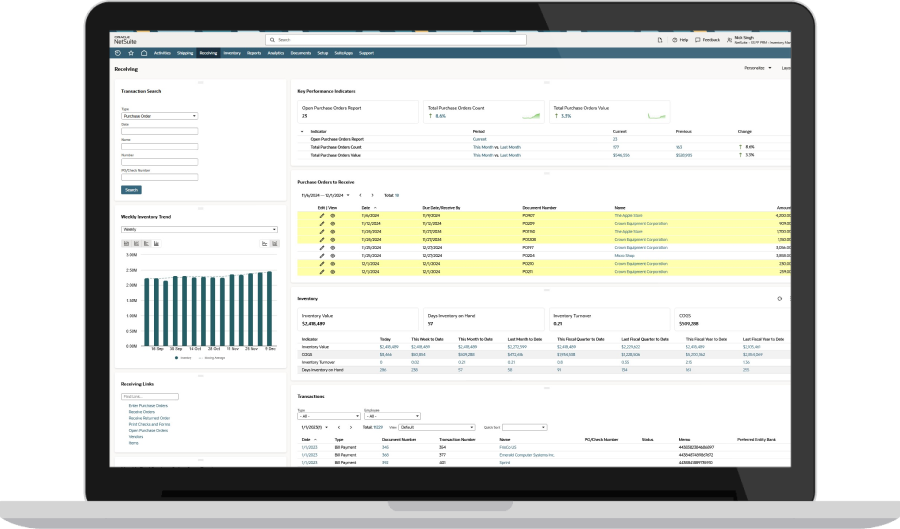
ERP systems elevate procurement from manual processes and disconnected spreadsheets by connecting purchasing data to every aspect of the business. Organizations can use these platforms to track costs, sync purchasing with demand and inventory, manage vendor relationships, and make faster, more informed decisions. Whether it’s saving time managing orders, offering teams self-service options to find information, or creating a more efficient operation, the right ERP solution turns procurement from a necessary cost into a strategic advantage.
ERP in Procurement FAQs
What are the challenges of adopting ERP for procurement?
Common challenges include migrating data from incompatible legacy systems, gaining buy-in from resistant staff, and configuring the system to match existing processes. Implementation timelines vary based on complexity, though cloud-based ERP typically speed the process.
How long does it take to implement an ERP system for procurement?
Implementation timelines range from a few months for an “out-of-the-box” cloud-based system to over a year for a heavily customized, on-premises system. Data migration, integration with existing tools, and other factors impact timelines.
How does ERP help with supplier management?
ERP systems centralize supplier data, such as contracts, pricing, order history, and performance metrics, to create a consistent way for procurement teams to evaluate vendors. This visibility supports better negotiations and simplifies onboarding, especially for systems with intuitive vendor portals and integration capabilities with suppliers’ systems.