Enterprise resource planning (ERP) systems have become a critical tool for businesses over the past several decades. An ERP solution automates critical business processes and serves as a shared database for all financial and operational information from across the company. It pulls this data from a number of modules built to help various departments, from accounting to supply chain to human resources, perform their individual functions.
An ERP solution gives all employees access to the information they need to answer important questions about their department’s current performance and future planning, as well as target areas for improvement. This single source of information minimizes data accuracy and consistency issues and keeps everyone looking at the same numbers, no matter their role. It also drives better decision-making that leads to more efficient processes and cost savings. Additionally, ERP can automate many tasks, reducing errors and freeing up employees to focus on more strategic work. Leading ERP systems embed AI capabilities to automate more tasks and expand their analytical capabilities across modules. Because ERPs maintain unified databases, they provide their AI tools with the full context of a business to inform recommendations, uncover insights, and flag exceptions that need human attention.
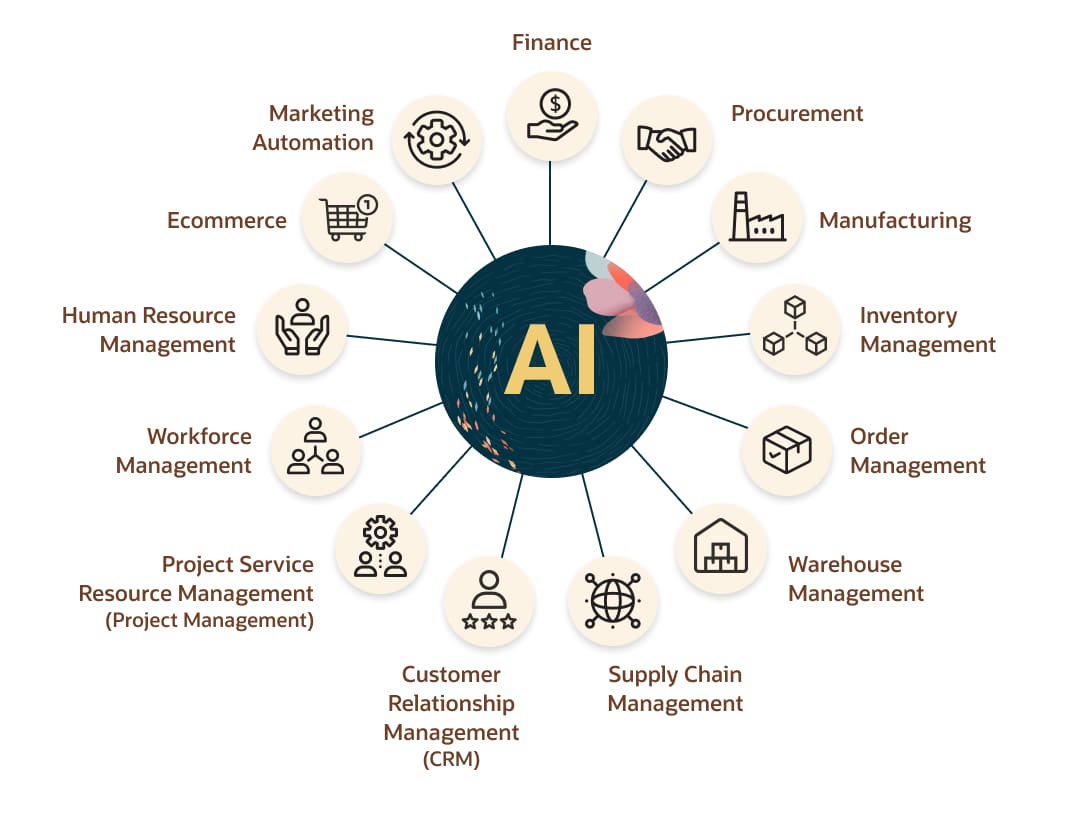
Common ERP modules support back- and front-office functions like finance and accounting, procurement, manufacturing, inventory management, order management, warehouse management, supply chain management, customer relationship management (CRM), and workforce management. More functionally rich solutions may also include professional services automation (service resource management), human resources management, ecommerce, and marketing automation.
What Are ERP System Modules?
Each ERP module is designed for specific business functions, providing the data and supporting the processes that will help those employees do their jobs. Every module plugs into the ERP system, so the system provides a single source of accurate data, even as the business adds new modules. If the ERP system is the toolbox, the modules are the screwdriver, wrench, hammer, and other tools in the box that each have specific uses.
Video: What Are ERP Modules?
How Do ERP Modules Help Businesses?
The modular design of ERP allows it to meet the shifting needs of a business and is a big reason this software has become ubiquitous. An organization can purchase only the modules relevant to its business model, operations, and key challenges. It can then add ERP modules to address new needs or challenges as the organization evolves.
The beauty of modular ERP software is that a company can add this functionality while keeping the same foundation in place. There is no need to implement a new ERP system—a lengthy process—when requirements change, as long as the company chooses an established ERP provider with a wide selection of modules.
How Do ERP Vendors Charge for Each Module?
There is a wide variance in what is included in an ERP purchase and which modules vendors charge extra for. Typically, the core financial functions are included with the base package, while features like CRM and human resources management may cost extra. Some offerings are bundled by industry so, for example, a manufacturer would buy a package with supply chain management included or a retailer would buy a package with commerce included. On-premises ERP vendors typically charge an upfront per-user license, while software-as-a-service (SaaS) vendors charge on a per-user, per-month, or year basis. In some cases, there are transaction-based charges.
13 ERP Modules and Their Features
-
Finance
The finance and accounting module is the most important ERP module because it allows businesses to understand their current financial state and future outlook. Key features of a financial module include tracking accounts payable (AP) and accounts receivable (AR) and managing the general ledger. It also creates and stores crucial financial documents like balance sheets, payment receipts, and tax statements.
The financial management module can automate tasks related to billing, vendor payments, cash management, and account reconciliation, helping the accounting department close the books in a timely manner and comply with current revenue recognition standards. Modules with AI capabilities further accelerate accounting processes by flagging anomalies in financial data, using optical character recognition to scan and upload invoices, and generating narrative explanations with language oriented toward specific target audiences (accountants, executives, or the public, for example). This module also has the data that financial planning and analysis employees need to prepare key reports, including profit and loss (P&L) statements and board reports, and run scenario plans.
-
Procurement
The procurement module, also known as the purchasing module, helps an organization secure the materials or products it needs to manufacture and/or sell goods. Companies can keep a list of approved vendors in this module and tie those suppliers to certain items, helping with supplier relationship management. The module can automate requests for a quote, then track and analyze the quotes that come in.
Once a company accepts a quote, the procurement module helps the purchasing department prepare and send out purchase orders. It can then track that purchase order as the seller turns it into a sales order and ships the goods, automatically updating inventory levels once the order arrives. Modules with built-in AI tools use purchasing and invoice data to suggest strategies that improve procurement, such as prioritizing reliable vendors, making payments based on order urgency, or timing purchases to optimize cash flow.
-
Manufacturing
The earliest version of ERP, material requirements planning (MRP) systems, were designed for manufacturers, and manufacturing remains a key piece of ERP. Today, ERP systems typically have a production management or manufacturing execution system (MES). The manufacturing module helps manufacturers plan production and make sure they have everything they need for planned production runs, like raw materials and machinery capacity. AI-powered demand forecasting can help manufacturers anticipate production needs through historical data analysis that informs production requirements and timelines, as well as best case, worst case, and most likely scenarios. During the manufacturing process, the module can update the status of goods-in-progress and help companies track actual output against forecasted production. It also provides a real-time picture of the shop floor, capturing information on items in progress and finished goods. It can calculate the average time to produce an item and then compare supply with forecasted demand to plan adequate production.
-
Inventory Management
The inventory management module unlocks inventory control by tracking item quantities and location down to individual SKUs. This module offers a complete picture of not only current but also incoming inventory, through an integration with the procurement tool. This piece of software helps businesses manage inventory costs, making sure they have sufficient stock without tying up too much cash in inventory. An inventory management application can weigh sales trends against available product to help companies make informed decisions that boost margins and increase inventory turn (a measure of how often inventory is sold over a certain period). It can help prevent stockouts and delays, which enhances customer service.
Businesses that lack other supply chain management modules may also use the inventory management application to handle purchase orders, sales orders, and shipping. Larger organizations will need a version of this solution that can track inventory across multiple locations. Modules with AI software can generate demand forecasts that incorporate more diverse data—social media buzz and external market factors, for example—and adjust inventory levels before any demand shifts affect fulfillment times or hurt profitability.
-
Order Management
An order management module tracks orders from receipt to delivery. This piece of the ERP feeds all orders to the warehouse, distribution center, or retail store after customers place them and tracks their status as they’re prepared, fulfilled, and shipped to the customer. The order management module prevents orders from being lost and boosts on-time delivery rates to keep customers happy and cut unnecessary expenses for expedited shipping.
More advanced order management applications can help a company determine the most cost-effective option for fulfilling an order—a store vs. a warehouse vs. a third-party fulfillment partner, for example—based on available inventory and the buyer’s location. AI agents built into order modules can monitor orders for exceptions like unexpected surges or fulfillment delays and recommend corrective actions before problems spread.
-
Warehouse Management
A warehouse management module can deliver a rapid return on investment for businesses that operate their own warehouses. This application can efficiently guide warehouse employees through all warehouse processes based on the layout of the facility, from putaway when shipments arrive to picking, packing, and shipping. It can also help companies plan labor based on expected order volume. The warehouse management module can support different picking strategies like batch picking, wave picking, and zone picking depending on which is most efficient for a given business, and some modules can show employees the most efficient pick path. With integrated AI-enhanced analytics, warehouse data can inform big-picture strategic planning that aligns floor layouts, labor scheduling, and picking strategies to reduce bottlenecks and overhead costs.
When the warehouse management module is integrated with inventory management and order management applications, employees can find the right products and get shipments out the door quickly. Faster delivery ultimately increases customer satisfaction.
-
Supply Chain Management
A supply chain management module tracks each step in the movement of supplies and goods throughout the supply chain, from sub-suppliers to suppliers to manufacturers to distributors to retailers or consumers. It can also manage any materials or products returned for refund or replacement. Built-in AI tools allow supply chain teams to run detailed analyses and wide searches that help anticipate disruptions and inform contingencies across procurement, inventory, and logistics operations.
As noted earlier, supply chain management can include a wide array of modules like procurement, inventory management, manufacturing, order management, and warehouse management. However, it may have functionality beyond the core capabilities of those modules.
-
Customer Relationship Management (CRM)
The customer relationship management (CRM) module stores all customer and prospect information. That includes the company’s communication history with a person—the date and time of calls and emails, for example—and their purchase history. A CRM improves customer service because staffers can easily access all the information they need when working with a customer. This information also feeds into AI features that can suggest relevant products throughout the customer journey based on actual purchase history and buying patterns, rather than generic marketing pushes.
Many businesses also use CRM to manage sales leads and opportunities. It can track communication with prospects and suggest which customers should be targeted for certain promotions or cross-sell opportunities. More robust CRM modules may support customer segmentation (leading to more targeted marketing) and advanced contact managers and reporting tools.
-
Professional Services Automation (Service Resource Management)
A professional services automation (PSA) module, also called a service resource management module, allows an organization to plan and manage projects. Services-based businesses often use this module. The application tracks the status of projects, managing human and capital resources throughout, and allows managers to approve expenses and timesheets. AI helps PSA modules provide deeper insights into how projects are progressing by generating status summaries, flagging at-risk projects, and recommending staffing adjustments based on real-time utilization and profitability data. This module facilitates collaboration between teams by keeping all related documents in a shared place. Additionally, the PSA module can automatically prepare and send bills to clients based on rules around the billing cycle.
-
Workforce Management
A workforce management module is similar to a human resource management module but is designed for companies with more hourly than salaried employees. It can monitor workers’ attendance and hours and measure things like employee productivity and absenteeism.
Payroll could also fall under the workforce management module. A payroll sub-module automatically distributes paychecks to employees on a set schedule with the appropriate taxes deducted and handles expense reimbursement. It can also provide reports on payroll expenses, total overtime hours, and similar KPIs. AI features identify subtle patterns in attendance, overtime, and productivity data to help managers spot scheduling issues or workforce trends.
-
Human Resources Management
A human resource management (HRM) or human capital management (HCM) module usually encompasses all the features of a workforce management application and offers additional capabilities. HRM could be viewed as CRM for employees. This popular module has detailed records on all employees and stores documents like performance reviews, job descriptions, and offer letters. It tracks not only hours worked but also paid time off (PTO)/sick days and benefits information.
Since the HRM module stores a vast amount of information on every employee across the organization, it eliminates a lot of duplicate or inaccurate data that many organizations store in various spreadsheets. Its data can also feed generative AI tools that help HR teams quickly draft important documents—for example, internal memos describing new policies, job listings, emails, and performance reviews.
-
Ecommerce
Certain ERP vendors offer an ecommerce module for businesses that want to sell online. This module allows companies to quickly launch a business-to-business (B2B) or business-to-consumer (B2C) ecommerce website. Leading commerce applications include user-friendly tools that allow employees to easily add new items, update product content (item descriptions, titles, specs, images, etc.), and change the look and feel of the website. Once items are listed, AI-driven personalization can recommend products to shoppers based on browsing behavior, consumer trends, and purchase history to increase conversion rates and order values without a proportional investment in marketing or sales efforts.
When the ecommerce application is integrated with other ERP applications, all payment, order, and inventory information feeds from the ecommerce module into the shared database. This allows companies to easily add all transactions to the ledger, remove out-of-stock items from the site, and ship orders on time.
-
Marketing Automation
Like with ecommerce, certain software providers have developed a marketing automation module. A marketing module manages marketing campaigns across digital channels like email, web, social media, and SMS. It can automate email sends based on campaign rules and has advanced customer segmentation features, so customers only receive relevant messages. This targeted approach can be further enhanced by AI, which analyzes customer data to identify segments likely to respond to specific offers or messaging, even down to the individual shopper.
Marketing automation software, whether part of the ERP system or a separate solution, can provide detailed reports on the performance of campaigns to shape future marketing plans and spend. These applications can increase leads, customer loyalty, and, over time, sales.
Choosing the Right ERP Modules for Your Business
While the ERP modules a business should invest in will vary based on business model, industry, current obstacles, and other factors, there are a few modules that most organizations need to run their business operations. Every company needs a finance and accounting module to operate, monitor its financial health, and pay its bills. It’s difficult to run a business without software that can provide financial information and execute basic accounting tasks.
Though not as critical as finance and accounting, almost every company—regardless of industry, and whether it’s product- or services-based—depends on some type of customer, so CRM is another module that would benefit most businesses. Similarly, the workforce management or HRM module is a worthy investment for most companies with more than a few employees. Employees must be paid on time, and employers need a central place to track their information and career development.
Any products company—a category that includes almost all manufacturers, distributors, and retailers—will benefit from a supply chain management module. Most organizations start with inventory and order management modules, since those are crucial to daily operations, and might later add solutions for manufacturing, warehouse management, and procurement.
Services businesses like consultancies, agencies, and maintenance and repair companies could realize a fast return on investment with a project management module. It automates complex, time-intensive billing processes and simplifies resource planning for projects.
Commerce and marketing automation are both pieces of software that some would not put under the ERP umbrella, though many businesses rely on them to attract and convert customers, especially as the internet has become a primary driver of new business. Though there are plenty of marketing automation and commerce solutions available from non-ERP vendors, solutions from your ERP provider offer a tighter, more reliable integration and may share a common user interface that reduces the learning curve and increases adoption among employees.
Purchasing and implementing an ERP platform used to be intimidating, even overwhelming, but beginning with an ERP system that’s right for your business allows you to hit the ground running with the foundations and build it out as you grow. The ideal ERP modules for your business is one that meets your needs right now and is scalable to help you meet the challenges and opportunities that growth presents.
ERP Modules FAQs
What does ERP mean?
ERP, or enterprise resource planning, is software that integrates core business
processes into one platform. Businesses use ERP to combine finance, supply chain, customer
relationships, orders, manufacturing, human resources, and other specific functions that
they require. Each module communicates and shares data to create and maintain a consistent
view of the business’s operations and financial performance. This data can also power other
tools, such as artificial intelligence, to enhance forecasting and analytics.
What are ERP modules?
ERP modules are applications dedicated
to certain business functions and processes. All modules are integrated with the ERP
system’s central database so there’s a single source of accurate data. This also allows
different systems—like finance and inventory management, for example—to easily exchange
information and work together to execute more complex tasks.
What is ERP and its types?
ERP stands for enterprise
resource planning and is a platform many businesses rely on to support their daily business
operations. Systems that manage key processes related to finance, supply chain, HR, customer
relationship management (CRM), project management, and more are all connected to the ERP.
There are multiple delivery models for ERP, including cloud, on-premises, and hybrid. A cloud system runs on remote servers and may be managed by the software vendor, while an on-premises system requires local, company-owned servers. A hybrid approach blends the two, combining aspects of both on-premises and cloud ERP platforms.
What are the mandatory modules of any ERP system?
Business
requirements determine which ERP modules a company needs, but most start with a finance
module to automate accounting processes, track all financial information, and provide key
reports. A CRM is another popular module, as just about any company has customers to manage.
Products-based businesses typically need inventory management, order management, and other
supply chain-related modules, while services organizations often require a professional
services automation application.