
Managing project costs is one of the hardest parts of running a business. Without proper tracking, it’s easy to lose sight of actual profitability. Job costing software addresses this challenge by centralizing expense data and connecting it with other finance and project management systems. Companies in the construction, manufacturing, and professional services industries rely on its real-time insights to respond faster to cost overruns and to access clear reports that guide informed, strategic decisions for every project.
What Is Job Costing Software?
Job costing software is a specialized tool that monitors and allocates expenses for individual projects. It records labor, materials, equipment, and overhead costs in a unified system and compares actual spending to planned budgets. The software provides instant data analysis and accurate reporting, which companies can use to devise smarter pricing strategies and protect profit margins. Industries with complex, project-driven work benefit most from its capabilities.
Key Takeaways
- Job costing software addresses the financial risks of project-based work by improving estimates and protecting against cost overruns.
- Centralizing project expenses and automatically allocating them to jobs minimize manual errors and enhances visibility.
- Integrations with payroll and accounting help connect project costs to wages and statements for better reporting and faster billing.
Job Costing Software Explained
Job costing software goes beyond expense tracking to create a full financial picture of every project. Businesses enter estimates at the start, record actual costs as work progresses, and compare the two throughout the course of the job. Managers use these insights to spot problems early and adjust schedules or resources to protect profitability. At the same time, finance teams get automated reports with fewer errors, so they can prepare reliable statements for stakeholders. The software also stores historical job data, which contributes to the accuracy of estimates for future bids. Connections to payroll, accounting, and project management software create a cross-functional system that improves cash flow oversight and lifts efficiency.
Several emerging technologies are expanding these capabilities. AI supports predictive analytics and smarter cost forecasting, giving managers better tools with which to spot overages and adjust resources. Cloud and mobile platforms make it easier to access data in the field so information can be shared instantly among teams. And deeper integrations with ERP systems bring advanced capabilities, such as automated cost allocation and invoice matching.
Benefits of Job Costing Software
Complex projects rarely go exactly as planned. Unexpected labor costs, off-target estimates, and overlooked expenses can quickly erode margins. Job costing software addresses these risks by helping businesses:
- Avoid cost overruns: Job costing software positions expenses against budgets in real time and alerts managers when costs begin to rise. Early intervention prevents small overruns from growing into significant losses.
- Create accurate project estimates: A record of past jobs, including associated expenses, forms a reliable foundation for new bids and proposals. More precise estimates reduce the risk of underpricing or overpricing work.
- Improve profitability and cost management: Detailed expense tracking highlights where money is being spent and where savings are possible. Managers can identify profitable project types and protect margins.
- Enhance cash flow: Linking costs with billing milestones improves invoicing efficiency. Instant visibility into works in process and vendor expenses strengthens cash flow planning.
- Boost customer satisfaction: Armed with deeper insights about expenses and job progress, managers can correct issues before they cause cost overruns or delays. Clear financial reporting further supports transparent communication with clients.
- Support decision-making: Customizable reporting and up-to-date information let leaders reallocate resources, adjust pricing, and prioritize investments. Smarter decisions at every stage improve both short-term outcomes and long-term growth.
Job Costing Software Key Features
Project expenses come from many sources, and they often shift as work progresses, which complicates tracking. Job costing software brings these details into one system, linking costs to jobs and minimizing the chances of manual data entry errors. The software’s following core capabilities give managers a clearer view of project performance:
- Cost allocation: Companies can assign labor, materials, equipment, and overhead to specific jobs, projects, or cost codes. Automated allocation cuts down on manual errors and provides a well-defined picture of true profitability.
- Labor costing: The software captures employee expenses—wages, overtime, benefits, payroll taxes—and ties them to jobs. It calculates complete labor costs for each project, enabling managers to control workforce spending.
- Time tracking: Employee hours are logged directly against jobs, tasks, or phases. The system optimizes payroll processing by automatically calculating wages—including overtime and special rates—based on actual work.
- Integration with other systems: By automatically linking time and labor data with wages, taxes, and benefits, payroll integration creates audit-ready reports. Accounting integration syncs all project costs with financial statements, supporting accurate invoicing and faster reporting.
- Mobile access: Field teams can enter time, update progress, and report expenses from mobile devices. This eliminates reporting delays and improves data quality, keeping managers current on project status at all times.
- Budget management: Project managers or finance teams use job costing software to create detailed budgets for labor, materials, and overhead at the start of each job, setting clear financial targets for every cost category. Variance alerts help prevent overruns and keep projects financially on course.
- Profitability analysis: Dashboards and reports compare costs with revenue to measure margins. These insights highlight cost drivers so managers can focus on the most profitable work.
Which Industries Use Job Costing Software?
Juggling multiple—and often complex—projects at once while managing distinct expenses and billing requirements is a challenge for businesses in many sectors. Construction firms, manufacturers, professional services providers, and agencies often turn to job costing software for help controlling costs and keeping work on track.
Construction
In addition to tracking internal expenses, construction companies face the added complexity of managing subcontractors and their costs. On top of that, jobs often run in parallel, each with its own budget and schedule. Construction job costing software directly addresses these challenges. Labor and subcontractor cost analyses help contractors refine schedules and generate accurate invoices, and precise financial reports increase transparency for all stakeholders. Bids based on historical data stored in the system improve competitiveness and protect margins. Meanwhile, linking expenses to billing milestones enhances cash flow management.
Manufacturing
Manufacturers often work with custom orders or small-batch production runs with highly variable costs, so precise tracking of materials, labor, equipment, and outsourced processes is essential. Integrating job costing software with manufacturing accounting and ERP systems facilitates instant reporting on variances between actual and standard costs. This helps managers address rising input costs and other inefficiencies while production is still underway, preventing losses and protecting delivery commitments. Managers can also analyze profitability by batch, order, or product line to identify high-margin products and uncover cost drivers in need of adjustment. Cost monitoring supports better pricing and decreases waste in the production cycle. Over time, this data helps refine resource allocation and improve overall efficiency.
Professional Services
Labor often represents the largest expense for professional services firms, including consulting and legal practices, and it directly impacts their profitability. Job costing software integrates with time tracking and accounting systems to capture billable hours, overhead, and other expenses. These connections support accurate revenue recognition and per-client profitability analyses. Managers can assess these margins to evaluate per-client profitability and modify staffing or billing models as needed. For example, a firm may assign junior consultants to low-margin clients and dedicate senior experts to more profitable engagements. Or it may switch from time-and-materials billing to a fixed-fee model for projects with consistent, predictable costs. Job costing software can flag projects at risk of going over budget, and automated reporting features alleviate administrative burdens and support timely invoicing.
Agencies
Agencies juggle multiple campaigns for different clients, each with their own unique working arrangements. Some clients are billed on an hourly basis, others are on fixed monthly retainers. Performance-based fees and commissions further complicate matters. Resource demands vary widely, as specific projects may involve different combinations of in-house and agency teams, as well as outsourced freelancers—all with significant budgets. Job costing software tracks employee time, freelancer costs, and expenses by project phase or client. Managers use this information to control budgets, reallocate resources when needed, and evaluate margins. These profitability insights help guide decisions around pricing and service offerings. Historical cost data also helps improve planning for future campaigns.
Job Costing Software Implementation Best Practices
Deploying job costing software affects workflows, financial reporting, and project management, so planning is vital. The following six best practices help companies avoid common pitfalls while closely tracking expenses and maximizing efficiency:
- Define your system requirements and software needs: Identify key features that address the business’s unique challenges and workflows. A manufacturer might prioritize compatibility with inventory management software, for example, whereas a consulting firm may need strong time tracking and billing automation.
- Document all your processes to identify potential gaps and opportunities: Map existing workflows, approvals, and data sources to uncover redundant processes and overlapping responsibilities. Clear documentation guides optimal configuration and helps avoid repeating these issues with the new system.
- Evaluate your software options thoroughly before choosing: Assess job costing software vendors with regard to functionality, integration capabilities, usability, and support. Use demos, trial periods, and user feedback to minimize adoption risks.
- Don’t skimp on user training: Comprehensive training teaches users how to enter correct data and take advantage of features to decrease errors and enhance report reliability. Ongoing refreshers keep teams updated as the system evolves.
- Adopt a mindset of continuous improvement: Regularly review system performance and gather user feedback. Implement vendor updates to increase efficiency, fix problems, and add new features that align with evolving business needs.
- Take advantage of system integrations: Connect job costing software with accounting, payroll, and inventory systems to optimize workflows. This creates a unified financial view that speeds reporting and simplifies audits.
Integrating Job Costing With Accounting Software
Without seamless integration between job costing software and accounting systems, project-based companies risk financial reporting delays, data errors, and fragmented visibility—which will undermine profitability and disrupt cash flow. NetSuite cloud accounting software addresses these challenges by tightly connecting real-time job costing data to comprehensive financial management tools. This unified platform automates expense allocation, captures labor and overhead costs, and delivers detailed profitability reporting by job or project. The system’s billing and revenue recognition capabilities, plus customizable dashboards, cut down on administrative effort and provide trusted insights that generate smarter financial and operational decisions.
In-Depth Expense Tracking With NetSuite Cloud Accounting Software
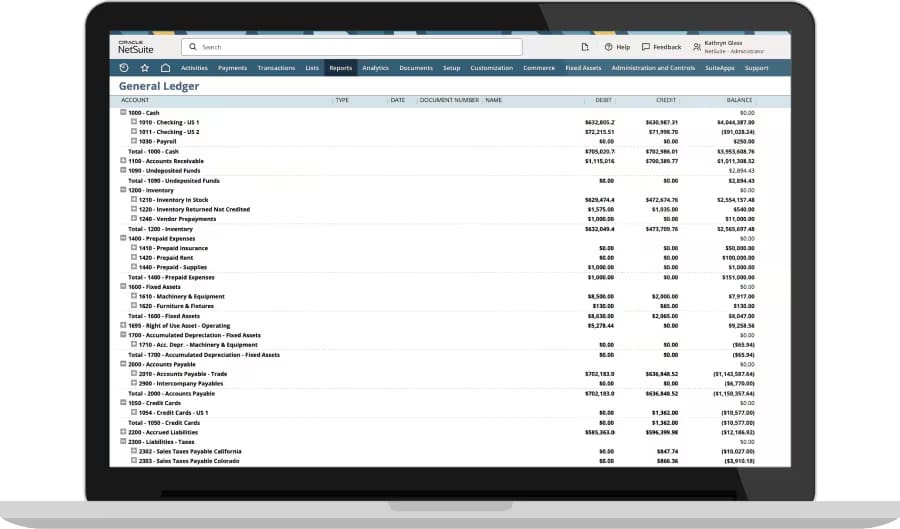
Job costing software melds the critical elements of project-based financial management into one system. Its cost allocation, labor costing, and profitability analysis features give project managers and finance professionals precise control over expenses and margins. And integration with payroll and accounting systems extends these benefits throughout the business. Together, these attributes result in greater accuracy and clearer visibility for companies in a wide range of industries, including construction, manufacturing, and professional services.
Job Costing Software FAQs
Who uses a job costing system?
Companies that manage distinct projects and custom work use job costing systems. These include businesses in construction, manufacturing, professional services, healthcare, retail, and logistics.
How much does job costing software cost?
The price of job costing software depends on business size, features, and deployment type. Companies should also consider functionality, integrations, and support when evaluating their options.