
In an era of booming global digital commerce, the limits of traditional warehouse management processes are constantly tested. To keep up with customer expectations for fast, accurate, on-time shipping—without compromising quality or increasing costs—many businesses are turning to warehouse management systems (WMS).
What Is a Warehouse Management System?
A WMS is a software application that controls daily warehouse operations by automating processes and coordinating the warehouse’s many moving parts, including staff, equipment, inventory, and orders.
Companies are increasingly turning to WMS to achieve the accuracy and efficiency needed to get products to customers on time without an unsustainable spike in costs. WMS solutions may be provided as part of an ERP suite of business applications or as standalone products that are cloud-based or on-premises.
Key Takeaways
- A WMS helps warehouse managers control daily operations to create more efficient and accurate order fulfillment processes.
- WMS solutions provide real-time inventory tracking, automated workflows, and performance analysis that help managers reduce costs, delays, and manual errors.
- Businesses can choose cloud-based, ERP-integrated, or standalone on-premises WMS to match their size and requirements.
- Integrating a WMS with other business systems creates a comprehensive view of how warehouse performance fits into a company’s larger supply chain operation.
Warehouse Management Systems Explained
A WMS synchronizes complex warehouse workflows into one platform through real-time data processing and automation. By using WMS software to create digital twins of their physical warehouses, businesses can map every location, track each item, and continuously optimize every step of order fulfillment, from the receiving dock to the shipping bay. These systems integrate directly with barcode scanners, RFID readers, and mobile devices to capture data at every touchpoint and give managers complete visibility into warehouse operations.
A WMS typically operates on a rules-based engine that automates warehouse operations. When new inventory arrives, for example, the system identifies optimal storage locations based on factors such as item velocity, size, weight, and any special handling requirements (e.g., temperature or humidity). Then, when fulfilling orders, the WMS suggests the best picking path, combining similar orders to minimize travel time for either human pickers or system-controlled robots. Over time, the WMS’s data analytics capabilities identify patterns to help businesses better predict demand, allocate labor, and prevent bottlenecks. Businesses can then implement these tested improvements across fulfillment channels, including ecommerce platforms, retail stores, or B2B customers, to repeat any relevant successes. These continual improvements help companies maintain their competitive advantage as they adapt to changing market conditions.
What Is Warehouse Management?
Warehouse management is an umbrella term for the processes involved in running and overseeing the daily operations of a warehouse. Warehouse management considers everything from layout and labor management to day-to-day activities, such as receiving and managing inventory, fulfilling orders, and coordinating with shipping partners.
Effective warehouse management optimizes and integrates all these facets of warehouse operations to maximize productivity and efficiency, facilitating fast, accurate order fulfillment while keeping costs low.
What Does a Warehouse Management System Do?
A WMS provides real-time insights into any aspect of warehouse operations, from the location of each item to the number of employees on the packing floor. The software can use these insights to generate actionable suggestions to improve efficiency, save time, and strengthen margins throughout the supply chain—a major cost driver for most companies.
A WMS connects previously isolated areas—ranging from workforce scheduling to picking and shipping items—to centralize management and monitor the downstream impact of any changes. By automating routine steps and decisions and tracking targeted key performance indicators (KPIs) over time, the system can reduce delays and improve reporting accuracy. Furthermore, a WMS can analyze these tracked metrics to automatically alert managers when new bottlenecks arise, unlocking quick resolution before impacting customers.
Key Features and Functions of a WMS
A WMS can be used to manage key warehouse operations, including:
- Warehouse organization: By inputting warehouse size and inventory information (such as pallet size, object size, and product use), a WMS can generate a warehouse diagram that will help a business optimize inventory storage by making the best use of available space.
- Daily scheduling: Taking into account current orders and available staff, a WMS can devise daily plans that schedule the right amount of labor and estimate labor costs. A WMS can also connect to transportation providers to schedule shipping and receiving times and locations. That helps truck drivers arrive at the right dock at the right time and keeps staff ready for them.
- Inventory management: A WMS can gather information from mobile devices and machinery to record the movement of inventory throughout the warehouse. An associate can scan items when they’re received and again when stored, picked, packed, and shipped. The WMS adjusts inventory levels in real time to help minimize waste and avoid stockouts.
- Order fulfillment: A WMS facilitates fast and accurate order fulfillment. To fill each day’s orders, the picking team can use a highly detailed packing list—often on a mobile device that they carry with them—listing exactly what they need and where it’s located.
- Monitoring and reporting: A WMS documents standard operating procedures so employees can follow them at all times and monitor warehouse operations to detect problems. The company can then analyze the data collected by the WMS to assess warehouse performance, find areas for improvement, create goals, and track progress over time.
- Mobile access: Warehouse workers can log into their WMS via mobile applications on smartphones, tablets, or handheld devices. This mobility allows staff to access order and inventory information from anywhere in the warehouse, eliminating trips to and from fixed workstations, increasing productivity, and minimizing delays when assessing inventory.
- Integration with other software: A WMS can integrate with enterprise systems, including ERP, CRM, and transportation management software, to create automatic data sharing among systems, such as updating accounting and inventory records when shipping goods or notifying sales teams when popular items run low. This gives all staff the same accurate, real-time information, regardless of their department.
Types of Warehouse Management Systems
Like many other types of business software, there are different types of WMS, including standalone on-premises and cloud-based solutions and modules integrated into ERP suites.
Standalone On-Premises WMS
A standalone on-premises WMS typically offers basic functionality, including core warehouse management features, such as inventory management, order fulfillment, and shipping. This type of WMS generally requires an IT team to troubleshoot problems and maintain and upgrade the software. Compared to other types, on-premises WMS typically take longer to implement because they require custom integrations with existing business systems.
Cloud-Based WMS
Cloud-based WMS are web-based, software-as-a-service solutions that users access through the internet. A cloud WMS has the benefit of a lighter footprint than an on-premises solution; therefore, there’s less need for on-site hardware and IT specialists.
A cloud-based WMS is also generally faster to implement. Leading solutions are highly configurable, allowing companies to tailor them to their specific needs and processes. Cloud WMS can be integrated with cloud ERP suites and other warehouse technologies, such as mobile devices, conveyors, and sorting machines.
WMS ERP Modules
A WMS ERP module is natively integrated with a unified ERP solution that usually includes other modules for accounting, CRM, human resources, inventory, and order management. Since all warehouse data is stored in the shared database used by the other modules, everyone in the organization has access to the same up-to-date information at all times.
Benefits of a Warehouse Management System
Using a WMS can benefit your warehouse operations in multiple ways, boosting your bottom line while sending customers the right products on time. A WMS allows you to:
- Reduce waste: Better space, inventory, and labor management can help minimize waste and cut costs.
- Optimize warehouse processes: From receiving inventory to picking, packing, and shipping, a WMS can use data analytics to pinpoint bottlenecks and inefficient processes.
- Reduce human error: Devise simple, efficient practices for put-away, picking, and packing to increase order accuracy and decrease time spent walking across the warehouse.
- Track materials in real time: Trace inventory with lot and batch numbers to see exactly where a material or product is during each stage of its journey through the supply chain.
- Improve customer and supplier relationships: Coordinate inbound and outbound operations by communicating with suppliers and transportation services to receive and ship orders as efficiently as possible.
- Increase flexibility: Adapt to changes in order volume after a seasonal uptick in sales or quickly respond to an unexpected disruption, like shipping delays due to inclement weather.
Common WMS Integrations
WMS software is often just one piece of a larger management system; businesses often integrate various equipment and software to create seamless information flow across the organization. Some common equipment integrations include barcode scanners, RFID readers, conveyor systems, and sorting equipment that automatically track inventory movements and monitor equipment performance. The WMS then shares this real-time data with other integrated software, including ERP systems for financial and inventory data and CRM platforms for customer information, both explored in greater detail below.
ERP and WMS Integration
Integration between a WMS and ERP can help the organization achieve broader improvements in supply chain processes. For example, a company might receive a list of orders via its ERP system. The ERP system communicates the orders to the WMS, which creates a plan for picking, packing, and shipping them. Once the orders ship, the WMS automatically sends the shipment information back to the ERP system, which then shares it with the customer.
CRM and WMS Integration
Integrated WMS and CRM systems connect warehouse operations with customer data and preferences to deliver better customer experiences. For example, when a high-value customer places an order, the CRM system can flag it as a priority, signaling the WMS to expedite picking and allocate the shipment to the fastest delivery method. The WMS can also send delivery confirmations and tracking information back to the CRM, giving customer service representatives comprehensive order updates. This back-and-forth data flow helps warehouse teams predict future inventory needs and better understand customer demand and gives sales and service teams up-to-date order status and stock information.
How Does Warehouse Management Affect Supply Chain Management?
Warehouse management plays a crucial role in supply chain management (SCM), broadly defined as the steps and processes required to transform raw materials into products delivered to customers. Warehouse management helps keep supply chains running smoothly by efficiently managing the storage of goods—raw materials, finished products, and other inventory—until they’re needed.
Warehouse management that prioritizes fast, efficient service without sacrificing quality can benefit the entire supply chain, helping businesses build long-term relationships with partners and customers. On the other hand, warehousing snafus can negatively affect the entire supply chain. For example, if a manufacturer’s warehouse crew incorrectly stores sensitive components, employees will discover the damaged components when they’re scrambling to fulfill an urgent order. The manufacturer’s assembly team must then reorder the components from its suppliers, and the customer ends up receiving the products late, costing the business time and money and potentially hurting its relationship with that customer.
Warehouse Management System Use Cases
Each business has unique needs, so different companies use their WMS in different ways. For example, a company that has struggled with manual tracking and spreadsheets might use a WMS to automate inventory tracking. By integrating the system with automated barcode scanners at key checkpoints, such as receiving, storage, and shipping, the company can unlock real-time location tracking to reduce stock discrepancies and virtually eliminate manual inventory counting time. The business can also set minimum inventory thresholds and configure the WMS to alert procurement teams when stock levels drop below preset levels. This proactive approach prevents both stockouts that frustrate customers and overstock that ties up capital.
Or consider a business trying to keep up with increased customer demand. It could use a WMS to spot inefficiencies in the way the warehouse is organized and suggest a different layout that allows workers to store, move, and pick more items in less time. For instance, the WMS might reveal that frequently ordered items are stored in hard-to-reach locations, wasting picking staff’s time and effort. Then, the system can use this data to recommend a new warehouse floor plan that keeps high-velocity items in prime picking zones closer to the packing and shipping departments. This simple reorganization cuts down on pick times, allowing the business to handle more orders without expanding the facility or workforce.
Meanwhile, a larger company acquiring a smaller operation might adopt a WMS to consolidate the two entities’ warehouse operations into a single platform. Instead of managing multiple disconnected systems with different processes and reporting formats, a unified WMS standardizes operations across all locations and gives managers consistent data to compare performance metrics across facilities. This consolidation also enables teams to negotiate better shipping rates with vendors by combining volumes. Additionally, warehouse managers could use the platform’s collaborative tools to share best practices with other departments, resulting in both immediate cost savings and long-term returns that offset the system investment.
Implementing a Warehouse Management System
A carefully planned WMS implementation is a crucial step in getting a system that meets your business’s needs and drives major benefits. Best practices for implementation include:
- A clear plan: Define clear objectives. Exactly how does your company hope to benefit from a WMS? Create a structured plan and determine who will be responsible for key responsibilities, such as project management, data migration, and training.
- Effective change management: Switching to a WMS will change the procedures your warehouse workers are accustomed to. Communication is key to overcoming resistance to this change. Make sure your entire team—from HR to shipping—understands the implementation steps and schedule and how the new system will affect their daily workflows.
- Careful data migration: Transferring data from your old system to your new WMS must be executed with care to avoid duplicate data, data loss, or data corruption.
- Thorough training: A well-trained staff that understands how to use the WMS will help the company fully realize its benefits. Some vendors provide on-site training, online courses, digital training sessions, or other training materials.
- Adequate testing: Thorough testing is critical before going live. Test every possible scenario, using real data, to make sure the system works as expected. Compare results to your old warehouse management methods to make sure the business isn’t missing anything.
Choosing a Warehouse Management System
There are many WMS applications available, including software designed for specific industries and companies of various sizes. Since warehouse operations can vary widely depending on the industry and each company’s unique business needs, it’s important to carefully research options to determine how closely each product meets your requirements. For example, a food producer will likely have different warehouse requirements than an electronics manufacturer, and a midsized operation may have different priorities than a large enterprise.
A WMS should be intuitive and easy to learn, offer real-time insights into each aspect of your operations, be flexible enough to help your business grow and adapt to changing market conditions, and easily integrate with other business applications.
Increase Warehouse Productivity With NetSuite
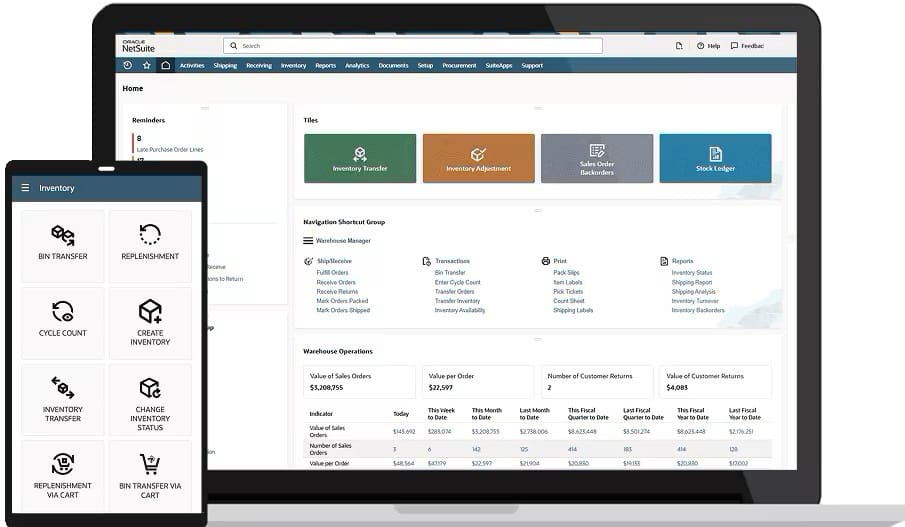
Managing warehouse operations with disconnected systems and manual processes obscures inventory figures and delays order fulfillment. These problems only compound as businesses grow and their offerings and warehouses become more complex. NetSuite Warehouse Management System eliminates these challenges with real-time visibility, automated inventory tracking, and productivity monitoring across all warehouse locations in one, intuitive dashboard.
Beyond monitoring, the system’s intelligent fulfillment capabilities help companies optimize pick paths, select shipping methods based on customer requirements, and allocate inventory across multiple warehouses to minimize shipping costs without missing delivery expectations. NetSuite’s unified platform also integrates warehouse management directly with financials, inventory, and order management. This comprehensive suite is scalable, so businesses can add new warehouse locations, manage third-party logistics providers, and implement advanced automation technologies, like mobile functionalities and scanning tools, as their needs evolve. Because NetSuite WMS runs on a single, cloud-based platform, businesses can break down data silos, give users access from both the office and the warehouse floor, and automatically update their system with the latest features without disrupting operations. With NetSuite, businesses can make their warehouse operations a critical piece of their competitive strategy, strengthening margins and providing more reliable customer service.
NetSuite’s Warehouse Management Dashboard
As customer expectations for fast, accurate deliveries continue to rise, WMS have become essential tools for reducing costs while maintaining—or even improving—service quality. By replacing outdated, manual operations with a WMS, businesses gain real-time inventory tracking, automated processes, and data-driven decisions that enhance each step of their corner of the supply chain. Whether it’s a standalone WMS solution or an integrated ERP platform, warehouse managers leverage these systems to create more agile and scalable operations that best suit their unique business model. This modern approach to warehouse management helps businesses meet changing global market conditions, outperform the competition, enhance profitability, and deliver the high-quality experiences that modern customers demand.
Warehouse Management Systems FAQ
What is the difference between logistics and warehouse management systems?
Logistics is the broader process of planning, procuring, and moving goods and materials across the supply chain, including transportation, distribution, and information flow. Conversely, a warehouse management system (WMS) is more targeted software that controls how a business stores, handles, and tracks goods within its facilities.
How much does a warehouse management system cost?
The cost of a warehouse management system (WMS) varies widely based on deployment type, features, and scale. Cloud-based systems typically include service licensing fees, as well as indirect costs, such as training staff and downtime during implementation; on-premises systems, meanwhile, require higher upfront costs for IT infrastructure and ongoing training and maintenance expenses. Furthermore, specific customizations and additional modules can increase the cost of a WMS.
How do you implement a warehouse management system?
Implementing a warehouse management system starts with defining project goals and requirements, assembling an implementation team, and selecting the right software. Then, the team works with business leaders and department heads to configure the system and integrate it with existing business tools, migrate data, train staff, test the system, and go live. After deployment, the business should monitor performance and adjust processes as their needs change and new best practices and technologies arise.
How does warehouse management differ from inventory management?
Warehouse management focuses on managing the goods within a warehouse, such as raw materials, work in process, and finished products. This involves ordering, storing, handling, and picking inventory to make products or fulfill orders. Inventory management, on the other hand, focuses on optimizing material and product levels to save space and money while still meeting customer demand.