
Cloud enterprise resource planning (ERP) adoption has surged in recent years, with no signs of slowing down. This growth is well-earned—cloud ERP provides numerous advantages over on-premises systems, helping organizations enhance operations, enhance flexibility, and improve overall efficiency. However, making the switch isn’t always easy. The transition requires careful planning, but the benefits of cloud ERP make it a smart investment for businesses looking to stay competitive in 2026 and beyond.
What Is Cloud ERP?
Cloud ERP is enterprise resource planning software that runs on a vendor’s cloud servers, accessible remotely from any device with an internet connection—whether workers are in the office, working remotely, or traveling. The system integrates business functions across finance, supply chain, sales, human resources, and operations into a single platform, unifying processes and data analysis.
Unlike traditional, on-premises ERP systems that require internal infrastructure, cloud ERP systems are typically subscription-based with vendors responsible for all hardware, maintenance, and upgrades. This cloud-based approach reduces upfront costs and IT expertise requirements, lowering the barrier to entry for businesses of all sizes. Because the vendor manages the technical infrastructure, companies can focus their resources on using the system to improve performance rather than managing hardware.
Key Takeaways
- Cloud ERP systems run on vendor-managed servers accessed via the internet, minimizing the need for internal IT infrastructure and maintenance.
- Cloud ERPs typically follow a subscription model, offering lower upfront costs and faster implementations than traditional on-premises ERP systems.
- Common cloud ERP benefits include centralized data access, increased operational efficiency, comprehensive security features, and the ability to scale.
- Businesses should choose cloud vendors with industry expertise and implementation plans that maximize value and minimize disruption.
The Top 10 Reasons to Adopt Cloud ERP
Traditional on-premises ERP systems are typically too rigid to keep up with the shifting demands of today’s businesses due to expensive customizations and disruptive upgrades. This causes many businesses to stick with older versions of the software, making it difficult to adapt to new business trends.
Cloud-based ERP leverages the power of the internet to offer companies increased flexibility and scalability. What other benefits does cloud ERP offer businesses?
-
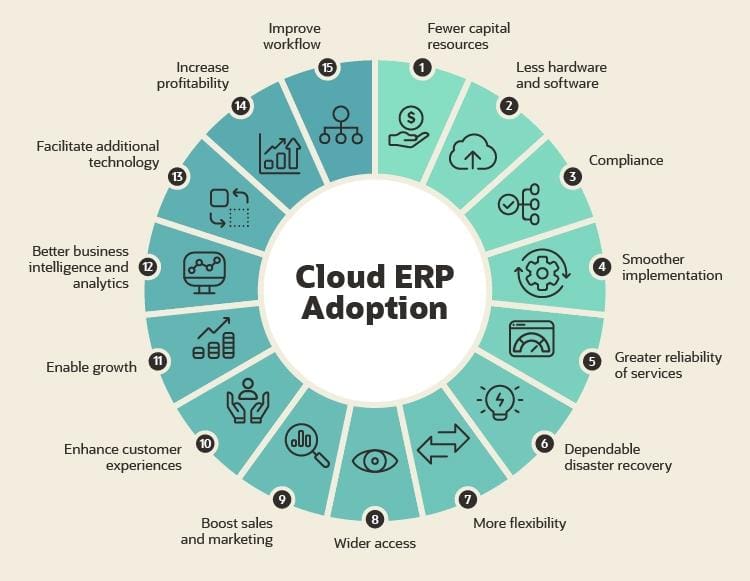
Fewer Capital Resources
Managing cloud ERP systems doesn’t require purchasing hardware or hiring additional IT personnel; that’s provided by the vendor. The upfront costs of cloud ERP are usually lower than those of on-premises solutions because users pay a recurring subscription fee that covers all hardware, software, security, updates, and maintenance. With on-premises systems, the customer is responsible for hardware and security while paying an annual fee for maintenance and support.
-
No Hardware
Since the ERP vendor provides the infrastructure, companies can avoid the upfront and ongoing costs of hardware. On-premises systems require enterprise-class servers, cooling systems, backup and storage equipment, sophisticated networks, and other expensive equipment—not to mention the electric bills all this equipment produces. Cloud ERP only requires a device with an internet connection, a current web browser and adequate processing power, allowing for access by most computers and mobile devices on the market today.
-
Compliance
ERP systems must adhere to ever-changing regulations, which can be difficult with on-premises systems, particularly if a business is running on an older version of the software that may need to be upgraded before enhancements can be made. However, leading cloud ERP vendors are proactive about complying with state, federal, and international laws and regulations regarding accounting, taxation, and customer privacy. Requirements for HIPPA, GDPR, GAAP, and other regulations are built into cloud ERP software, along with regular automatic updates to ensure continuous compliance.
-
Faster, Easier Implementation
Companies that opt for cloud ERP solutions typically go live faster than on-premises systems. That’s largely a product of the all-in-one nature of cloud ERP that eliminates the logistics of hardware, including purchasing, configuration, and management. Implementation can also be less of a burden for staff due to the more intuitive design and user interfaces of cloud ERP systems. That reduces the amount of required training for staff while shortening the adjustment period. Cloud ERP can also be implemented faster at multiple locations or geographies, which helps reduce implementation teams’ travel expenses.
-
Greater Day-to-Day Reliability
Cloud ERP vendors often aim for 99.999% uptime, which equates to fewer than eight minutes of unplanned downtime per year. Individual businesses cannot devote the same sort of resources to supporting a system on their own that a cloud ERP vendor can, thanks to economies of scale.
-
Dependable Disaster Recovery
This increased reliability also translates into faster recovery in the rare instances of fire, flood, theft, and other catastrophic data loss. Cloud ERP services are designed with disaster recovery in mind. With daily backup routines included in the SaaS subscription, cloud ERP vendors can restore the entire system quickly. On-premises ERP customers are responsible for their disaster recovery measures.
-
Easier Upgrades and Integrations
Because cloud ERP vendors only need to support one version of the software, configuration and customization are simpler. Customizations and integrations carry forward automatically with every upgrade. That makes upgrades much easier and keeps companies current rather than avoiding updates out of fear of the expense and disruption.
This makes it easier for cloud ERP to integrate with a company’s other existing systems as well as new technology.
-
Wider Access
Cloud ERP systems centralize data from various areas of the company into a single database, allowing authorized users to glean insights into any relevant component of the company. That includes back-office staff in operations, accounting, and HR; front-office customer service employees; and even the customers themselves.
This anywhere/anytime access makes cloud ERP particularly beneficial for remote workers. As long as they have an internet connection, authorized users can access the ERP system anytime, anywhere. This also gives companies the flexibility to hire and retain the best people for the job, regardless of where they live and without using troublesome VPN connections or web-based portals.
-
Enable Growth
Cloud ERP can more easily scale with small-to-midsize businesses as they grow. Because of its lower cost of entry, smaller businesses can access cloud ERP early on; as the business grows, new licenses, modules, and even more storage can be easily added.
Additionally, remote access means that companies can expand into other regions, or even globally, without setting up a new ERP instance. Small groups of workers, or even a single professional, can establish a new branch, log in to the ERP system, and get to work immediately rather than waiting the days, weeks, or months it can take to move in and set up an on-premises system.
-
Facilitate Additional Technology
Because cloud ERP solutions are built on a unified platform, partners are poised for easier builds of complementary software and integrations. As software companies shift their attention to the cloud, channel partners and other software companies are more likely to invest development resources in cloud-based technology at the expense of older, on-premises systems.
Finding a Cloud ERP Provider
Cloud ERP is one of the fastest, most cost-effective ways to optimize finance, supply chain, sales and marketing, human resources, operations, and other business functions. However, companies need to first find the right solution, then put the necessary effort into integration and configuration to maximize the technology.
To start, businesses should partner with a vendor that has deep experience implementing systems in their industry. A cloud ERP provider, or its partner ecosystem, must be able to assist with project management, educate users on the technology, and help drive innovation.
This relationship and collaboration shouldn’t end once the implementation is complete. The vendor should be available to address issues, answer questions, and provide ongoing guidance so companies continue to reap maximum value from a cloud ERP solution as they adapt new modules or launch new business models.
Move to the Cloud With NetSuite ERP
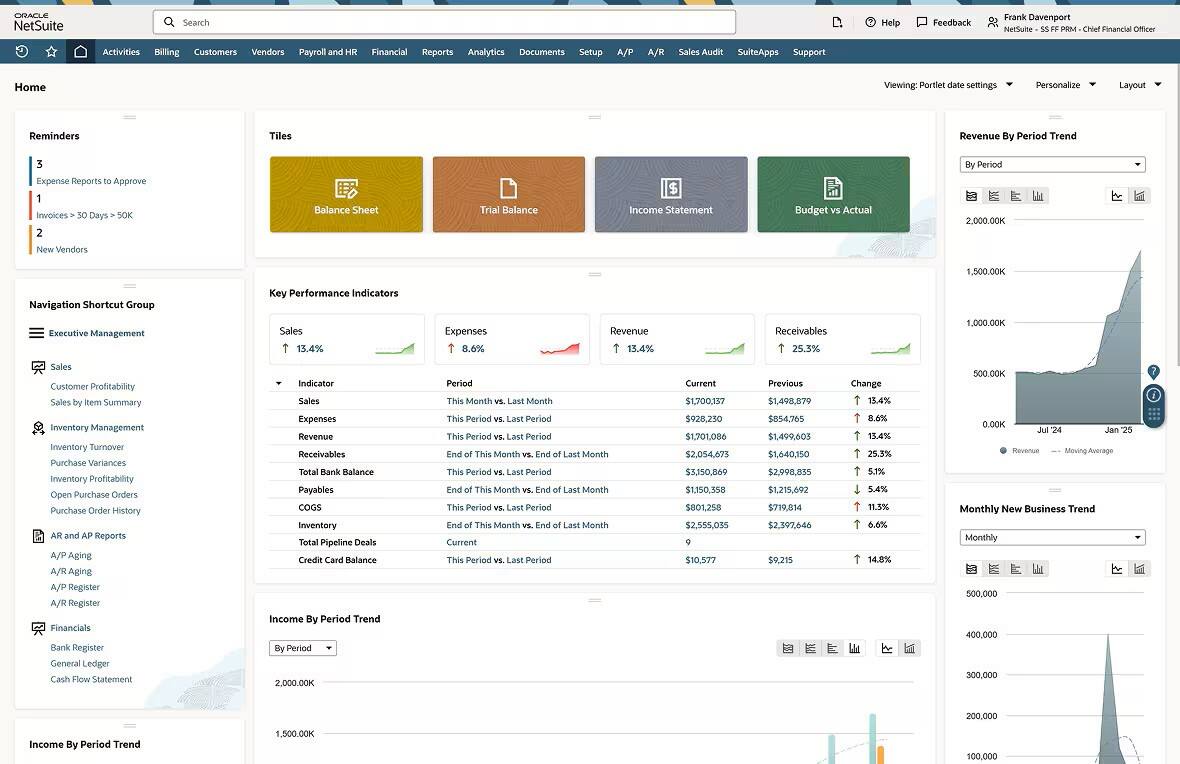
NetSuite’s cloud ERP solution provides a broad range of functions in a unified platform that flexibly adapts to business needs and processes for stronger revenue and market share growth without driving up costs. NetSuite’s ERP platform offers different modules to meet the various needs of companies, regardless of size or industry. Some modules are licensed separately from the base ERP, but they are still built for NetSuite and built natively on the system. Modules provide additional capabilities such as point-of-sale, project management and billing, and warehouse management.
NetSuite’s Cloud ERP
Cloud ERP solutions reduce costs, increase scalability, and offer more advanced capabilities than on-premises ERP systems, making cloud migration an immediate need for businesses across industries. Choosing the right system from a vendor with industry expertise helps companies move forward with their cloud migrations, minimizing downtime, and maximizing ROI.
Cloud ERP Adoption FAQs
What is the difference between cloud ERP and ERP?
ERP refers to all enterprise resource planning software. Cloud ERP runs on vendor-managed servers accessed via the internet. On-premises ERPs require companies to purchase, install, and maintain their own hardware.
What is the role of cloud computing in ERP adoption and implementation?
Cloud computing has replaced the capital-intensive and rigid infrastructure of on-premises systems with a flexible, service-based approach that minimizes the need for on-site infrastructure and facilitates faster deployment. It allows businesses of all sizes to access enterprise-grade ERP capabilities through subscription models, rather than investing in their own internal IT infrastructure.
What is the adoption rate of enterprise cloud?
According to Panorama Consulting Group’s 2025 ERP report, 75% of organizations chose cloud-based ERP. The report cites reasons such as the ability to quickly meet changing market demands, evolving customer expectations, and supply chain disruptions.
What are the six cloud migration strategies?
The six cloud migration strategies, often called the “6 Rs,” are:
- Rehosting: Moving existing systems from on-premises to cloud servers.
- Replatforming: Migrating legacy systems to the cloud with some updates and optimizations.
- Repurchasing: Replacing systems with a new, cloud-based service.
- Refactoring: Redesigning and building applications from scratch to better suit the new cloud environment.
- Retiring: Decommissioning legacy systems that are no longer useful.
- Retaining: Keeping some legacy systems in place instead of migrating them to the cloud.
What is a cloud adoption roadmap?
A cloud adoption roadmap is a strategic framework that outlines the steps, timelines, and benchmarks for implementing a cloud-based system, whether adopting a new solution or migrating from an on-premises system. Roadmaps typically include phases for initial assessment, vendor selection, data migration, implementation, testing, and post-deployment refinements.