
Accounting software can dramatically improve financial accuracy, speed, and decision-making—but only if implemented correctly. Too often, growing businesses run into costly pitfalls: choosing systems that don’t scale, over-customizing workflows, or underestimating the change management required. Whether your business is outgrowing spreadsheets or replacing legacy systems, a clear, methodical approach is essential. Here we provide a step-by-step process for implementing new accounting software that encourages its adoption and acknowledges best practices for selecting, configuring, and rolling out a modern accounting platform that will help finance teams achieve the outcomes they seek.
What Is Accounting Software Implementation?
Accounting software implementation is the structured process of selecting, configuring, and deploying a new financial management system. Successful implementation plans cover everything from initial planning and software selection to data migration, system setup, staff training, and post-launch support.
Thorough preparation, including process mapping and readying data for migration, positions the system to meet the company’s financial management goals without disrupting daily operations. This attention to detail helps teams confidently choose and launch software tools that can serve the business’s technical requirements, compliance standards, and end users’ needs.
Key Takeaways
- A successful accounting software implementation starts with a clear plan detailing methodology, timeline, technical requirements, costs, and stakeholder involvement.
- Redesigning workflows and validating financial data—not just digitizing existing processes—help support long-term ROI and protect data integrity.
- Early engagement, user training, and multitiered support structures can encourage user adoption and reduce resistance to change.
- A step-by-step implementation roadmap helps companies choose, configure, and deploy a system that will support current operations, yet scale with future growth.
Accounting Software Implementation Explained
Challenges that arise from data migration efforts, incompatible legacy systems, and internal resistance can derail accounting software implementations, resulting in cost overruns, data integrity issues, disrupted workflows, and compliance risks. In some cases, companies end up with a partially functioning system that creates more problems than it solves, damaging productivity, stakeholder trust, and reputation.
Resistance to change is often one of the biggest hurdles. According to a November 2023 survey on digital transformation conducted by Small Business Majority, one-third of small-business owners report not using accounting software, with 44% of that group citing the familiarity and comfort of their current methods as their main reason for sticking with manual or existing systems.
But when implementation is planned properly, it can deliver measurable returns. The benefits of accounting software include reduced manual effort through automation, faster close cycles, improved reporting accuracy, and stronger compliance. These upsides can save companies time and money and give decision-makers real-time access to accurate financial reports whenever needed.
Planning Your Accounting Software Implementation
A successful implementation plan comprises five key elements: methodology, timeline, system requirements, cost estimates, and stakeholder involvement. Investing time in these areas up front can help companies avert disruptions, reduce costs, increase the likelihood of user adoption, and build a solid foundation for every stage of the rollout that follows.
Choosing an Implementation Method
When selecting accounting software, companies must also determine how they will implement it. The decision should be based on several factors, including system complexity, risk tolerance, budget, resistance to change, and desired timelines.
Some businesses adopt a phased approach, rolling out features gradually to give teams time to adjust while reducing the risk of major disruptions or overlooked bugs. Others choose a “big bang” strategy, launching all features simultaneously to accelerate the timeline and realize benefits sooner. Many organizations opt for a hybrid model, going live with core financial modules first (such as the general ledger and reporting tools), then merging specialized functions (such as accounts receivable or payroll rules) as users become more comfortable with the new procedures.
Considering a Timeline
Accounting software implementation timelines can range from a few months for smaller businesses with simple needs to more than a year for larger companies with complex systems and multiple integrations. Timelines should be flexible and realistic, with built-in buffers to accommodate unexpected challenges. It’s also wise to allocate adequate time for both system testing and user acceptance testing.
When developing the timeline, implementation teams should be sure to plan around critical financial deadlines—such as year-end close, tax preparation, and audits—to reduce the risk of introducing errors while users are still learning the system and to keep essential reporting activities on track.
Identifying Requirements and Integrations
Defining accounting processes, system requirements, and integration points early gives implementation teams a clear catalog of existing workflows, regulatory obligations, reporting needs, and data dependencies. This part of the planning phase should also spotlight any industry-specific requirements and complex accounting scenarios, such as Generally Accepted Accounting Principles (GAAP) compliance or financial privacy rules, and identify opportunities for automation.
Thorough documentation at this stage helps keep the implementation focused and within scope, reducing the possibility of budget overruns, unexpected or unnecessary customizations, or delays that ensue from avoidable surprises.
Estimating Implementation Costs
The cost of software and licensing is an obvious line item, but implementation budgets should also account for expenses associated with data standardization and migration, system customization, user training, and potential hardware upgrades—factors that can push total costs well beyond the annual software subscription fee.
It’s also common to include contingency funding (say, 15% of total implementation costs, for instance) to cover unforeseen requirements, additional functionalities, or mid-project scope adjustments. In addition, companies should factor in opportunity costs—such as staff time diverted from regular duties—as well as the operational impact of system downtime or delays in core processes, such as invoicing and billing.
Stakeholders: Who Should Be Involved?
Accounting software implementation affects teams across the organization, so planning should include input from various stakeholders, including finance leadership, accounting staff, IT, department heads, and executives. Each group brings a unique perspective: Accountants define functional needs, IT specialists speak to infrastructure and security, and department leaders can highlight integration points with the existing system, for instance.
Project managers and leaders should be responsible for resolving conflicts, approving design decisions, and allocating resources. A clear implementation structure with defined roles, responsibilities, and decision-making authority helps prevent ambiguity and delays when it’s time to go live.
10 Key Steps for Implementing Accounting Software
A structured implementation plan helps protect data integrity, minimize disruptions, and improve the ROI of a new accounting system. While each implementation should reflect the company’s specific goals and structure, the 10 steps below offer a roadmap for meeting technical and business needs, supporting compliance, and preparing teams for change. Together, these steps provide a practical framework that can accelerate time to value without sacrificing stability or adoption.
-
Assess Your Needs and Define Your Goals
Start by documenting your current accounting processes and identifying metrics that will serve as benchmarks for success, such as limiting the month-end close to one day or improving GAAP reporting accuracy by 25%. Stakeholder interviews, cross-functional workshops, and surveys can all be used to capture perspectives from participating departments.
Many companies opt to classify requirements as either “needs” or “wants” to guide both software selection and how the implementation will be rolled out. This classification should reflect input from accounting, finance, IT, compliance, and other connected departments to capture cross-functional needs that might be overlooked by accountants acting alone—for example, the ability to generate ad hoc financial reports for team leads or connect forecasts from sales and finance.
By defining these needs up front, businesses can reduce the gap between their initial plan and the final system performance, helping avoid the need for any costly rework following the implementation.
-
Evaluate and Choose Your Software
Though most accounting software solutions offer similar core features and capabilities, common criteria to consider include:
- Cost
- Vendor reputation and stability
- Deployment model (such as cloud or on-premises)
- Implementation timelines
- Security features
- Integration capabilities
- Training resources
- Ongoing product development and support
When evaluating vendors, request demos configured to your business’s most complex use cases, such as custom revenue recognition or international tax calculations. It’s also helpful to engage with industry peers or the vendor’s current customers to learn about real-world implementation challenges and the quality of ongoing support.
To increase long-term ROI, look for software that can scale with your business and adapt to evolving transaction volumes and regulatory changes. The best choice balances short-term financial needs with long-term strategic goals.
-
Map Your Accounting Processes
List all accounting workflows in their current state. Rather than simply replicating existing processes, redesign them to take advantage of the new system’s features and automation capabilities. Look for opportunities to eliminate redundancies, automate manual tasks, and standardize procedures across departments. Visual tools, such as flowcharts and swim lane diagrams, as well as process mapping software, can help teams clearly document and analyze each step.
The process map should also define accountability roles, handoff points, approval requirements, and financial controls to maintain consistency and accuracy during the transition and beyond. Once implementation is complete, this map can serve as a record of prior processes to support training and identify additional opportunities for improvement.
-
Data Preparation
Before migrating to a new system, audit your financial data to identify and resolve any inconsistencies, duplications, and inaccuracies that could undermine system integrity. Decide which historical transactions will be migrated and which can be archived—perhaps those tied to long-closed accounts—to keep the new environment clean, organized, and efficient.
For data that will be carried over, establish governance protocols, including standardized formats, a consistent chart of accounts structure, and rules that meet expected reporting needs. Pay special attention to open orders, unreconciled items, and in-progress accounting periods to maintain continuity in accounts receivable and payable.
Though time- and resource-intensive, this preparation paves the way for a more reliable, accurate, and high-performing system.
-
System Design and Configuration
Configure the system to support every mapped accounting process, including reporting hierarchies, approval workflows, journal entries and reconciliations, security protocols, and financial controls. This work is often done in a sandbox or staging environment, where configurations can be tested safely before being moved into production. Design decisions should match the company’s exact requirements, such as fiscal period definitions, GAAP or International Financial Reporting Standards compliance, industry-specific modules, multi-entity structures, and tax configurations.
For instance, an international retailer might configure its system to track financial performance by region, store format, and department, while also enabling multicurrency consolidation and automated reconciliations.
Be deliberate about customizations. Standard functionality will often suffice for most needs; over-customization can increase costs, complicate upgrades, and impair usability. After configuration is complete, document every decision and its rationale to provide context for performance tracking and future system administrators.
-
Data Migration
A strong data migration strategy should cover general ledgers, subledger details, open transactions, and relevant historical records. Many implementations follow a phased migration approach, with checkpoints and comprehensive backups to protect data integrity throughout the process.
Finance and IT teams should collaborate to trace and validate data from its original source to its destination in the new system. This process typically involves multiple rounds of test migrations, using validation reports to reconcile totals, flag inconsistencies, and identify any needed data transformations or exception handling. For example, if during a migration a firm discovers inconsistent depreciation calculations in its fixed asset records, that data needs to be standardized before going live to prevent significant balance sheet discrepancies in the new system.
Finally, establish a data archiving strategy that aligns with current data compliance standards so that necessary legacy records will be accessible for audits or future reference.
-
Testing and User Training
Test the new system in phases, starting with individual workflows and components, then expanding to end-to-end testing across financial processes. Use test scripts to simulate daily transactions, financial close procedures, and reporting, compliance, and exception scenarios based on your existing accounting requirements. Many companies run legacy and new systems in parallel for a limited time to validate critical processes before fully transitioning. For example, a company might test revenue recognition for two billing cycles to identify any discrepancies between systems before going live.
Once testing is complete, launch user training that’s tailored by role and covers both system functionality and ways to conduct core accounting concepts. Training is often delivered through a mix of live sessions, on-demand learning platforms, and in-system walkthroughs to accommodate different learning styles and schedules. Training materials should include standard operating procedures and workflow documentation that can double as post-launch reference material.
-
Transition and Go-Live
The transition to new accounting software requires tight coordination and clear cutover planning (that is, the process of switching from a legacy system to the new one). This phase typically includes a “go/no-go” decision point to confirm readiness before going live, followed by final data loads, system activation, and carefully sequenced tasks among teams. Assigning a cutover lead to oversee execution, communicate status updates, and act as a point of contact helps keep activities synchronized and avoids last-minute confusion.
To minimize disruptions to daily operation, many companies schedule the transition during low transaction volume days, such as on weekends or between accounting cycles. It’s also common to enforce a freeze on financial data entry or system changes for a period of time to avoid conflicting updates.
Once the system is live, it can be helpful to establish a temporary “command center” staffed by representatives from accounting, IT, and the software vendor. This group will monitor real-time system behavior, respond to user issues, validate core functionality, and coordinate any required rollback procedures. Operating from a documented go-live checklist, the command center plays a core role in stabilizing the system during the early hours and days of the transition.
-
Post-Implementation Support
A tiered support structure helps users adapt to new workflows and addresses issues that surface after the system goes live. Three common support levels include:
- First-level: Direct assistance from internal super-users with advanced training
- Second-level: Support from the implementation team and managers
- Third-level: Vendor support for complex technical issues
Support teams should use a ticketing system or shared tracking tool to log incoming issues, monitor response times, and flag repeat errors that may signal deeper configuration problems. Creating categories or tags (such as training-related, access issues, reporting errors) helps requests get quickly routed to the right level of support.
In addition to handling support tickets, teams should also schedule structured check-ins (such as at 30, 60, and 90 days post-implementation) to assess system performance, gather user feedback, resolve bottlenecks, and make adjustments that better match the system to business goals.
-
Continual Improvement
After go-live, continual improvement helps businesses extend the value of the system by responding to evolving internal needs, market forces, regulatory changes, and vendor updates. To determine when changes are warranted, track key performance indicators that measure progress against industry benchmarks and original implementation goals like reducing manual journal entries, accelerating the financial close, or improving reporting accuracy. Quarterly system reviews can be consulted to assess performance, review audit logs, and identify areas where the system is underutilized or workflows are breaking down.
Equally important is collecting qualitative feedback from front-line users. Maintain open feedback channels via surveys and check-ins to uncover friction points that may not show up in performance metrics but can be addressed by means of further configuration or training.
Accounting Software Implementation Best Practices
To make the most of their implementation, businesses need to avoid common pitfalls—among them, stakeholder resistance, missed opportunities, system rigidity, weak data governance, and insufficient testing. By embedding contingency plans and proactive strategies into every step of implementation, teams can shorten timelines, strengthen financial controls, encourage user adoption, and accelerate core financial processes. Best practices include the following:
-
Get Stakeholder Buy-in Early
Securing stakeholder commitment before implementation begins—rather than during or after—helps sidestep delays, minimize resistance, and pinpoint important requirements early. First, identify how the new accounting system will affect each department’s workflows, reporting responsibilities, and financial processes. Then, conduct pre-implementation workshops where stakeholders can express concerns, brainstorm ideas, and shape the project’s success. These sessions not only build trust but can turn resistant users into system champions—especially when they’re supplemented with advanced training or testing scenarios that demonstrate how the system will improve users’ day-to-day work.
To catch early signs of resistance, look at who attends workshops, who contributes meaningful input, and whether early feedback signals support, hesitation, or confusion. These indicators can help flag “quiet resistors” and point leaders toward where to focus their communication and support efforts.
-
Look for Optimization Opportunities
The ROI of new accounting software is directly impacted by how well it improves day-to-day financial workflows. To find areas to optimize, start by identifying recurrent inefficiencies, such as manual reconciliations, redundant approvals, or outdated workarounds. Because many legacy steps become second nature to perform, front-line staff may be among the first to realize where changes are most viable. Review each process with a fresh lens: What can be eliminated, automated, or redesigned? Set priorities based on transaction volume, risk tolerance, and potential time savings.
For example, if every purchase requires a three-step approval—even small, routine expenses—accounting software may allow you to set a dollar-amount threshold that automatically approves transactions for preauthorized vendors. This would speed up procurement and reduce administrative burden without sacrificing financial controls.
-
Consider a Vendor That Will Upgrade Your Current Processes
The 2023 Small Business Majority survey found that 55% of small-business owners and decision-makers who use accounting software turned to their vendor for help setting up online financial tools more than any other source. That level of engagement reflects the value of choosing a vendor that goes beyond meeting baseline requirements.
When choosing a vendor, request case studies showing how similar organizations have improved processes, such as tax preparation or regulatory reporting. Strong candidates should offer more than out-of-the-box functionality; they should identify opportunities to streamline or automate your existing workflows, even during the sales process.
Invite accounting teams to help evaluate each vendor’s financial expertise so they can ask detailed questions about how their tools support the business’s specific requirements. Vendors that fall short in this area may miss important nuances in your requirements or overpromise their capabilities.
During this phase, many software vendors offer assessments of their customers’ accounting procedures, chart of accounts structures, financial close processes, and reporting frameworks and may recommend targeted improvements as part of implementation. Prioritize partners that take this kind of proactive approach and that offer ongoing product enhancements, not just one-time solutions.
-
Check for Accuracy Before Fully Transitioning
Validate data accuracy throughout implementation by establishing defined checkpoints and requiring formal sign-offs from accounting leadership at each phase. At these checks, compare data from both the old and new systems to confirm that all records—balances, transactions, and calculated fields—have transferred correctly and are functioning as expected.
Effective reconciliation strategies combine automated balance checks, targeted manual reviews, and side-by-side testing of critical workflows. For instance, a company preparing to go live might reconcile customer payment histories, open vendor balances, and tax calculations in both systems, then verify that every value matches and that the new system processes all records correctly.
To further support audit readiness and minimize risk, define clear accuracy standards (for example, a 100% match for balance sheet accounts) and use random sampling or spot checks for large volumes of transactions. All validation steps should be documented in detail to inform future audits and ongoing system monitoring.
-
Don’t Ignore User Training
Develop a structured training plan that covers both how the system works and how it supports core accounting responsibilities. Even experienced accounting staff will need time to adjust—sometimes more than new hires—because established workflows and familiar habits may no longer apply. Tailor training to specific user roles, from occasional transaction processors to financial analysts and controllers, with content calibrated to each group’s responsibilities. Training programs should also address common errors and difficulties, drawn from performance monitoring and direct user feedback. Many companies formalize learning with certifications for prime users, such as those involved in close processes, compliance reporting, or system administration.
After go-live, continue support with refresher courses that review new features and system updates, and make sure onboarding programs for new hires are up to date. Keep a record of all training activities to monitor staff participation, encourage accountability, and build a central knowledge base of system guidance, troubleshooting guides, and best practices.
Modernize Your Accounting Infrastructure With NetSuite
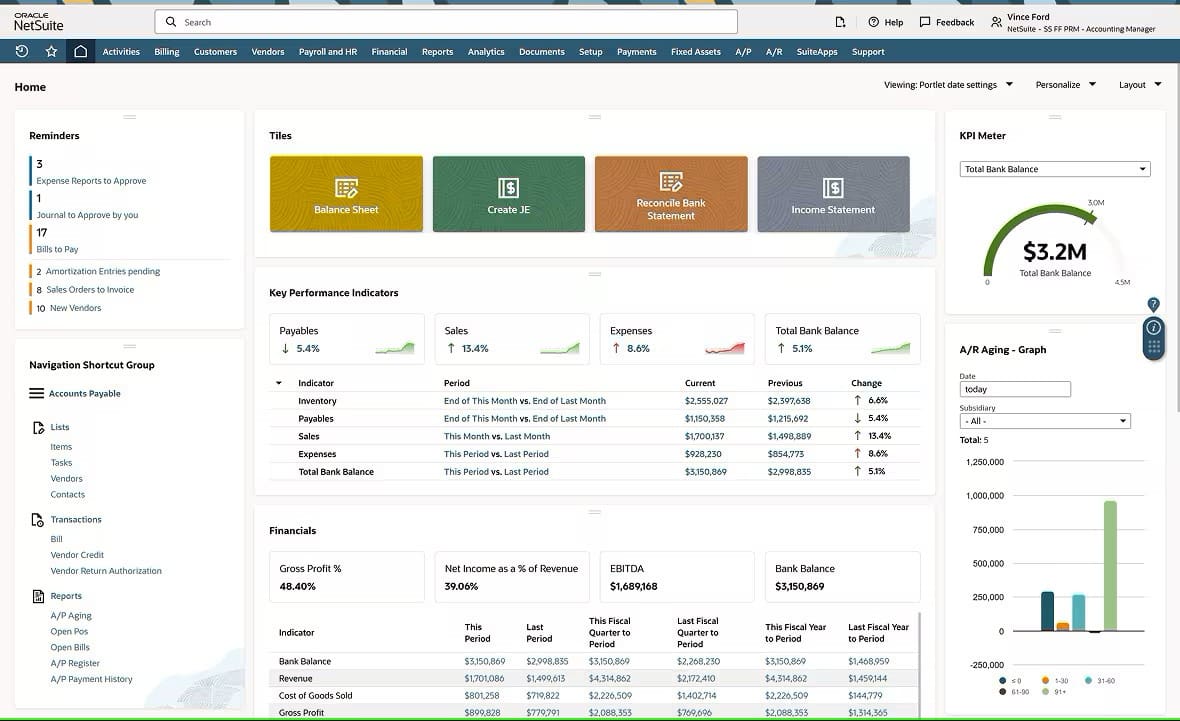
NetSuite Cloud Accounting helps businesses modernize financial operations through a unified, scalable platform designed to support smoother implementation and shorten the path to value. Its structured deployment approach helps organizations configure prebuilt financial modules with built-in controls, role-based dashboards, and industry-specific capabilities that reduce complexity during setup. By consolidating data from finance, inventory, CRM, and ecommerce into a single cloud environment, NetSuite helps break down information silos and raise accuracy levels across departments. Real-time reporting, automated workflows, and an intuitive interface facilitate system adoption and make it easier for users to adapt to—which frees finance teams to spend less time on manual processes and more time on strategic growth initiatives.
NetSuite’s Accounting Dashboard
Accounting software implementation presents an opportunity for businesses to streamline financial processes, increase visibility, and strengthen their financial controls. By using a thoughtful strategy that includes process mapping, data validation, a structured rollout, and ongoing support, companies can shorten the path to ROI while modernizing core activities, including the month-end close and compliance reporting. And because modern cloud accounting systems are scalable, a well-executed implementation also equips companies to navigate growth with confidence.
Accounting Software Implementation FAQs
What are the 4 stages of software implementation?
The four primary stages of software implementation are:
- Planning: Gathering requirements and selecting a vendor
- Preparation: Mapping processes, cleaning and verifying data, and configuring the system
- Deployment: Migrating final data sets, training users, and launching the system
- Post-implementation: Ongoing support and continuous improvements.
What types of software are commonly used in accounting?
Accounting software ranges from basic tools like spreadsheets to advanced ERP systems equipped with integrated financial modules. Specialized software solutions include general ledger systems, accounts payable/receivable systems, tax preparation software, payroll platforms, and financial reporting and analytics solutions. Some businesses also use industry-specific solutions for project, fund, or cost accounting.
How does accounting software help with accounting automation?
Modern accounting software automates such tasks as data entry, invoicing, reconciliations, recurring journal entries, and report generation. Automated workflows reduce errors, save time, and free staff to focus on exceptions, complex issues, and analyses. The automation process also generates detailed records of every financial transaction, forming audit trails that can simplify compliance documentation and provide decision-makers with real-time insights into financial performance.