
The disconnect between onsite work and the “corporate office” often makes field service invoicing messy: Details are lost when the handoff relies on paper forms or phone calls. Parts go unbilled. Invoices arrive late. Cash flow suffers. Field service invoicing software addresses these problems by connecting technicians directly to the finance team. This article explains how the invoicing process works, the obstacles it presents, and the features to consider when selecting a solution.
What Is Field Service Invoicing?
Field service invoicing is the process of billing customers for work performed at their location by mobile technicians or service personnel. It encompasses everything from documenting work completed to calculating labor and materials charges, generating the invoice, delivering it to the customer, and tracking payment status.
Key Takeaways
- Field service invoicing bridges the disconnect between field operations and accounting.
- Manual invoicing processes can lead to transcription errors, underbilling, and collection delays that strain cash flow.
- Dedicated invoicing software generates bills automatically, applying pricing that has been incorporated into contracts and rate cards.
- Integration with ERP and accounting systems supports accurate financial reporting.
- Invoicing software with mobile capabilities closes the timing gap between job completion and payment.
Field Service Invoicing Software Explained
Field service invoicing software automates billing for companies that dispatch service personnel to customer sites. The software links field operations with accounting by capturing job data at the point of delivery and converting it into invoices without manual intervention.
Most software runs on mobile devices. Technicians document their work, log time and materials, and capture customer signatures, all onsite. Some even collect payment on the spot. Using this data, the software prepares invoices instantly and applies the appropriate pricing rules and contract terms. Customers receive their invoices immediately. Meanwhile, accounting records and inventory levels are updated in the background.
The software helps the accounting team comply with proper revenue recognition. It captures every billable event and creates the documentation needed for audits and compliance. Automated workflows connect invoicing to the company’s ERP to synchronize field operations with the general ledger. Work orders flow into invoices. Invoices flow into accounts receivable (AR). Parts usage updates inventory and cost of goods sold (COGS) records. Simply put, one system tracks every job from service to payment.
Common Challenges in Field Service Invoicing
Field service invoices must capture many important details—including labor hours, travel time, service descriptions, equipment serial numbers, parts consumed, and customer signatures. The task becomes even more intricate when service agreements involve custom rates, warranty terms exclude specific labor or parts, contracts mandate tiered pricing based on response time, or a single project spans multiple visits over weeks. Each variable affects the final invoice amount, as well as the accuracy of revenue recognition, job costing, and AR records.
These kinds of complexities create several common obstacles:
- Manual data entry and paperwork: Whether due to mistyped amounts, transposed digits, or misread handwriting, the potential for error increases with each manual handoff of handwritten information across teams. Paper forms compound the problem, especially when they disappear in truck cabs, resulting in missed invoices and revenue leakage, or pile up on desks, delaying invoices and extending collection times.
- Incomplete job logs: Technicians may forget to document every piece of information when they’re focused on completing repairs and communicating with customers. The consequences can negatively impact a business’s top and bottom lines; for example, unlogged parts or hours may lead to underbilling, which lowers revenue and distorts job costing. Financial analysts also rely on having complete records to calculate profitability by customer, service type, or technician.
- Invoicing delays: It stands to reason—the longer the time lapse between service completion and invoice delivery, the longer it takes to collect payment. Customers are more likely to have forgotten the details, leading them to question charges or dispute line items. It also creates extra work for the collection team, further delaying payment. As delays mount, days sales outstanding (DSO) expands, tying up cash that could be better deployed elsewhere.
- Late payments: Without regular dunning, AR ages. The longer an invoice remains unpaid, the lower the probability of collection. Unpaid invoices lock up working capital and increase bad debt risk. They also force collection teams to chase payments by more direct means, which can strain customer relationships.
Advantages of Field Service Invoicing Software
The right invoicing software addresses the preceding challenges while creating measurable improvements in operational efficiency and financial performance. Among the advantages, field service invoicing software:
- Improves billing accuracy: Automated data capture removes the possibility of manual errors from the process, decreasing invoice disputes. The software pulls the job information from the technician’s mobile device, applies the correct pricing, and calculates totals on its own. When a contract specifies discounted labor rates or lists certain parts at no charge, the software applies them automatically. Accurate invoices also support revenue recognition according to such standards as ASC 606, “Revenue from Contracts with Customers.”
- Makes cash flow more reliable: Generating and delivering invoices immediately after service completion shortens the cash conversion cycle. Automated payment reminders prompt timely payment without incurring manual follow-up by email or phone. Some systems also support onsite payment via credit card or ACH, converting receivables to cash instantly, thereby speeding cash flow.
- Assists field service technicians: Mobile invoicing cuts technicians’ administrative burden. They can complete the entire service-to-cash process without being forced to return to the office or deal with paperwork. This can also boost productivity by allowing them to move directly to the next job. Real-time access to customer history, equipment records, and parts availability also helps raise first-time fix rates..
- Enhances customer service: Software delivers clear, detailed invoices to customers immediately after the work is done. Line items show exactly what was performed, which parts were replaced, and how much time was spent on the job, minimizing the potential for confusion or disputes. Multiple payment options make it convenient for customers to pay quickly. This transparency can build trust and encourage repeat business.
5 Features to Look for in a Field Service Invoicing System
As the field service industry grows, so does the global field service management software market—projected to expand from $2.86 billion in 2026 to $7.09 billion by 2035. Options for field service management software, including invoicing tools, are expanding fast. When evaluating solutions, prioritize features that address the company’s specific operational pain points and support accurate financial reporting. The following five capabilities often top the list.
-
Automatic Invoice Generation
The software must be able to create invoices automatically from completed work orders, assigning unique invoice numbers and pulling labor hours from time tracking, parts from inventory records, and pricing from customer contracts or standard rate cards. Make sure it works with a variety of billing models, including time and materials, flat-rate, contract billing, and milestone-based invoicing. The system must also handle other intricacies—for example, warranty work, which often requires different treatment from billable repairs; billable and nonbillable time, which require clear distinction; and multiline invoices that need accurate tax calculations based on service location. Automatic invoice generation reduces the risk of unbilled revenue accumulating in works in progress.
-
Real-Time Inventory Capture
When a technician uses a part, the software must immediately update inventory quantities, assign the cost to the job, and add the item to the invoice at the appropriate markup. This workflow benefits the company in a few ways. First, real-time tracking provides dispatchers with visibility into what’s on each truck. Second, inventory balances remain aligned with physical counts, which simplifies cycle counting. Third, finance teams have access to accurate data for COGS calculations, gross margin analysis by job or customer, and inventory valuation on the balance sheet.
-
Automated Reminders and Recurring Payments
The software should send payment reminders on a set schedule, both before and after due dates. It should also track payment status and automatically escalate reminders. These reminders reduce DSO by prompting payment before invoices become overdue. For customers with service contracts or on maintenance agreements, the solution should automatically generate and send recurring invoices on a set schedule. This also creates predictable revenue streams and reduces administrative overhead.
-
Digital Invoicing
The software must deliver invoices electronically, using professional, customizable templates with options for email, customer portals, and integration with customers’ accounts payable systems. Digital delivery eliminates printing and mailing costs and speeds delivery, which shortens overall collection times. Customers should be able to pay directly from the invoice via credit card, ACH, or other payment method. Suffice it to say, the easier it is for customers to pay, the faster they will do it.
-
ERP and Accounting Integrations
Look for invoicing platforms that connect via ERP modules and accounting software. This level of integration syncs invoice data automatically, creating appropriate journal entries for revenue recognition, AR, inventory adjustments, and COGS. Bidirectional connections allow customer master data, pricing tables, and payment information to flow between systems, eliminating duplicated entries and establishing a current view of financial performance. It also supports compliance with revenue recognition standards and maintains the audit trail that accounting teams require.
Automate Field Service Invoices With NetSuite
NetSuite Field Service Management software combines invoicing automation with ERP capabilities in a single platform. The solution captures job details from mobile technicians, generates invoices based on pricing rules and service contracts, and updates financial records in real time. Invoices connect directly to inventory management, revenue recognition, AR, and financial reporting, so field operations and accounting work from the same information. The cloud-based platform scales with the business, supports multiple currencies and tax jurisdictions, and provides the audit trails necessary for compliance and accurate reporting.
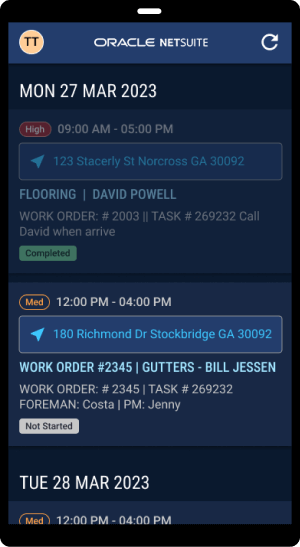
Field service invoicing connects technicians completing onsite work to the finance team managing cash flow at the central office. The right software links the two by automatically capturing job data, generating accurate invoices, and delivering those invoices to customers before a technician moves on to the next call. Once deployed, the payoff is clear: higher productivity, lower DSO, stronger customer relationships, and tighter controls over revenue, inventory, and reporting.
Field Service Invoicing Software FAQs
Is FSM the same thing as CRM?
No. Field service management (FSM) software handles dispatching, scheduling, parts tracking, and onsite service delivery. Customer relationship management (CRM) software tracks sales activities, customer interactions, and marketing campaigns. When the two systems are integrated, technicians can access the full customer context, and service history can flow back to sales teams automatically.
What are common invoicing mistakes to avoid?
Anything that lengthens the invoice-to-cash cycle should be avoided. Make sure to invoice immediately, while the job is fresh. Use specific language that describes work performed, parts replaced, and time spent. Verify pricing and tax calculations to prevent revenue leakage, customer disputes, and payment delays.