Industrial machinery manufacturers operate in a demanding environment. Production runs are small, specs are often unique to each customer, components are too specialized for batch ordering, and a single machine might stay in service for 30 years or more. That kind of complexity demands tighter coordination between engineering, production, procurement, and service that generic business systems can’t handle.
Industrial manufacturing ERP systems are built to meet these demands. Choosing the right one starts with knowing which features matter most to your business and how to implement them well.
What Is Industrial Manufacturing ERP?
Industrial manufacturing ERP is software that integrates production planning, inventory management, supply chain coordination, field service, and financial capabilities for makers of large-scale machinery. Integration powers real-time visibility across every stage of the equipment lifecycle, from procurement through final delivery and servicing.
Unlike generic business software, industrial manufacturing ERP systems are built to handle complicated bills of materials (BOMs), project-based cost tracking, multistep production and quality control processes, and long-tail service requirements. Enter a sales order and the system updates inventory, triggers production, generates purchasing requirements, and posts the transaction to the ledger without any manual handoffs.
Key Takeaways
- Industrial machinery ERP systems connect factory systems, inventory, service management, and financial data to reduce data silos and manual handoffs.
- Top features of these systems include engineer-to-order (ETO) support and capacity planning.
- Benefits include lower costs, sharper demand forecasts, and full traceability from raw materials to finished products.
- Successful implementations start with clear goals and prioritize change management.
Industrial Manufacturing Explained
Makers of industrial machinery operate differently than producers of high-volume consumer goods. Whereas a packaged-foods facility might churn out thousands of identical units over a week, an industrial equipment manufacturer could spend months engineering and building one custom machine. These long production cycles yield high-value orders and service relationships that frequently run for decades after the initial sale.
These conditions create coordination challenges that less advanced ERP systems have difficulty handling. Production teams often revise BOMs midproduction to incorporate engineering changes, and they need to track project-level costs as those changes happen. Field service teams need immediate access to asset histories, warranty entitlements, and parts availability. When engineering, production, procurement, and service data live in one system, a BOM change automatically updates cost estimates and current parts availability. Many platforms now incorporate AI-powered forecasting to help manufacturers plan further ahead.
ERP Advantages for Industrial Manufacturers
Adopting a new ERP system involves changing how people work, which managers often need to justify. The following benefits can help them establish expectations and choose benchmarks for measuring gains:
- Enhanced visibility: When production, inventory, finance, and product lifecycle management data live in a single system, managers across the organization can access the same information when making decisions. This includes high-level analysis, such as comparing project costs to budgets, as well as parsing granular data, such as component availability and product-specific margins.
- Reduced production costs: When forecasting and procurement tools talk to each other, manufacturers can order materials at the appropriate time—not so early that inventory piles up, but not so late that they’re paying rush freight to prevent a stockout. For manufacturers that use complex components with long lead times, this matters even more. Supply chain delays can compound quickly, leaving customers waiting weeks or months for delivery.
- Better traceability: ERP systems’ lot and serial-tracking capabilities build traceability into every production step as materials flow from vendors to production facilities to customers. This minimizes the scope of recalls when quality issues or design flaws arise and gives maintenance teams full specifications and warranty information during service calls.
- Increased productivity: A single shared database limits redundant data entry and the administrative labor that accompanies it. Automated workflows mean every entry is immediately reflected everywhere, and orders move from sales through production without manual re-entry. That translates to faster fulfillment and fewer errors.
- Enables growth: Cloud-based ERP systems scale with growth, adding product lines, facilities, users, and service territories without requiring a proportional increase in staff or a system upgrade.
Features to Look for in an Industrial Manufacturing ERP Solution
The ERP features that matter most for industrial machinery handle large-scale production, custom engineering, and service relationships that can last for decades. Look for the following capabilities.
Field Service Management
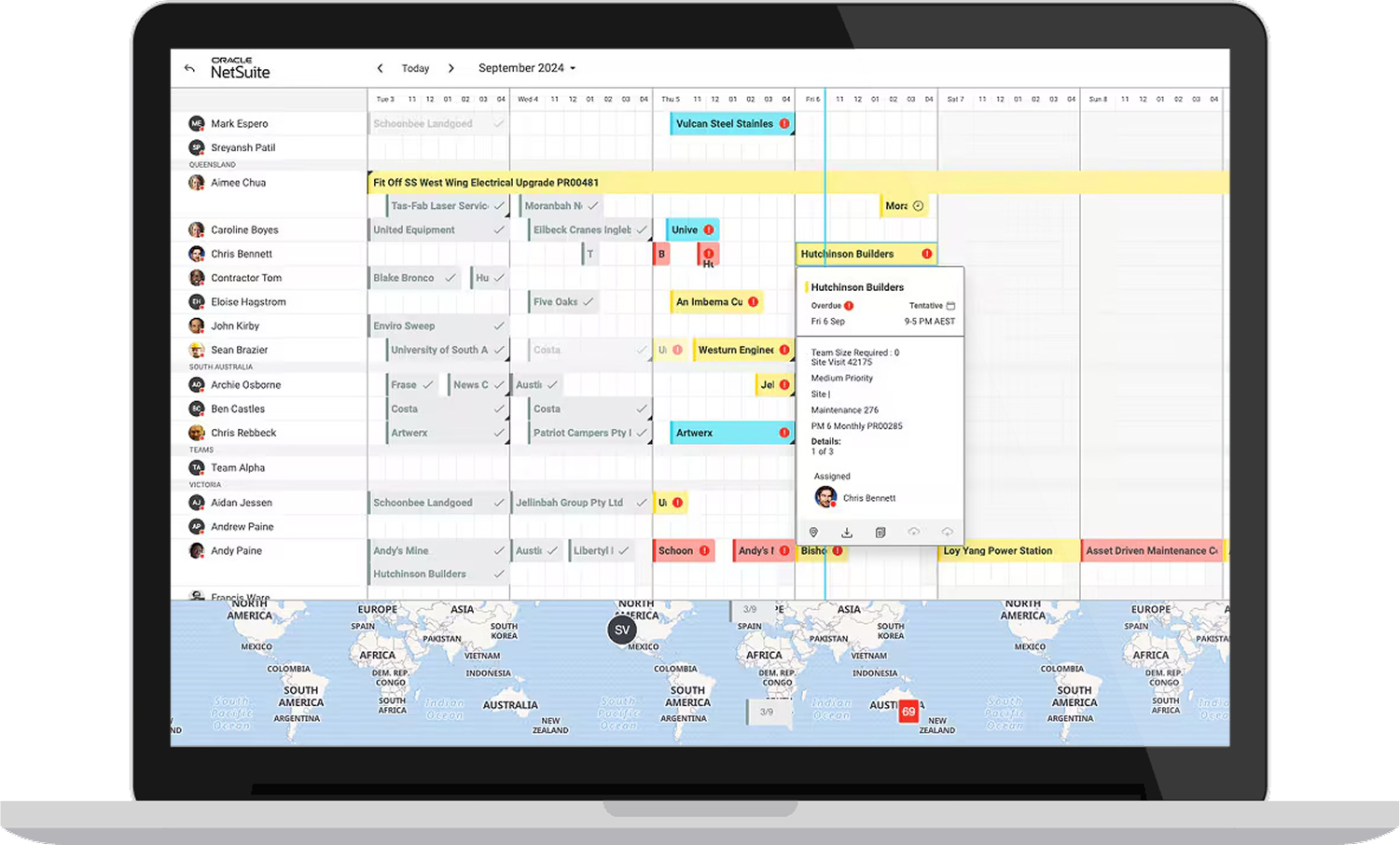
Dispatch needs to know who on the team is available, where they are, and whether they have the right skills and parts for the job. Technicians in the field need access to a machine’s service history, warranty status, and troubleshooting steps without having to call the office. And once the work is done, invoicing needs to happen automatically, whether the job falls under a warranty, time-and-materials, or fixed-price contract. Good field service management ties that all together.
Production and Capacity Planning
Production planning capabilities route work orders to facilities and workstations automatically. Capacity planning shows when work centers are overloaded or underutilized and where machines are sitting idle. Visibility into both helps manufacturers make realistic delivery commitments to customers and avoid the higher costs or quality issues that come with rushed work and expedited deliveries.
Engineer-to-Order Support
Look for ETO support that includes tracking features that record every labor hour, component, and subcontract charge, automatically recording each transaction against its specific project. As engineering and CAD changes come through during the design and build process, the system updates the BOM. This is critical given how frequently ETO manufacturers revise BOMs during a single build; less-advanced ERP systems that assume stable BOMs frequently require manual workarounds to keep pace. Revenue recognition should align with project targets, not shipment dates, to keep accurate financial records during the project lifecycle.
KPI Reporting
An ERP system’s consolidated data serves as the engine for role-based dashboards that give each stakeholder the metrics and key performance indicators (KPIs) they need. For example, a plant manager can track production volume and open work orders while a CFO can track gross margins and budget variance, all from the same customizable interface.
Demand Forecasting
Effective demand forecasting combines historical demand, seasonal adjustment, open opportunity weighting, and human input to estimate future sales and inventory needs. AI-powered ERP tools process the data to sharpen estimates, then feed it directly into material requirements planning. As a result, forecasts stay current and preserve the flow of goods without bloating carrying costs.
Real-Time Inventory Tracking
Real-time inventory tracking shows what’s on hand, what’s committed to work orders, and what’s on the way. According to Panorama Consulting’s “2025 ERP Report,” 54.4% of companies that had been live on their ERP for at least a year reported optimized inventory levels. Armed with accurate information, teams can allocate inventory to maintain stock levels across locations, including warehouses, service vans, and customer consignment sites. Look for ERP systems that integrate inventory with purchasing and production planning to make replenishment recommendations based on actual demand signals, thereby reducing stockouts. Inventory tracking also monitors equipment inventory, so every facility’s shop floor has what it needs to meet demand.
Budgeting & Forecasting
An ERP system should handle budgeting and forecasting at every level, from individual projects to the entire company. Manufacturers that specialize in project-based work need to track budget versus actual cost at each step to spot margin erosion before it becomes irreversible. Look for ERP systems that create and update rolling budgets as scope changes and production processes evolve. This helps manufacturers keep up with new trends, such as smart manufacturing and sustainability initiatives.
Shop Floor Control
Shop floor controls tell each operator what to work on next and report productivity back to planning as work gets done, including time spent and units produced. Discrete manufacturers producing complex assemblies can use these controls to track progress across work centers, identifying and resolving bottlenecks before they spread. The system uses that data to update work-in-progress status in real time and compare shop-floor conditions with schedules and budgets.
Supply Chain Management
Supply chain management monitors the entire supply network, including purchase order management, vendor performance tracking, landed cost calculations, and inventory allotment across locations. Manufacturers sourcing custom components use these features to manage long lead times and maintain qualified supplier relationships. Disruptions often start beyond tier-one suppliers, so look for ERP capabilities that support multitier visibility, including supplier risk monitoring and scenario planning for alternative sourcing.
5 ERP Implementation Best Practices for Manufacturers
Selecting the ideal ERP platform is an important first step, but planning doesn’t stop once you’ve picked a vendor. Rushed or poorly configured deployments often lead to low user adoption, delayed ROI, or outright failures that leave an organization worse off than before. The following best practices can help:
-
Set implementation KPIs and objectives: Every implementation should begin by defining the specific problems the system will solve and how success will be measured. Choose specific, measurable KPIs—
for example, reducing production schedule variance from 25% to 10%—with a regular review schedule (typically monthly or quarterly).
- Evaluate vendor support: Look for implementation partners with experience in industrial machinery. Ask for references from similar companies, then inquire about post-deployment support, training resources, and the vendor’s track record for meeting budget and timeline goals.
- Understand the TCO of an ERP solution: Total cost of ownership includes the initial price, plus implementation services, internal resource time, data migration, integration development, training, and ongoing operating costs. Data migration often takes longer for manufacturers with 10 or more years of historical transactions or multiple legacy systems, so budget accordingly. Cloud systems require fewer upfront infrastructure costs and IT expertise than in-house systems, though they come with ongoing subscription fees. In return, vendors handle system maintenance and upgrades.
- Prioritize change management and user adoption: Successful implementations minimize resistance to change by involving end users early. When frontline workers share feedback on production pain points and workflow quirks, implementation teams can build training around real-world scenarios using actual company data. Another benefit of early involvement: It often helps identify internal champions who can support their colleagues through the transition.
- Use a phased rollout: Phased implementations and parallel testing give teams time to work out bugs and help staff adjust before deployment. Finance and inventory modules are frequent starting points because they touch fewer shop-floor workflows and provide quick wins for reporting. A production module often follows once the data foundation is stable. Avoid going live during peak production periods and provide extra support resources during rollouts.
Tackle Complex Work Orders With NetSuite ERP
Industrial machinery manufacturers juggle custom builds, multilevel BOMs, long supply lead times, and extended service relationships. NetSuite ERP for Industrial Machinery brings production, inventory, field service, and financials into one cloud-based platform to enable real-time visibility from the factory floor to the field to the office. Work orders flow automatically from sales through production planning, and the system tracks costs at every stage. Integrated service management equips technicians with everything they need to service equipment, whether it’s new or decades old. The result is faster deliveries, better service, and tighter cost control, even as the business scales.
NetSuite’s Industrial Machinery ERP
Industrial machinery manufacturers need a reliable ERP system that can keep up with their production complexity and decades-long service relationships. ERP systems purpose-built for makers of industrial machinery provide a unified view of operations—from the shop floor to the service van to the finance office—supporting faster, more productive operations. With the tailored system and disciplined implementation, manufacturers can cut costs, hit delivery targets, and grow without losing control.
Industrial Manufacturing FAQs
How does ERP improve production efficiency?
ERP systems improve production efficiency by limiting manual data transfer among systems. Real-time updates provide shop floor managers and supervisors with accurate capacity information and visibility into work-in-progress status. This information also supports proactive scheduling decisions and faster problem detection, both of which cut lead times and administrative overhead.
How long does it typically take to implement a manufacturing ERP system?
Implementation timelines vary based on company size and scope of implementation. Small manufacturers with simple deployments often take a few months, while larger manufacturers with complex integrations or multiple facilities may need one to two years.
How does ERP help with supply chain management?
ERP systems connect purchasing, inventory, production, and supplier data in a single system so supply chain teams have full network visibility. Manufacturers can use this integrated view to assess vendor performance, manage components with different lead times, maintain inventory levels across facilities, and identify potential disruptions. Built-in demand forecasting and AI capabilities help teams anticipate shifts and keep supplies flowing.