
Fashion companies that fail to adapt fall behind, as each season introduces new products and styles, more complex supply chains, viral trends, and increasingly demanding customers. When designers, production teams, and retailers work in silos, processes break down because of outdated or conflicting data, leaving businesses with a shortage of popular items while last year’s fads sit in warehouses, accumulating dust.
Success in fashion requires agility and overarching visibility. ERP systems tailored to fashion help companies achieve these goals—but only when the business follows a comprehensive deployment strategy. This article provides a step-by-step guide to implementing an ERP system for fashion, along with best practices and cost considerations, to help companies build a more unified and responsive operation.
What Is ERP In the Fashion Industry?
ERP in the fashion industry refers to integrated software systems that apparel companies use to manage and coordinate all core business processes, including initial design, material sourcing, production, and sales. These systems connect traditionally siloed functions and departments—merchandising, procurement, manufacturing, warehousing, and retail—into a single platform that gives users real-time operational visibility.
Fashion ERP systems address industry-specific challenges, such as managing large seasonal product catalogs, tracking materials through global supply chains, marking down items to move old stock as seasons change, and pivoting operations as viral trends emerge. When compared to generic ERP software, apparel ERP solutions often feature industry-specific modules, including product lifecycle management, demand forecasting, size and color management, and omnichannel inventory allocation.
Key Takeaways
- Fashion-specific ERP systems address the industry’s needs through such capabilities as extensive SKU catalogs, seasonal demand-planning features, and multichannel inventory management.
- Implementation requires cross-functional teams, phased data migration, and testing that mirrors real business conditions, including peak sales periods and seasonal transitions.
- Choosing the right vendor involves assessing technological capabilities, product usability, ongoing support policies, and industry-specific expertise and experience.
- ERP systems vary with business size and complexity, ranging from on-premises systems to cloud-based systems maintained by vendors.
ERP Implementation in the Fashion Industry Explained
Fashion businesses implementing an ERP system need to do more than install generic software; they must configure the system to connect their unique design, production, financial, distribution, and customer service processes. Fragmented systems can lead to disjointed or inefficient work if designers and production planners must use disparate systems, or if warehouse managers have to rely on manual methods, such as spreadsheets or paper invoices. Apparel ERP implementation consolidates these workflows to standardize processes and eliminate redundancies, reduce errors, accelerate time to market, and provide accurate data for informed decision-making.
This consolidation addresses a primary pain point for the fashion industry: balancing inventory with customer demand. Between $70 billion and $140 billion worth of excess stock was produced in 2023 alone, according to McKinsey’s “State of Fashion 2025” report, and companies are increasingly adopting tech tools to create more flexible supply chains. By integrating real-time sales, production, and supplier data into one ERP system, businesses can avoid both stockouts and excess inventory. This centralized control is especially valuable for managing multiple sales channels and international operations in which inventory allocation and logistics expenses directly impact profitability.
Why Is ERP Important in the Fashion Industry?
Fashion is a volatile industry where companies must plan development cycles around consumer preferences that can shift overnight—say, in response to an unexpected celebrity endorsement or a viral runway moment. Lacking integrated visibility, procurement teams might base purchasing decisions on outdated forecasts, warehouses might ship inventory that stores no longer need, and executives might make decisions based on incomplete or conflicting data. These disconnects result in missed opportunities if popular items sell out, new trends emerge faster than production can keep up, or customers defect to competitors because of poor service and empty shelves.
ERP systems eliminate these information silos and communication delays by instantly connecting every part of a fashion business. For instance, when a retail customer’s buying patterns change or when social media traffic drives new demand, ERP systems adjust material orders, production schedules, and inventory allocation. This responsiveness helps companies minimize inventory costs, improve order fulfillment rates, increase margins, and shorten development cycles—key advantages in the highly competitive fashion industry where a single poor season can jeopardize long-term profitability.
Advantages of an ERP System for a Fashion Business
Fashion ERP systems offer operational advantages by addressing specific industry challenges, such as balancing inventory needs among distributors and navigating global logistics. According to the McKinsey report, 63% of fashion executives plan to increase digital and technology investments in 2025 to compete more effectively with on-demand apparel manufacturers that add thousands of new items each day and deliver them faster than traditional distributors. Common benefits of ERP for the fashion industry include:
- Simplified SKU management: Fashion ERP systems help businesses manage a wide variety of the size, color, and style SKUs represented in their full catalog. Buyers can view up-to-date availability on all product combinations, as the system automatically sends orders to the appropriate facilities, accompanied by relevant manufacturing and shipping instructions.
- Informed decision-making and demand planning: Forecasting models use current sales data and granular historical data (for example, style, season, or channel) to allow companies to spot trends early and adjust procurement accordingly. In fact, the McKinsey report states that data-driven planning and forecasting is the top strategy for inventory optimization in 2025, with 75% of executives surveyed choosing it over any other strategy.
- Optimized inventory: In addition to demand planning, an ERP system’s automated allocation rules align inventory numbers with sales to prevent rushed shipments or the unnecessary addition of carrying costs that cut into margins. Fashion businesses leverage these tools to manage companywide clothing inventory, marking down slow-selling items while stocking shelves with popular goods nearer to the customers most likely to purchase them.
- Better supply chain coordination: Automated purchase orders and intuitive supplier portals cut down on lead times and miscommunication during procurement, especially for complex supply chains that involve multiple and/or international vendors. The system also helps businesses mesh production schedules and retail shipments with actual demand to avoid dead stock and back-orders.
- Enhanced reactivity: As market conditions change, an ERP system adjusts prices, promotions, safety stock levels, and production schedules, all from a single management platform. This responsiveness empowers fashion brands to capitalize on new revenue opportunities and trends while they’re still relevant.
- Improved scalability: Growing businesses can add new sales channels, product lines, or regions to their ERP systems without incurring a proportional increase in costs or creating bottlenecks. Most ERP software also integrates with add-ons for additional features, such as HR/payroll or ecommerce, as a company’s needs evolve.
- Increased transparency and visibility: Executives and front-line managers alike can view immediate, role-based performance data across the company through customizable ERP dashboards. This level of ongoing supply chain visibility helps identify and address problems early, ranging from supply shortages to shipment delays.
- Added competitive edge: These features all work together to help fashion businesses offer superior customer service with faster order fulfillment and more reliable deliveries. The unified approach creates sustainable advantages over slow-to-act competitors that rely on manual, disconnected systems.
Key Steps in a Successful ERP Implementation
Effective ERP systems connect operations and increase efficiency, but rushed or misguided implementations often create more problems than they solve. Execution requires deliberate planning to avoid common challenges, such as low user adoption or delayed investment returns. The following nine steps lay out an implementation framework that supports a successful launch.
-
Identify Your Requirements and Objectives
Start by documenting key priorities—tracking fabric consumption, managing size and color SKUs, automating billing processes, coordinating deliveries to retail and ecommerce storefronts. Then, set measurable targets and key performance indicators (KPIs), such as lowering inventory carrying costs by 20% or achieving a 95% on-time delivery rate. Concrete objectives will help decision-makers choose appropriate vendors and establish benchmarks for successful ERP implementation.
-
Gather Stakeholders and Assemble an Implementation Team
Create an interdepartmental team consisting of staff from merchandising, production, warehousing, finance, and IT. A cross-functional approach prevents fashion businesses from implementing a system that fails to address real business needs, even if that system is technically sound. Appoint project managers and executive sponsors with both fashion and technology expertise who can resolve conflicts or opposing priorities among members. This team should also include users from each department to advocate for the system and train their peers to increase adoption rates.
-
Evaluate the Options and Choose Your ERP System
Consider vendors with fashion expertise, rather than generic ERP providers. Request demonstrations using actual product data, SKU structures, seasonal calendars, and multichannel scenarios. Check that candidates are well-suited for the business’s workflows, such as preseason preparation, bulk returns, or integrations with legacy systems. Industry peers are another valuable resource, offering insights into implementation time frames, total costs, and post-launch support through reviews and firsthand experiences.
-
Prepare Your Data for Migration
Clean and standardize existing data before importing it to the new ERP system. Master data templates help users preserve consistency across product catalogs and identify errors, such as redundant color codes or conflicting sizes. Organizing information up front and archiving historical data prevent post-deployment inconsistencies and confusion.
-
Migrate Data Into Your ERP System
Migrate data in phases and run parallel tests to compare outputs from the old and new systems, flagging discrepancies. Begin with static data—vendor details and material masters, for example—then progress to more complex data, such as multi-season hierarchies and customer accounts. Pay special attention to seasonal data: Many fashion businesses keep current season information and trend analysis separate from past seasons to secure a clean, organized start when the new system goes live. This separation helps avoid mixing outdated trends with fresh data, enabling smoother operations and more accurate decision-making from day one.
-
Design and Configure Your System
Configure workflows to match actual business processes instead of forcing teams to adapt to rigid defaults. New procedures and approval hierarchies should reflect how purchases, markdowns, and production schedules work in practice. Customize ERP dashboards to display role-based, relevant metrics—retailers need sell-through rates and inventory levels, while accountants need financial performance metrics, for example. When possible, avoid over-customization that adds unnecessary complexity.
-
Perform Testing and Provide User Training
Test system performance under realistic scenarios, including rushed holiday orders, flash-sale inventory needs, and new product launches. Verify integrations with existing legacy systems, such as ecommerce platforms and major retailer connections. Develop role-specific training courses—return processing for sales teams or inventory transfers for warehouse staff, for instance—and host seasonal refreshers to keep teams familiar with how the ERP software handles annual events, such as holiday planning or end-of-season markdowns.
-
Go Live
Go live with the new ERP system during a low-stakes period, avoiding peak seasons or market weeks when teams won’t have time to address any system issues. Phased rollouts that start with one division or channel and read-only legacy systems allow users to identify and resolve any discrepancies during the transition before they spread. Establish a dedicated support center staffed with technical experts and management to address user questions and adjust the system, as needed.
-
Maintain Continuous Improvement and Post-Implementation Support
Schedule monthly reviews with management to assess whether the system meets the KPI expectations set during planning. For instance, if inventory accuracy hasn’t improved, investigate the root causes—is it a system configuration, process compliance, or training issue? Plan regular system updates to accommodate new requirements, such as additional sales channels, AI integration, expanded offerings, or new apparel categories, notifying staff of upcoming downtime in advance to minimize confusion and frustration. Formal feedback channels can also help users feel heard, especially when support staff prioritize improvements based on their biggest pain points.
Best Practices for a Successful ERP Implementation
Following a deliberate implementation plan keeps ERP deployment on budget, on time, and in line with expectations. By proactively addressing the human and organizational factors that impact performance, businesses increase the likelihood of a smooth execution with faster user adoption and better ROI once the system goes live. Below are five best practices to guide your ERP implementation.
-
Keep Stakeholders Motivated
Regular communication among managers, IT teams, executives, and everyday users can increase acceptance of your new ERP system. For example, show the procurement team how automating purchase orders frees up time for assessing new suppliers, or give warehouse staff demonstrations on how mobile scanners cut back on errors and redundant manual data entry. Throughout the process, implementation teams should communicate milestones so users are aware when changes will occur and when they should expect to see improvements. Address employee resistance head-on by inviting skeptics to participate in system design sessions and by addressing their concerns directly. And when the system goes live, spotlight achievements in key areas, such as the first accurate multichannel inventory report or a drop in customer returns.
-
Pick a Vendor That Will Support Your Specific Requirements
Look for vendors that understand the nuances of the fashion industry, including seasonal cycles, catalog management, high return volumes, and the difference between wholesale and retail operations. A vendor’s client base often provides valuable insights into its focus and expertise—a vendor serving 50 apparel brands might have more industry knowledge than one serving 500 generic manufacturers. Also consider vendors’ support responsiveness post-implementation, especially for cloud-based systems where vendors are responsible for updates and maintenance. Service agreements should account for industry priorities, such as guaranteed response times during peak seasons when downtime could significantly impact the bottom line.
-
Consider How Your End Users Will Engage With the System
Balance system sophistication with usability by configuring interfaces with realistic workflows in mind. For instance, buyers and sales teams both need image libraries and style boards, not just text-based item numbers, when evaluating products, and warehouse workers need clear sizes and pack configurations, not complex windows loaded with irrelevant data. Even the most powerful ERP can fail if it forces designers to struggle through pop-up windows and unnecessary prompts just to check fabric availability. Over-customization complicates system maintenance and reduces buy-in; however, out-of-the-box configurations can lead to inefficient workarounds and poor utilization rates that impact ROI. Therefore, base all configuration decisions on what will benefit end users the most.
-
Structure Your Data to Align With an ERP System
Organize product information and data sets to reflect day-to-day operational needs and align with precise historical analysis and reporting. Separating brands, divisions, seasons, and classifications logically helps analysts run year-to-date or cross-department comparisons without manually manipulating data. Standardize all definitions so labels like “T-shirt” mean the same whether buying products, scheduling production, or allocating finished inventory. Naming conventions should accommodate catalog complexity, yet remain intuitive, such as by using numbers to indicate season, category, line, and color to help users navigate thousands of SKUs without needing to memorize arbitrary codes.
-
Don’t Skip the Test Phase
Before deploying the ERP system, test basic functionality and edge cases, such as split shipments and complex discount structures, bringing in actual end users to identify nuances that IT staff may overlook. Document every issue that the testers discover, as even minor inefficiencies can balloon into major frustrations when users encounter them daily. Any resulting workarounds or fixes can be used to inform future diagnoses, training, updates, and troubleshooting manuals.
How Expensive Is an ERP Implementation for a Fashion Business?
Fashion ERP implementation costs vary with deployment models, company size, and system complexity; consequently, most vendors provide hands-on consultations before issuing a quote. Traditional on-premises systems typically include software licenses, hardware infrastructure, and implementation costs, as well as ongoing expenses for maintenance, IT staff, and upgrades. Conversely, cloud-based ERP systems shift infrastructure and maintenance responsibility to the vendor, reducing both deployment timelines and up-front costs. Cloud-based systems still incur implementation costs, such as for training and productivity losses during the transition. Subscription models are particularly suited for growing fashion brands that prefer to scale incrementally, especially if they don’t already have an existing IT infrastructure and expertise.
NetSuite ERP Is Built for Growing Businesses
In fashion, any product can go viral or fall out of style almost overnight. Businesses need flexible operations, especially when managing complex global supply chains and multiple sales channels. NetSuite Apparel ERP is a cloud-based platform with fashion-focused capabilities for style-color-size management, automated demand forecasting and inventory allocation, and real-time visibility into every step from design through delivery. The system scales alongside business growth, making it suitable for small boutique chains and global fashion brands alike. Role-based dashboards and prebuilt business intelligence tools show sales teams their best-selling styles, alert buying and warehouse teams to potential stockouts, and give executives comprehensive financial analyses. This unified view keeps the entire company working from the same current data to speed up time to market and increase profitability.
NetSuite’s ERP Dashboard
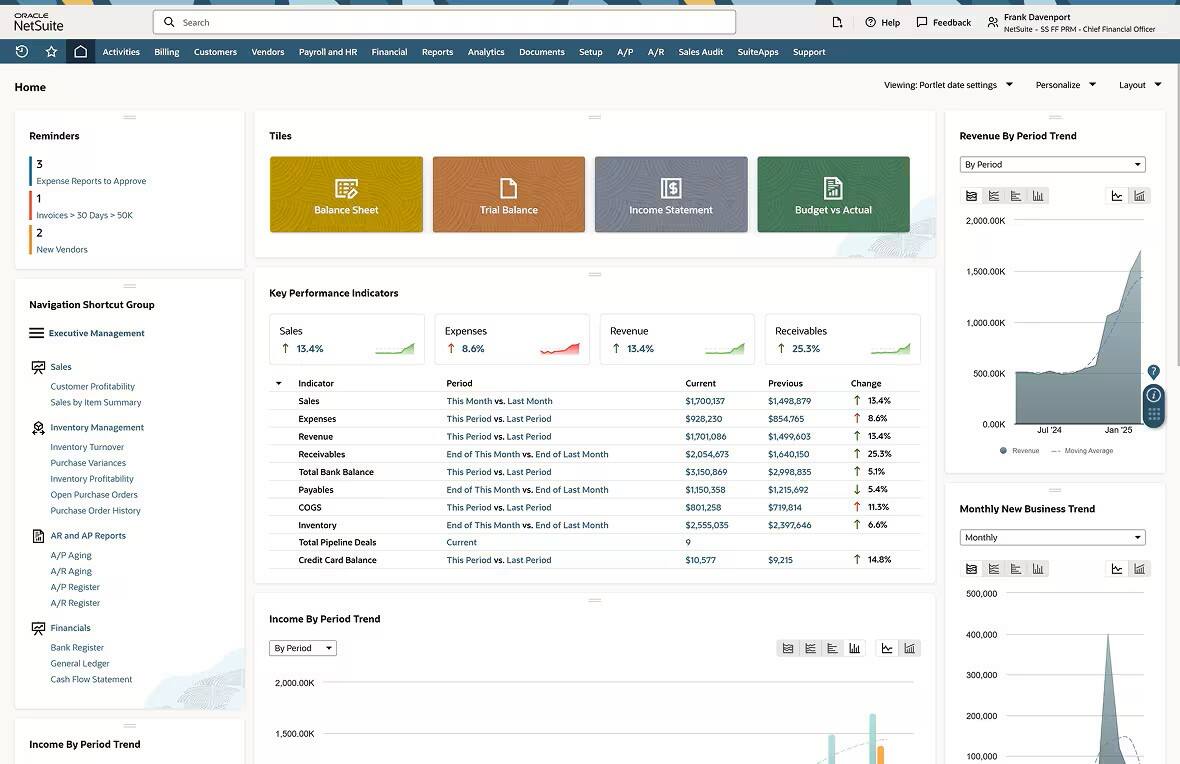
By implementing an ERP system, fashion companies gain long-term competitive advantages that compound over time, including faster product launches, tighter inventory control, and a more efficient and reliable order fulfillment process. Today’s consumers expect greater product variety and faster omnichannel shopping experiences, and integrated systems help fashion businesses deliver at the speed and scale the market demands. Successful ERP implementation requires simultaneous attention to technology, process, and workforce priorities—but, with proper planning, businesses can gain the agility they need to thrive in the fashion industry.
ERP Implementation in the Fashion Industry FAQs
How widespread is the use of ERP across the fashion industry?
ERP systems are becoming more prevalent in the fashion industry, driven by the increasing accessibility of cloud-based solutions that let companies of all sizes leverage automation and access real-time data. According to Verified Market Reports data, the apparel ERP industry was estimated to be worth $2.6 billion in 2024, with an expected compound annual growth rate of 9.8% through 2033.
How is ERP software used in retail?
Retail operations use ERP software to synchronize inventory across stores and ecommerce marketplaces and to replenish stock automatically based on sales patterns. These systems also help retailers provide consistent customer experiences across all sales channels and distribution networks. By connecting point-of-sale data with merchandising and inventory management, ERP systems help companies reach data-driven decisions on markdowns, inventory transfers, and personalized marketing campaigns.
What are the three layers of ERP?
The three layers of ERP are:
- Presentation layer: User interfaces, role-based access, and dashboards
- Application layer: Internal rules, logic, and workflow processes
- Database layer: Information storage and management
Fashion companies rely on all three layers in their day-to-day operations. For example, a designer can access new ideas in a curated dashboard, view available materials from vendor databases, and then choose fabrics and colors based on brand rules.