
ERP systems provide the operational backbone for cross-functional collaboration. When teams throughout the business use the same platform and access the same centralized data, coordination happens naturally within the flow of work. Communication stays connected to real activity. The result: less time catching each other up, more time working together to move the business forward. This article explores 10 ways ERP systems make that possible.
What Is the Role of an ERP?
An ERP system serves as the central system of record for the business, connecting and managing core processes from finance and supply chain to HR and procurement. Every department works with the same data, without constantly having to verify whose version is correct.
Key Takeaways
- ERP systems improve collaboration by aligning teams around shared, real-time information.
- Integrated workflows connect business processes across departments and functions.
- Automation handles routine tasks, freeing teams for higher-value collaboration.
- AI-driven insights help teams anticipate issues and reach resolutions faster.
10 Ways ERP Unlocks Collaboration and Benefits
The global ERP software market is projected to nearly double over the next decade—from $59.4 billion in 2025 to $116.5 billion by 2035—according to Precedence Research, reflecting how central these systems have become to business operations. By combining data management, workflows, and communication tools into a single platform—often through specialized modules—ERP systems support more effective teamwork throughout the organization in the following ways:
- Single source of truth: ERP systems store business data in one database, giving every team access to the same real-time intelligence. Inventory levels, financial data, staff availability, and order status update automatically for everyone, eliminating delays caused by siloed systems and manual tasks. Collaboration becomes more productive and decisions are made faster when teams align around facts.
- Cross-functional workflows: Collaboration often breaks down at handoffs, where errors creep in and delays accumulate. ERP workflows connect processes end to end, so that activities in one department prompt actions in another automatically. For example, a sales order will trigger inventory checks, production scheduling, procurement, and shipping notifications. These integrated workflows save time and show teams how their work impacts others.
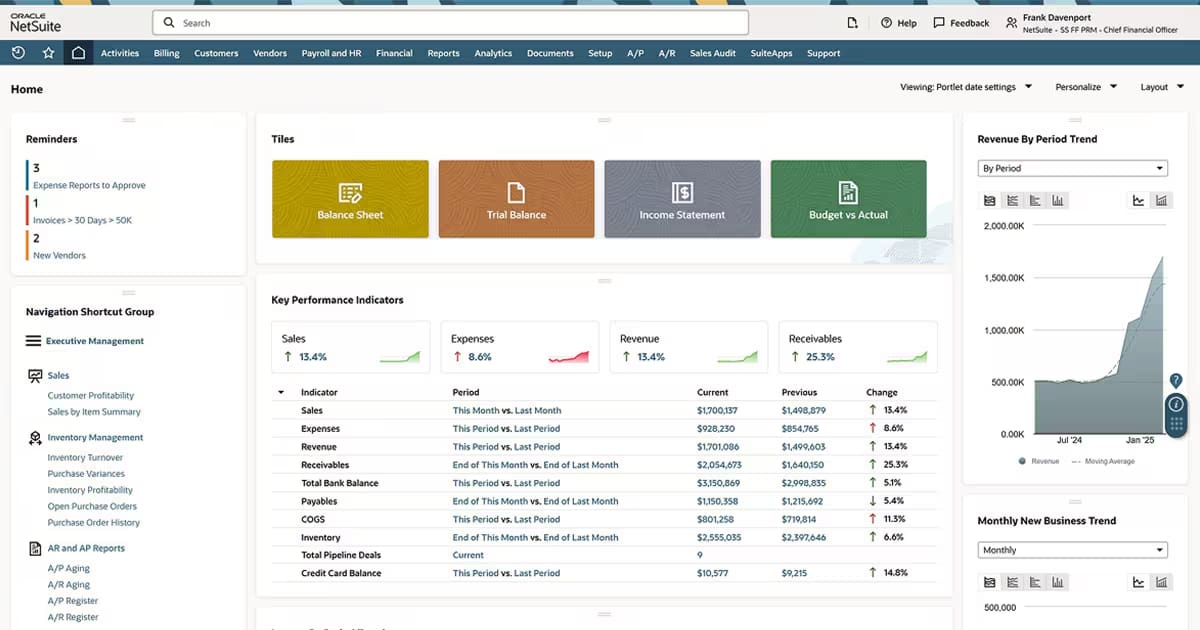
- Real-time visibility: ERP dashboards and shared reports provide teams across the organization with a live view of the same metrics, such as inventory levels, budget status, order pipelines, and production schedules. When conditions change, everyone sees it at once. Issues can be addressed while they’re still manageable, decisions don’t wait for a weekly status meeting to be made, and teams remain aligned on performance, risks, and priorities. This visibility also supports better planning, giving finance and operations a shared view of forecasts and actuals.
- Standardized processes: Unpredictable processes create friction. Separate teams handling similar tasks using different approaches makes it harder to share resources, compare performance, or transfer staff among business units. ERP systems standardize workflows and controls but still allow flexibility where needed. Approvals, reporting, and other processes follow the same steps organizationwide. Standardization also supports regulatory and internal compliance—plus, teams know what to expect when working with various departments or regions.
- Role-based access: Collaboration requires openness, but it also demands control. Teams need visibility into information relevant to their roles but that doesn’t expose sensitive data. ERP systems use role-based access controls to define who can view, edit, or approve specific information. A regional sales manager, for example, may be able to view their team’s pipeline but not their colleagues’ compensation. Clear access controls build trust. Employees can collaborate confidently, knowing they can obtain the information they need without jeopardizing security or governance.
- Embedded communication: Context gets lost when communication happens outside the systems where work is performed. ERP systems keep everything attached—emails, chats, meeting notes, and task assignments—within any related workflows and transactions. When a warehouse manager adds a receiving note to a purchase order explaining a discrepancy, the buyer, accounts payable clerk, and finance manager see it immediately, tied to the record itself. Many ERP systems also integrate with third-party collaboration tools, such as Microsoft Teams and Slack, to bring notifications and approvals into daily workflows, all the while preserving audit trails.
- Automation of routine tasks: Centralized functions, such as finance, HR, and business services, could see up to 35% of their work automated by 2030, according to McKinsey. ERP systems promote that effort throughout the business by handling approvals, notifications, status updates, and other repetitive work through automation. For example, inventory automatically replenishes when levels dip below a predetermined threshold; in finance, account reconciliation happens in minutes. When issues arise, all relevant parties are notified at once. With routine coordination handled, employees have more time for problem-solving and cross-functional collaboration.
- AI-driven insights: AI elevates ERP from a system of record to a powerful predictive engine that helps teams anticipate what’s ahead. Indeed, nearly three-quarters of organizations have modernized their ERP environments with AI, according to Panorama Consulting. AI analyzes real-time, cross-departmental patterns that impact demand forecasts, cash flow projections, and staffing needs—while built-in recommendations guide internal decisions and customer interactions. For example, if a forecast flags a potential inventory shortfall, procurement, operations, and finance can collaborate immediately on a response.
- Scalable collaboration: New subsidiaries, partners, and suppliers add more workflows, more data, and the need for more coordination. ERP systems let collaboration scale alongside, too. The same operating cadence and controls—for purchasing approvals, close checklists, inventory visibility, or onboarding flows, for instance—can be easily adapted by new teams. Multi-entity, multicurrency, and multilanguage features allow a single ERP instance to support dozens of legal entities across geographies and time zones.
- Faster decision-making: This is where the previous nine points converge. Decisions don’t linger, waiting for information or alignment. Departments across the business can evaluate options and act together. Multistep approvals that once required physical signatures or email chains can be executed with a single click. Faster decision-making—and overall agility—becomes a natural outcome of ERP-driven collaboration. That speed translates directly to bottom-line results, with productivity and efficiency gains cited by nearly 82% of organizations as the top benefit derived from their ERP implementation, according to Panorama Consulting.
Achieve More Through ERP-Driven Collaboration
Collaboration becomes the default status when teams share a single platform. NetSuite ERP unites core business processes, including financial, supply chain, customer relationship, and enterprise performance management, in a single, cloud-based platform. All teams work with the same data and workflows, reducing the back-and-forth efforts that bog down collaboration. Embedded analytics and shared, real-time dashboards prompt faster, more coordinated responses that minimize risk. NetSuite ERP also grows with the business; subsidiaries, business units, and global operations stay connected through shared processes. With AI embedded across the platform, teams spend less time on tasks requiring manual effort, while governance, security, and accountability remain in place.
ERP systems don’t just manage business operations—they shape how teams work together through shared data, integrated processes, and real-time visibility. The 10 capabilities outlined here create the foundation for close-knit collaboration that scales with the business. And as automation and AI become standard in modern ERP platforms, that advantage will continue to strengthen.
ERP Collaboration FAQs
What are the main functions of ERP?
An ERP system integrates core financial and operational functions into a single platform for real-time data consistency. Functions, often automated, include accounts payable/receivable, inventory management, procurement, and HR.
What is the main goal of ERP?
A primary goal of ERP is to improve efficiency across business processes. By integrating and automating workflows, the platform lets teams spend less time reconciling information and more time collaborating on decisions, exceptions, and improvements.