
Marketing, sales, customer service, finance, and operations departments often use separate systems that store the same data in different formats. When those systems don’t talk to each other, teams spend time reconciling records instead of doing meaningful work. CRM and ERP integration brings customer-facing and back-office functions together, providing a single, consistent source of information. This article explains use cases, benefits, and challenges.
What Is ERP–CRM Integration?
ERP–CRM integration refers to linking an ERP system with a CRM system. It keeps data about customers, products, pricing, orders, invoices, and service cases in sync across both platforms. APIs connect the systems, keep records current, and initiate cross-department workflows. For example, when a quote turns into an order in the CRM system, ERP software automatically creates the sales order, checks customer credit, and updates the CRM solution with the order number and status.
Key Takeaways
- CRM and ERP integration helps marketing, sales, operations, and finance teams collaborate better and make smarter decisions.
- Synchronized data between systems improves key business processes, such as quote-to-cash and fulfillment tracking.
- Poor data governance and the limitations of legacy systems can complicate integration efforts.
CRM and ERP Integration Explained
CRM and ERP systems both support the goal of serving customers profitably. CRM software enhances customer interactions by attracting buyers, nurturing leads, converting prospects, and building stronger relationships. ERP software manages operations by handling the flow of products through the supply chain and overseeing how they’re bought and sold.
When using separate CRM and ERP systems, teams lack the complete picture needed to make good decisions, and manual handoffs of information cause delays. Consider a sales rep who creates a quote in the CRM system. The rep needs to check product availability, pricing, and delivery times, which are usually stored in the ERP system. Without integration, the rep must ask finance, operations, and the warehouse for this information. This slows down the sales process and increases the risk of sending out a quote that the company can’t fulfill.
Integration solves the visibility problem, but it works best when each system has a clear role. Most businesses keep relationship and pipeline data in the CRM system and product and financial details in the ERP software, syncing only the fields both systems need to prevent conflicts. For example, when a sales rep updates a customer’s billing address on the CRM side, the change should sync to the ERP side—but not necessarily go live immediately. Finance may need to approve it first, since billing records affect tax rules and payment terms. Integration shares the data, while ownership rules determine who can act on it.
Why Are Businesses Integrating CRM and ERP?
According to Dataversity’s 2024 “Trends in Data Management” survey, 68% of respondents named data silos as their top concern—up 7% from the previous year. These silos create problems that look small at first but add up over time, such as mismatched order statuses, pricing discrepancies, and billing holds that sales doesn’t know about. Eventually, teams build workarounds for these issues, tracking order status in spreadsheets and confirming inventory and pricing data over email. This ends up creating new problems, such as inconsistent records and misinformed decisions. Businesses connect CRM and ERP systems to eliminate these silos, cut down on duplicated data entry, and improve day-to-day operations.
What Are the Advantages of Integrating ERP and CRM?
Integration projects often promise better visibility, but the real payoff comes from removing friction in daily tasks. When CRM and ERP systems share data, teams don’t have to stop their work to check basic details about customers and orders. Sales cycles shorten, and leaders make better decisions. More specifically, integration helps companies achieve the following benefits:
- Real-time syncing: Records automatically update based on set rules and triggers. For example, when finance records a payment in the ERP, the CRM shows the new account status. Sales and service teams then know not to treat the account as past due during renewal talks.
- Improved efficiency and productivity: Integrated systems make information easy to find. A sales manager can quickly see if finance approved billing terms and the first invoice was sent, without waiting for email updates. Or a service rep can check order and invoice status during a customer call, without having to reach out to other departments.
- Fewer manual errors: Manual data reentry may lead to wrong SKU numbers, outdated pricing, mismatched shipping addresses, and incorrect invoices. Integration helps prevent these issues by passing structured, validated records between systems. For example, syncing customer pricing rules from the ERP to the CRM helps reps create quotes with current terms instead of using a prior quarter’s outdated spreadsheet.
- Optimized fulfillment: Approved order details flow from the CRM to the ERP, so the warehouse team can quickly start assembling orders with complete, accurate information. And when exceptions like backorders, partial shipments, and address validation issues occur, ERP status updates flow back into the CRM so customer-facing teams can manage expectations.
- Sharper forecasting: Integration links sales pipeline activity to real operational and financial data. For example, a manufacturer can see the CRM pipeline by product line next to ERP inventory levels, production schedules, and lead times. This helps with more accurate revenue timing and inventory planning.
The Benefits of CRM–ERP Integration
| Real-time syncing | Records automatically update based on rules and triggers. |
| Improved efficiency and productivity | Information is easy to find. |
| Fewer manual errors | Structured, validated records are passed between systems. |
| Optimized fulfillment | Approved order details and status update flow from CRM to ERP and back again |
| Keener forecasting | Sales pipeline activity links to real operational and financial data. |
CRM and ERP Integration Use Cases
The best CRM–ERP integrations do more than just sync data; they create better workflows that help increase revenue and improve customer experiences. Here are some examples of how businesses connect CRM and ERP systems to cut down on handoffs and improve teamwork among marketing, sales, finance, operations, and service teams.
-
Unified Customer Data
Integration brings together relationship details and transaction history in one place. The CRM system shows contacts, notes, opportunities, and service cases alongside order history, invoice status, payment behavior, and fulfillment issues in the ERP. If the ERP software shows an open billing dispute, the service team can send the issue to finance first and check if a billing hold is stopping parts shipments or service coverage before sending a technician or starting a product investigation.
-
Sales Order Syncing
Sales order syncing links accepted quotes in the CRM to order creation in the ERP. The process usually starts in the CRM, where the rep builds a quote with products, quantities, pricing, and shipping terms. Once the customer accepts, the integration creates a matching sales order in the ERP, assigns an order number, and sends it back to the CRM. Sales and service teams can then track fulfillment without needing to provide manual updates.
-
Workflow Automation
Workflow automation connects approvals and exception handling between both systems, sending these tasks through set steps based on certain rules. For example, if a quote goes over a discount limit or an account needs a credit check, the workflow sends the right approvals before the ERP accepts the order. This keeps sales, finance, and operations on the same page about what needs review and what can move forward.
-
Real-Time Inventory Visibility
Real-time inventory visibility afforded by CRM–ERP integration helps sales and service teams set expectations based on current stock and lead times. Syncing ERP inventory and allocation rules with a CRM system also prevents overselling, since reps can see availability by channel and warehouse—not just a general stock number. At the same time, CRM data integrated with ERP software helps match inventory planning to expected demand by linking open opportunities and expected orders to purchasing and restocking decisions.
-
Deeper Reporting
When customer activity metrics combine with operational and financial results, leaders can connect win rates to fulfillment performance, compare discounting patterns to profit margins, and trace support volume back to product lines and shipping issues. This transparency also makes it easier to reconcile pipeline, booked orders, and revenue because reports use shared customer and order records. For example, a company can compare renewal results in the CRM with invoicing and payment timing in the ERP to find accounts that renew but pay late, then adjust terms and follow-up steps as needed.
CRM and ERP Integration Challenges
Integration projects run into trouble when teams disagree on governance, data mapping reflects conflicting definitions, and legacy processes don’t align with new, automated workflows. These problems result in inaccurate dashboards and incomplete orders. Among the most common challenges companies face when connecting their CRM and ERP systems are:
- Poor data governance: Duplicate customer records, inconsistent naming, and mismatched product identifiers can cause conflicts, especially if both systems let users edit the same field. Without shared definitions and ownership rules, syncing can overwrite important flags and create reporting confusion.
- Compliance challenges: CRM and ERP systems hold sensitive information, such as personal contact details, payment history, and financial records. Integration means more systems can access this data, making role-based access control, auditability, and retention policies even more important.
- Legacy connectivity: Older systems often lack modern integration options, or they only support limited import/export methods, which makes near-real-time syncing difficult. For example, a distributor using an older on-premises ERP system might rely on nightly batch files for updates, which can leave the CRM tool showing outdated inventory or invoice status during the day.
What Should Companies Look for in an ERP and CRM Vendor?
Choosing the right vendor is crucial for s successful CRM–ERP integration because business needs and platform capabilities must align. If they don’t, custom scripts can break after updates, data-field mappings may need constant maintenance, and reports might never fully match between systems. The right vendor helps avoid these pitfalls by supporting clean data models, clear record ownership, and integration patterns that fit how each department works.
On a practical level, the vendor should offer strong APIs for the most important records, including accounts, items, orders, and invoices, as well as crucial actions, such as order creation, payment application, and shipment confirmation. System-of-record controls are also important. The integrated platform should support field-level ownership, so each system allows users to write only the data it owns and treats other fields as read-only. Security and governance features should match the company’s structure. For instance, role-based permissions, audit trails, and segmentation by business unit or subsidiary matter when different departments need different levels of access to financial and customer data. In addition, consider the vendor’s implementation support. Migration tools, documentation, training resources, and an experienced partner ecosystem can limit the disruptions often caused by switching ERP systems or integrating ERP and CRM systems. Proper support also helps companies successfully adopt new processes.
NetSuite Integrates CRM and ERP
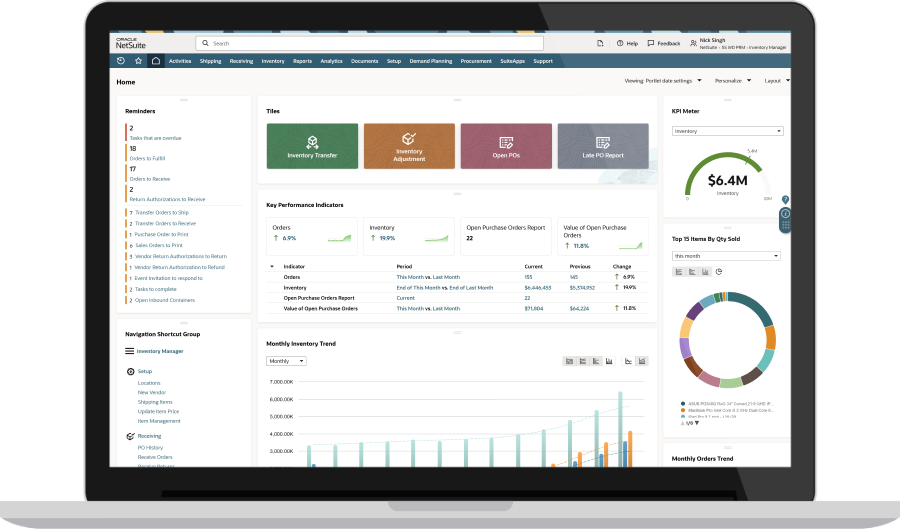
NetSuite combines CRM and ERP features, bringing sales, finance, inventory, order management, and service activity together in one cloud platform. With unified data, teams can access consistent customer, product, pricing, order, and billing records, which reduces duplicate entry and avoids conflicts between front- and back-office systems. NetSuite supports end-to-end processes, such as quote-to-order, with workflow automation and role-based controls to route approvals, apply business rules, and maintain accurate records. Real-time dashboards and reports link pipeline activity to operational and financial results, giving leaders better visibility into performance and helping sales and service track order status, invoicing, and account activity in one place.
Eliminate Order Management Bottlenecks With NetSuite
Customer interactions, sales workflows, and financial processes all depend on complete, accurate data. CRM–ERP integration gives companies a consistent view of customers, orders, inventory, and billing, while also automating handoffs from quoting to fulfillment, invoicing, and support. As processes become more complex to coordinate among teams and systems at scale, businesses that invest in unified, well-governed software can move faster with fewer errors and more reliable reporting.
CRM and ERP Integration FAQs
Can ERP replace CRM?
ERP cannot replace CRM because ERP focuses on operational and financial processes while CRM handles customer relationships, pipeline activity, and customer interactions. Some ERP suites include CRM capabilities, however.
What are the differences between ERP and CRM?
The differences between ERP and CRM are that ERP manages back-office functions, such as finance, inventory, procurement, and order processing, while CRM is responsible for sales, marketing, customer service, and other front-office work.
How long does a CRM and ERP integration typically take?
A CRM and ERP integration can take anywhere from a few months to two years, depending on how long it takes to define the data model, map objects and ownership rules, test workflows, and roll out adoption across teams.