
Marketing agencies juggle numerous clients, campaigns, and deadlines simultaneously—often with information scattered throughout various systems and tools. When client data lives in multiple places, teams scramble to answer basic questions—and promising leads go cold. CRM software for marketing agencies addresses these challenges by unifying client data and workflows onto a single platform. This article explains why CRM matters for marketing agencies and assesses which features to prioritize.
What Is CRM for Marketing Agencies?
CRM for marketing agencies refers to the software companies use to organize lead pipelines, store client data, document interactions, and run campaigns. It helps agencies handle multiple client accounts, track campaign performance, and preserve institutional knowledge by maintaining communication history even as team members come and go.
Key Takeaways
- Agency-specific CRM tools help companies address the data disorganization that leads to lost deals, poor communication, and weak client relationships.
- The most important CRM features for marketing agencies include pipeline management, performance analytics, and shared views of account records.
- Choosing the right CRM solution involves aligning capabilities with agency needs, evaluating the user experience, and considering both TCO and ROI.
Why Do Marketing Agencies Need CRM?
Marketing agencies face a particular set of operational challenges , all related to managing myriad relationships. Every account entails different campaigns, timelines, contacts, and expectations. Information tends to be tucked away in email inboxes, project management tools, spreadsheets, and people’s heads. When things get busy, details fall through the cracks. Case in point: A client calls asking about campaign status, and the team has to piece together the answer from three different sources. Or, an account manager leaves and clients have to re-explain their entire history and preferences to that manager’s replacement. CRM software addresses these challenges in the following ways:
- Introduces automation into your workflow: Administrative overhead—data entry, scheduling, status updates, and routine communications—slows agencies down. It consumes hours that could otherwise go toward client-facing creative work and strategic projects. CRM automation handles repetitive tasks systematically so team members can focus on items that actually require their expertise.
- Consolidates client data in one place: When client information lives in a single system, everyone who touches an account—including strategists, creatives, and account managers—works from the same foundation. Questions get answered faster because no one needs to track down details from a colleague’s inbox or personal files. Leadership can see each account’s performance without having to request updates or hold status meetings. And account teams can spot patterns and opportunities that disparate information sources would obscure.
- Improves client retention: Clients leave agencies for a mix of reasons.
- Enhances lead management: For many agencies, lead management is ad hoc. A promising inquiry comes in, someone follows up, and then the lead either gets tracked in a spreadsheet, lives in someone’s email, or simply evaporates. CRM tools capture leads systematically, score them according to defined criteria, and route them to the appropriate team members. Automated follow-up sequences keep opportunities from going cold, and pipeline visibility shows what’s needed to move each prospect forward.
Important CRM Features for Marketing Agencies
CRM software packs a lot of features, but marketing agencies won’t use many of them. Territory tracking and cart abandonment workflows, for example, exist for enterprise sales teams and ecommerce companies—not businesses managing multiple client accounts and campaigns. Agencies should look for CRM software that helps them work together to capture leads, stay in touch with clients, and measure performance. The following features help achieve those goals:
- Lead management and qualification: Agencies typically have limited business development resources, so they need to focus on the leads most likely to become profitable, long-term clients. CRM systems with customizable scoring criteria help reveal prospects with the right budgets, timelines, and decision-maker involvement. Lead source attribution is also important for identifying the most effective marketing efforts.
- Campaign tracking: Agencies need a clear picture of campaign activity and outcomes to demonstrate their value to clients. CRM tools that connect marketing efforts to results provide these insights without requiring account managers to manually compile data from separate platforms. These systems help agencies spot patterns among clients, so they can refine their approaches over time.
- Marketing automation tools: Agencies often run similar processes—onboarding sequences, check-in cadences, renewal outreach—for all clients. Marketing automation features handle these repeatable workflows through behavior-based triggers and templated sequences. The best CRM systems allow agencies to customize specific details for every client while maintaining consistent execution.
- Collaboration tools: Marketers work for many accounts, so they need a system that provides shared visibility into client records. Project management features—especially the ability to assign and track tasks—are especially important, as are tools that centralize client communications.
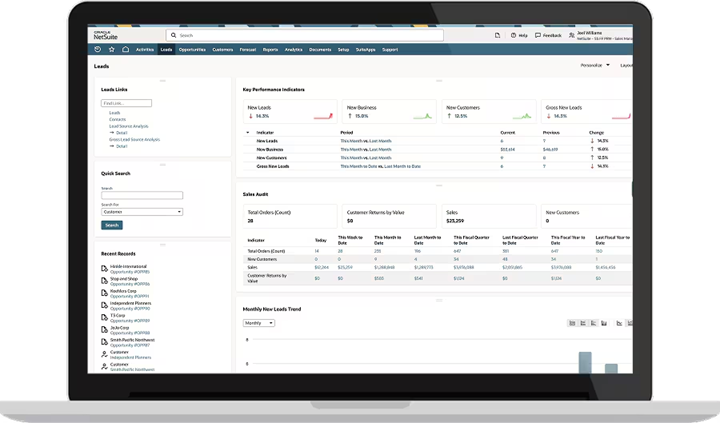
- Dashboards and reporting: Reporting should serve two audiences: internal teams that track productivity, pipeline health, and workload distribution; and clients that need to see the value of the agency’s work. Look for CRM software with dashboards that users can tailor to meet different stakeholder needs.
- Integration with other software: A CRM system needs to connect with the other tools an agency uses, including email, marketing platforms used for client campaigns, and ERP software. Agencies should evaluate a CRM solution’s integration capabilities carefully, because disconnected systems re-create the fragmentation problems that CRM is meant to solve.
How to Choose the Right CRM for a Marketing Agency
A CRM solution represents a significant investment, so choosing one should be done thoughtfully. Beyond the software costs, it requires a major time commitment to implement, learn, and integrate the system into daily operations. The wrong choice can lead to frustrated users and thwarted adoption, but many agencies still make their decisions based on surface-level demos or features that don’t reflect their actual needs. A methodical evaluation process takes more time up front but prevents costly mistakes. Follow these steps to find the right fit:
- Assess which features and functions your agency needs the most: Instead of browsing feature lists, document actual workflows and pain points. Identify the tasks that consume the most time, the gaps where information gets lost, and the new opportunities that teams could seize if they had better tools. Involve team members who serve different roles to disclose additional needs that might otherwise get overlooked. This assessment helps prioritize the features that address real problems, so your agency understands the clear requirements before evaluating any specific platform.
- Consider whether the solution will be intuitive to your end users: Complicated interfaces lead to inconsistent adoption, which undermines the entire purpose of centralizing information. Conversely, a user-friendly CRM tool results in higher adoption rates. Evaluate the user experience carefully, ideally with input from the people who will actually work with the system daily. Having employees who perform different roles test the system often reveals usability issues that might not come to light in a sales demo—for example, an account manager’s daily workflow differs significantly from that of a business development leader. Also pay attention to how many clicks common tasks require, whether the navigation feels logical, and how much training your team would need to become proficient.
- Choose a solution that will grow with your agency: A scalable CRM system will support your agency as your team expands and requirements evolve. The platform should work just as well for five people as it does for 20, and it needs to offer advanced features that larger firms demand, such as complex automations and more in-depth marketing reporting. Ask vendors about their product roadmaps and request testimonials from customers that have grown with their systems. This approach eliminates the possibility of having to migrate to a new CRM solution during a period of heavy growth—a painful and expensive proposition.
- Review pricing model for hidden fees: Over and above the listed subscription cost, CRM pricing often involves implementation fees, training expenses, and upcharges for extra users, more storage, and premium features. Tallied together, they can significantly increase the total cost of ownership. Request a detailed breakdown of all potential costs that could occur over the course of the vendor’s contract, including any adjustments necessary to accommodate anticipated growth. This will prevent surprise bills and allow for apples-to-apples comparisons of platforms.
- Make sure the CRM solution meets security and compliance standards: A CRM system contains sensitive client information—contact details, campaign strategies, business metrics—making security a serious consideration. Look for vendors with SOC 2 Type II certification, which indicates independent verification of their security practices. Agencies that work with clients in regulated industries or handle data from European Union citizens should verify that the platform meets applicable compliance requirements. Key questions to ask include: What encryption standards do you use? Who can access the system’s data and under what circumstances? What audit trails exist for tracking data access and changes?
Proving ROI of Your CRM Solution
Demonstrating CRM software’s ROI requires measuring the right data points at the right time. Before implementation, document baseline metrics pertaining to sales performance, marketing efficiency, client service quality, operational overhead, and any other areas the CRM tool will address. The specific key performance indicators will vary based on agency priorities, but common ones include lead response time, conversion rates, client retention, time spent on administrative tasks, and revenue per client. After implementation, those same metrics reveal whether the investment is paying off. Some improvements appear quickly, such as faster lead response times or reduced data entry time; others take longer to materialize, including higher retention rates or larger deal sizes.
CRM systems also provide intangible benefits, including better client relationships, less team frustration, and more predictable operations. Agencies that track both the quantitative and qualitative values of their platforms can develop a fuller understanding of how they contribute to their success.
Convert More Leads With NetSuite CRM
NetSuite CRM furnishes marketing agencies with a unified platform for managing the entire client lifecycle, starting with initial lead generation and continuing through ongoing engagement and renewal. Lead capture tools pull inquiries from multiple sources into a single pipeline and direct those inquiries to appropriate team members. Marketing automation optimizes campaign execution and tracks its performance, while account-specific dashboards give managers a complete view of each relationship. And integration with NetSuite ERP for Advertising & Marketing Agencies eliminates the data silos that plague agencies using disconnected tools.
The right CRM software is essential for fast-moving, high-growth marketing agencies. A system that centralizes fragmented data and automates complex campaign processes can strengthen client relationships and attract new accounts. Agencies that honestly assess their needs and carefully evaluate their CRM options stand to gain a lasting competitive advantage.
CRM for Marketing Agencies FAQs
Which CRM is best for marketing agencies?
The best CRM software for marketing agencies is one that meets a firm’s specific needs, budget, size, and existing systems. Agencies should evaluate platforms on their features, ease of use, scalability, integration capabilities, TCO, and ROI.
How is CRM used in marketing?
CRM is used in marketing to capture, qualify, and nurture leads; automate campaigns and measure their performance; and personalize communications at scale. It also helps build and strengthen client relationships.
What are the four types of CRM?
The four types of CRM are operational CRM, which automates daily tasks; analytical CRM, which transforms customer data into insights; collaborative CRM, which makes data accessible across teams; and strategic CRM, which offers segmentation, personalization, and other capabilities to improve customer relationships.