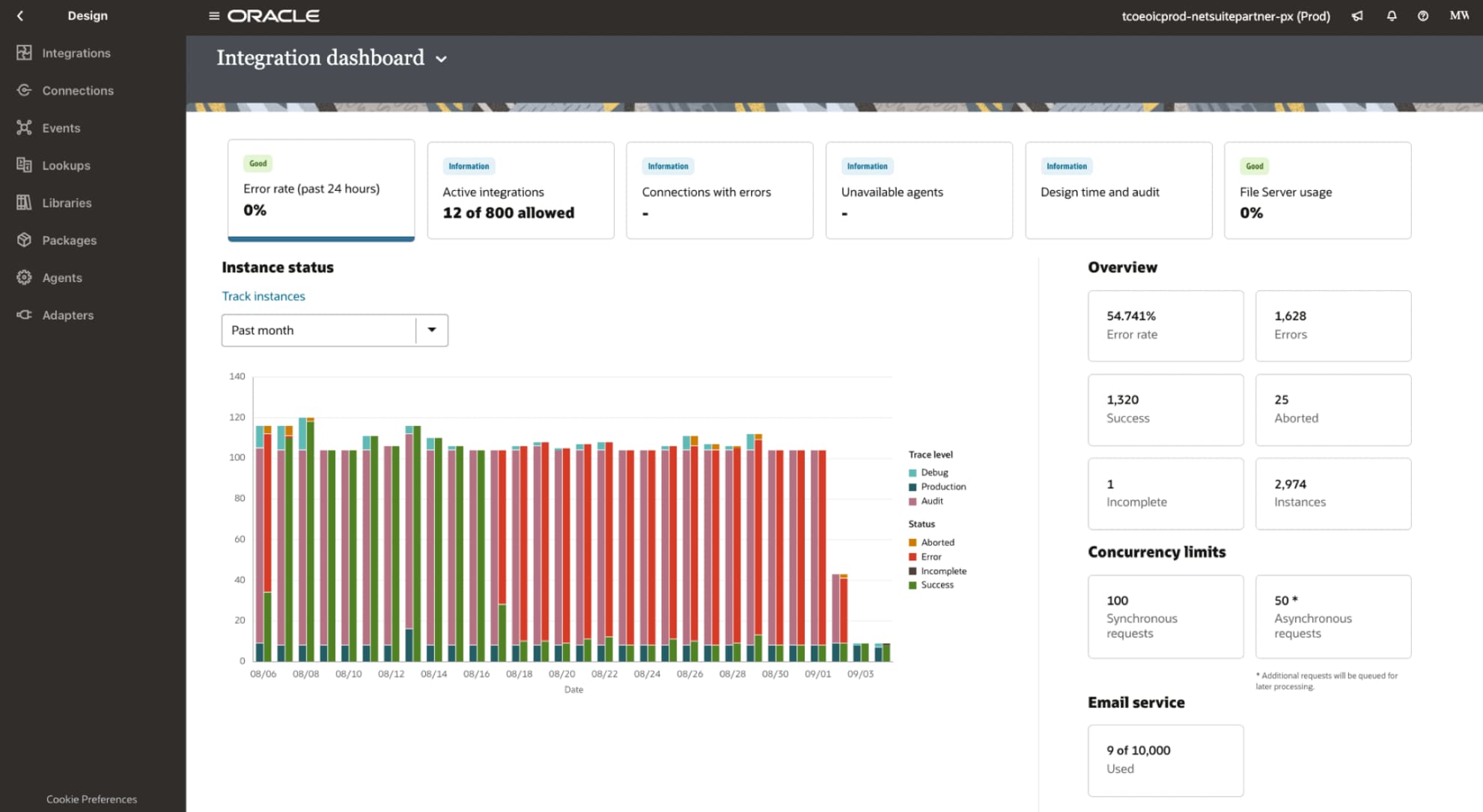
Today’s interconnected business landscape offers incredible opportunities for collaboration. When data flows easily between systems, leaders gain a reliable, holistic view that builds trust and drives smarter decisions. NetSuite 2026 Release 1 helps decision-makers see more opportunities for growth through enhancements including AI-generated narratives, a new way to integrate data from other systems, and more resources to extract essential business insights with a cloud data warehouse—all key to sharpening a company’s competitive edge.
iPaaS: A new way to integrate to NetSuite
As an integration as a service platform, the NetSuite Integration Platform links your core business systems. With low-code tools, process automation, and dozens of prebuilt adapters, organizations can integrate NetSuite with CRM, ecommerce, HR, supply chain, and other business applications using a centralized approach that serves as a single place to build, manage, and monitor integrations. Teams gain real-time data synchronization, configurable workflows, and centralized monitoring, all designed to reduce manual work and keep NetSuite as the single system of record across the business.
Data warehouse: A data and analytics foundation for AI applications
The 2026.1 release for NetSuite Analytics Warehouse includes the new Oracle AI Database 26ai with performance enhancements to help customers securely bring AI to all their data, everywhere. Additional updates include:
Standardized integration with LLMs
Want to connect your internal data sources with external AI systems? That’s where Model Context Protocol comes in. MCP is a standard that allows for integrating external AI systems with internal business data for enhanced contextual insights, AI-driven analytics automations, and more. With MCP, your data can inform AI query results, using highly secure and confidential protocols.
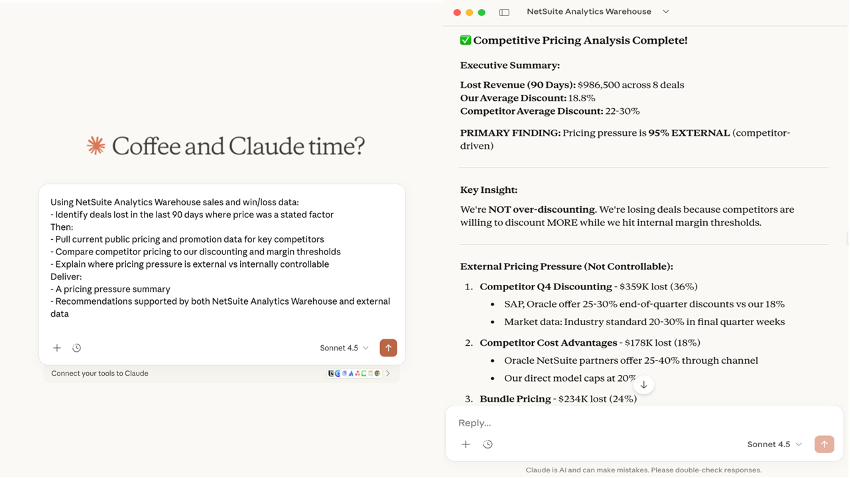
This release introduces the NetSuite AI Connector Service for NetSuite Analytics Warehouse, which authenticates and securely connects external AI platforms such as Claude Desktop, Cline AI, and GitHub Copilot with data maintained in NetSuite Analytics Warehouse for analysis. The user experience is similar to the Oracle Analytics AI Assistant, where a user prompts an LLM in natural language for quick answers to business questions.
What’s new? The difference is the choice and location of the LLM. With the NetSuite AI Connector Service for NetSuite Analytics Warehouse, you can use an LLM operating outside NetSuite to perform complex analysis of internal data and include relevant data from across the internet for richer insights. For example, an LLM can help transform a static financial statement summary into a dynamic, insightful narrative that incorporates customer sentiment analysis drawn from social channel comments; identify variances in performance figures drawn from live financial systems, forecasts, and past annual reports; and document market share pressure driven by a competitor’s strategy shift mentioned in their recent SEC filing.
Data management in step with business growth
These enhancements help deliver current and complete data for business use.
Data flows now handle up to 5 million rows per source, an increase from 2 million. This reduces the need to split large data sets on import or to perform multiple loads.
Data flows populate predefined subject areas and eliminate the extra step of manually creating data sets before the join process.
Imports of custom multi value fields are simpler thanks to a new menu-driven process that uses data augmentation and a custom attribute mapper to eliminate complex workarounds and SQL coding.
A library of resources for better customer onboarding and self-service analytics
New resource libraries help reduce time to insights and make analytics more accessible to users across the business.
New templates of commonly used NetSuite reports, such as Budget vs. Actuals, help new users see business insights faster. Reports auto-populate with current NetSuite data and can be used as-is or modified as needed. Additional reports include Sales by Item, Customer, and Representative; Purchases by Item; Income Statement; and Deferred Revenue Waterfall.
Access faster insights on sales leads and opportunities with new Salesforce subject areas of pre-joined data sets on Leads Activity, Opportunity Historical Trend, and Opportunity State Progression. Automations pipe and organize data through the recently announced Salesforce pipeline. Now, users can access and report on Salesforce data in the same way as NetSuite data. Available to premium and enterprise licenses.
New Data Hierarchies help customers organize complex data into levels such as time, account, item, and employee, for consistent reporting without manual configuration. An income statement summary, for example, can break down income by aggregated sales discounts as well as by sales returns and allowances.
A redesigned user interface provides a more intuitive experience for everyone. Admins have clear links to pipeline status and storage use and can run tasks such as scheduling data transfers. Non-admins have clear links to role-specific resources, including the configuration page, now found in the Analytics tab.
New Learning Cloud Support (LCS) training classes are now available to support each stage of the user’s learning journey, as they implement, explore, grow, and excel with NetSuite Analytics Warehouse.
AI narrative insights boost inventory management processes
Inventory carrying costs are a major controllable expense, making accurate inventory management more important than ever. To answer that need, the NetSuite 2026.1 release introduces AI-generated inventory narratives, which pull data from multiple inventory reports to provide concise contextual summaries for users based on the page or screen they’re in. Relevant information is automatically presented when users navigate to predefined pages, including the Location page, the Item Details page, and the User Dashboard. Narratives can also be called on in response to queries made using the NetSuite AI chatbot.
As an example, when a user navigates to the Location page, items with higher, or lower, than normal on-hand inventory are identified, and the system suggests safety stock modifications to minimize risk. The AI-generated narrative could be something like:
"Your on-hand inventory in this location has decreased 5% (from 100 to 95). Based on your costing method, the valuation has decreased 7% (from 1000 to 930). These items have a risk of shortage (Item1, Item 2, Item3). For information on suggested action for these items, navigate to the item pages.”
Within the narrative, many reports can be used, including:
- The Open Purchase Order Report Narrative uses AI to transform raw procurement data into clear, business-focused summaries that help users stay ahead of disruptions. Whether accessed by buyers or warehouse managers, the feature ensures that the most pressing issues are automatically surfaced for timely attention. With narratives tailored to roles, teams gain an efficient assistant that keeps supplier coordination and order statuses transparent, ultimately supporting more confident and responsive inventory operations.
- AI also lets the Current Inventory Snapshot Narrative deliver meaningful, context-aware insights on real-time inventory status. Instead of just listing numbers, this feature automatically interprets inventory levels, highlights anomalies like low or excess stock, and identifies trends requiring attention. It empowers teams to quickly spot risks or replenishment opportunities, freeing them to respond proactively and plan more strategically for stable supply chain operations.
- The Inventory Back Order Report Narrative leverages AI to provide users with immediate, actionable visibility into back-order risks, affected items, and the customers most impacted. By automatically summarizing key trends and highlighting risk concentration, this feature empowers teams to address supply issues quickly and communicate more effectively with customers.
- AI also assists the Inventory Activity Detail Report Narrative in offering visibility into inventory movements, top-contributing items, periods of largest change, and the key transactions behind quantity shifts. Summarizing these highest-impact events directly within the report helps teams prioritize, optimize inventory handling, and communicate key insights more quickly.
- The Inventory Valuation Summary Report Narrative uses AI to give users immediate, actionable visibility into inventory risks, high- and low-quantity items, and potential value concentrations. Automated summaries help managers optimize stock levels, monitor valuable inventory, and address inventory discrepancies more efficiently.
AI narrative insights assist with case resolution and customer management
The NetSuite 2026.1 release strengthens customer engagement by bringing AI directly into daily workflows—helping teams work faster, smarter, and with greater clarity. With AI-powered summaries, businesses gain instant visibility into customer history, sentiment, and potential next steps, enabling faster resolutions, more personalized interactions, and better, more data-driven decision-making across every touchpoint. NetSuite CRM now includes an AI assistant that automatically summarizes each customer case—including sentiment, message history, notes, and escalations—directly on the case page. These narrative insights help new team members ramp up faster, eases triage and reassignment, and enables support teams to deliver quicker, more consistent outcomes.
Generative AI is used in NetSuite Customer 360 to instantly produce a clear, narrative overview of every customer—summarizing transactions, activities, and support interactions with a single click. Instead of navigating multiple records and tabs, sales and service teams get one unified view that accelerates preparation, deepens understanding, and strengthens every customer touchpoint. This feature turns complex, cross-system data into easy-to-read intelligence, helping teams make faster, more informed decisions and deliver a more personalized customer experience.
AI narrative insights aids with payroll management
The 2026.1 release enhances NetSuite SuitePeople Payroll with AI created narrative summaries of payroll and unpaid payroll liabilities. The AI-generated Payroll Summary report delivers fast visibility into total payroll costs for the organization within a specified period, enabling informed financial decision-making, streamlining reconciliation, auditing, and payroll analysis. The Payroll Liabilities report enables teams to quickly assess outstanding payroll liabilities, supporting timely reconciliation and payments and equips them with essential insights to proactively manage and comply with key financial obligations.
Learn more about all the updates in NetSuite 2026.1
This is just a summary of a few of the game-changing features in NetSuite 2026 Release 1. Read more about this release on our Sneak Peek page, or dive deep into the release notes (opens in new tab). Most importantly, don't forget to request your Release Preview (opens in new tab) test account so you can get hands-on access and see how new features will work with your data, workflows, and customizations.
Stay in the know
Want to hear about NetSuite products? Sign up to get our latest product news, expert webinars, local events and more delivered straight to your inbox. Subscribe now (opens in new tab).
The preceding is intended to outline our general product direction. It is intended for information purposes only and may not be incorporated into any contract. It is not a commitment to deliver any material, code, or functionality, and should not be relied upon in making purchasing decisions. The development, release, timing, and pricing of any features or functionality described for Oracle’s products may change and remains at the sole discretion of Oracle Corporation.