
SaaS companies that depend on subscription-based revenue know that the sales cycle never ends. It takes more than spreadsheets and general-purpose software to manage thousands of accounts with unique payment plans, usage patterns, and support needs—and prevent them from churning. CRM software designed for SaaS companies helps teams track, analyze, and act upon every customer interaction. This article explains what SaaS CRM entails, why it matters, and how to implement it effectively.
What Is CRM in SaaS?
CRM in SaaS is cloud-based software that stores customer and prospect data, tracks
interactions, manages sales pipelines, and orchestrates marketing and customer success
workflows for subscription-based businesses. Most modern platforms bundle contact and
account management, lead and opportunity tracking, ticketing, email and campaign tools,
and reporting dashboards into a single interface. Many also incorporate AI for lead
scoring, churn prediction, and workflow automation.
Key Takeaways
- SaaS companies need CRM systems designed for subscription revenue models, not one-time transactions.
- Key CRM features for SaaS businesses include contact management, lead management, workflow automation, reporting dashboards, churn management, and integration capabilities.
- Successful implementation relies on clear success metrics, comprehensive user training, and a platform that can scale with the business.
CRM for SaaS Companies Explained
Traditional CRM systems are built for transactional sales cycles. They track and nurture leads from first contact through to a single purchase. With the SaaS industry’s recurring revenue models, however, companies need systems that help them nurture customers over months or years; manage renewals, expansions, and support; and monitor churn risks. A SaaS CRM tracks the entire subscription lifecycle. It maintains detailed records of subscription tiers, user seat counts, payment patterns, and support interactions and makes it all accessible from a single interface. This tight integration between customer-facing and back-office functions allows teams to improve service delivery and respond faster to customer needs.
SaaS go-to-market functions often include a mix of product-led growth, inside sales, self-serve upgrades, and partner models. Suitable CRM platforms integrate with product analytics, marketing automation, billing, and support tools, so customer actions in one channel automatically spark actions in others. When a trial customer hits a usage threshold, for example, the CRM system can trigger automated sales outreach. Or, when a health score drops, it can route the account to a customer success manager.
Subscription revenue also introduces complexity in billing cycles, contract terms, and recurring charges that general-purpose CRM software rarely handles well. SaaS-focused CRM platforms model opportunities in terms of annual recurring revenue (ARR) and monthly recurring revenue (MRR), monitor expansion and contraction alongside new business, and integrate with billing systems to maintain accurate subscription records.
Why Do SaaS Companies Need CRM?
A CRM solution gives SaaS teams a shared view of each account’s decision-makers, product usage, renewal dates, and support history—information that would otherwise become difficult to maintain as the business scales. This view is vital to the support of the SaaS subscription model because customers can cancel easily if they stop seeing value, which makes proactive engagement critical—reaching out when usage drops, for instance, rather than waiting until a customer requests cancellation. The same principle applies to growth. Upselling and cross-selling work best when they align with customer behaviors and are personalized to customers’ needs, not delivered as generic sales pitches. SaaS companies need CRM capabilities that address these realities.
SaaS companies also need CRM to reinforce customer retention, a profitability driver more crucial than initial acquisition. Industry research consistently shows that acquiring new customers costs significantly more than retaining existing ones. Loyal customers also tend to spend more, refer others, and provide valuable product feedback. CRM software strengthens retention by centralizing customer data, identifying at-risk accounts early, and enforcing consistent service across all touchpoints.
Additionally, CRM systems use the massive amounts of behavioral data that SaaS generates to inform business decisions. They aggregate usage patterns, support interactions, and engagement metrics to reveal insights about which customers need attention, which segments convert best, and which product features encourage retention. Without a centralized system, this information remains strewn among tools and is inaccessible to those who need it.
Benefits of CRM for SaaS Companies
CRM software addresses the operational realities of SaaS businesses by unifying customer data and automating key workflows. SaaS companies’ growth depends on both acquiring new customers and expanding relationships with existing ones—and CRM answers the call on both objectives. The following benefits illustrate how CRM software drives value throughout the subscription lifecycle from initial lead capture through renewal and expansion:
- Increased sales and upsell opportunities: For subscription businesses, growth often results from seat increases, feature add-ons, and plan upgrades. CRM platforms identify accounts ready for an upsell by combining pipeline data, customer profiles, and product usage indicators, then activating targeted offers or playbooks.
- Improved customer retention: When a CRM ingests data about product usage, support interactions, and lifecycle events, it helps identify at-risk customers early, such as those whose usage is declining or are experiencing recurring problems.
- Sharper customer insights: An analytical CRM layer transforms raw customer data into insights about adoption, engagement, and revenue potential. With unified behavioral, firmographic, and transactional data, SaaS companies can segment accounts, measure cohort performance, and understand the features that strengthen retention.
- Better efficiency and flexibility: Cloud-based CRM systems let SaaS teams standardize processes, such as lead routing, deal approvals, and support case handling, without incurring heavy IT overhead. Workflow automation cuts down on manual data entry, handles follow-up tasks, and orchestrates multistep campaigns, freeing teams for higher-value work.
- Greater team alignment: A CRM system’s unified account record and shared dashboards sync marketing, sales, customer success, and support around the same definitions of leads, opportunities, and health scores. When everyone sees the same timeline of emails, calls, product events, and support tickets, handoffs become smoother and customer experiences more consistent.
Key CRM Features for SaaS Companies
SaaS companies benefit most from the CRM capabilities that help them manage recurring revenue, track subscription lifecycles, and coordinate sales, marketing, and customer success. The following CRM features map directly to how subscription businesses acquire, retain, and grow customers. Each builds on the others, creating a system that upholds the full customer journey, not just isolated functions.
-
Contact management:
In SaaS organizations, every customer account typically includes multiple contacts: buyers, administrators, end users, and champions. The CRM tool must track who these people are, the role each plays in purchasing and using the product, and how they relate to one another. Sales and customer success teams can then build relationships with several people at once, instead of relying on a single contact. This reduces risk if that person leaves the company. CRM platforms also store contextual data on each customer’s industry, technology stack, and implementation stage, which is key for segmentation and personalized outreach. -
Revenue management:
A SaaS CRM’s revenue management features must work well with subscription concepts, such as ARR, MRR, seat counts, and contract periods. These features should be able to distinguish among the different deal types common in SaaS—new business, expansions, renewals—and include fields to capture recurring revenue amounts, contract start and end dates, and billing terms. When the CRM system properly integrates revenue data, SaaS companies can also calculate net revenue retention, track expansion rates, and forecast both new and renewal revenue more accurately. -
Lead management:
SaaS CRM software must be able to handle leads from website forms, free trials, product-led signups, events, partners, and other sources. Effective lead management includes capturing source data, applying scoring rules, assigning owners, and orchestrating nurturing workflows until a lead reaches product-qualified or sales-qualified status. From there, sales process automation handles repetitive tasks, such as sending follow-up sequences based on trial behavior, which reduces the risk of losing prospects in need of more time before buying. Clear lead lifecycle stages provide visibility into funnel performance and customer acquisition efficiency. -
Workflow automation:
With workflow automation, SaaS businesses can codify their nurture, sales, onboarding, and renewal playbooks into consistent, scalable processes. For example, inbound support requests might be routed to different teams based on account tier (for example, sending enterprise customers directly to senior reps or directing self-serve accounts to a chatbot or knowledge base). Automation helps cut down on manual data entry and ad hoc follow-up emails, lowering costs and the risk of human error. As CRM vendors add AI to workflow engines, these systems can recommend or execute next-best actions based on predicted outcomes. -
Customer self-service portals:
Self-service portals let customers search knowledge bases, open support tickets, and manage subscription details without having to speak with an agent. Access to fast answers improves customer satisfaction and reduces the load on support teams. Portal activity data feeds back into the CRM system, so teams can see what customers searched for, the articles they used, and which issues recur. These insights inform product improvements and help identify gaps in documentation. -
Data reporting and analysis:
Robust reporting transforms CRM software from a system of record into a strategic asset. SaaS companies rely on CRM dashboards for information on metrics, such as conversion rates by segment, win-loss trends, expansion pipeline, cohort retention curves, and customer success activity outcomes. Some businesses take analytical CRM approaches, integrating product analytics to show relationships between usage patterns and outcomes. For instance, a dashboard might reveal that customers who complete a specific onboarding step within the first week renew at twice the rate of those who don’t. With this kind of knowledge, teams can experiment with new onboarding flows and measure how they affect activations and churn. -
Churn management:
CRM’s churn management capabilities combine data from product usage, support interactions, net promoter scores, and contract metadata to compute health scores and churn risk. When the system flags an at-risk account, it can automatically trigger retention actions—a check-in email from a customer success manager, a discount offer, or an invitation to a training session, for example—prior to renewal dates or at early signs of disengagement. A focus on customer attrition helps SaaS companies identify patterns that lead to cancellation and address root causes before accounts reach the point of no return. -
Unified customer data:
SaaS customer journeys involve product, billing, marketing, and support systems. CRM platforms that integrate with these systems or embed similar capabilities natively can link all of these customer records. That means Jane Smith in the billing system, the support desk, and the product analytics tool is recognized as the same person with a consistent profile. This allows for consistent segmentation, personalization, and reporting across channels and cuts down on data reconciliation work for analytics teams. These unified profiles also assist privacy and governance practices by storing communication preferences and consent records in one place, making it easier to honor opt-outs and comply with data regulations. -
Integration capabilities:
SaaS-focused CRM systems deliver their full value only when tightly integrated with the rest of the go-to-market, product, and back-office stack, including ERP. Common integrations include marketing automation platforms for campaigns and scoring, product analytics tools for usage signals, billing systems for subscription and payment data, and help desk solutions for ticket history. Well-designed integrations strengthen real-time or near real-time synchronization, API-based extensibility, and secure data exchange.
Choosing a CRM Solution for Your SaaS Company
Selecting a CRM tool represents a significant investment—not only in software costs but also in the time required to implement, learn, and integrate the system into daily operations. The wrong choice can lead to frustrated users and low adoption, but many SaaS companies still make decisions based on surface-level demos or features that don’t reflect their actual needs. A methodical evaluation process takes more time up front but prevents costly mistakes.
SaaS companies’ starting point should be their go-to-market and customer lifecycle strategy, not a generic feature checklist. Key evaluation criteria include support for subscription revenue models, strength of integrations with the existing product and data stack, scalability, and configurability. An early-stage, product-led growth company might prioritize strong usage integrations and lightweight sales workflows, while an enterprise provider may need complex account hierarchies, advanced security, and customizable approval processes.
Usability deserves attention, as well. Complicated interfaces lead to inconsistent adoption, which undermines the purpose of centralizing information. Evaluate the user experience with input from the various employees who will actually work with the system daily. Account managers, marketers, customer success representatives, and sales development reps often have different workflow needs.
Best Practices for Implementing CRM for SaaS
Many CRM implementations fail to deliver expected value because of unclear objectives, insufficient training, or poor integration with existing workflows. The following five best practices help SaaS companies maximize their CRM investments by establishing clear metrics, building user proficiency, planning for scale, maintaining security, and automating effectively:
- Define implementation success metrics: Effective CRM projects begin with clear objectives and key performance indicators tied to business outcomes, rather than by citing vague goals like better visibility. Common success metrics for SaaS companies include improvements in conversion rate, time to first value, expansion ARR, net revenue retention, and reductions in churn or manual effort. These metrics should provide the foundation for configuration and post-implementation optimization decisions.
- Invest in comprehensive user training: CRM adoption often fails when teams lack training tailored to their roles and daily workflows. Employ a mix of live training, documentation, and in-app guidance and embed champions within each team who can coach peers. Ongoing training will remain necessary as new features, processes, and hires come into the business.
- Consider the need for scalability, integrations, and customizability: Use data models and workflows that can scale up from early pipeline tracking to complex enterprise sales and multiproduct offerings. This often means investing early in clean data structures and avoiding excessive customization, which can become hard to maintain. Define which systems serve as records of truth for key data and how information syncs across tools.
- Prioritize platforms with strong security and compliance practices: CRM software stores sensitive personal and business information. Look for encryption in transit and at rest, access controls and role-based permissions, audit logging, data residency options, and third-party certifications, such as SOC 2 or ISO 27001. For SaaS vendors serving regulated industries, verifying that the platform meets applicable compliance requirements is essential.
- Leverage automation capabilities: Identify repetitive, rules-based tasks—lead assignment, trial follow-up, onboarding outreach, renewal reminders—and implement workflows that handle them automatically. Governance processes should review these automations regularly to keep them in tune with current strategies.
Gain a Unified View of Your Customers With NetSuite CRM
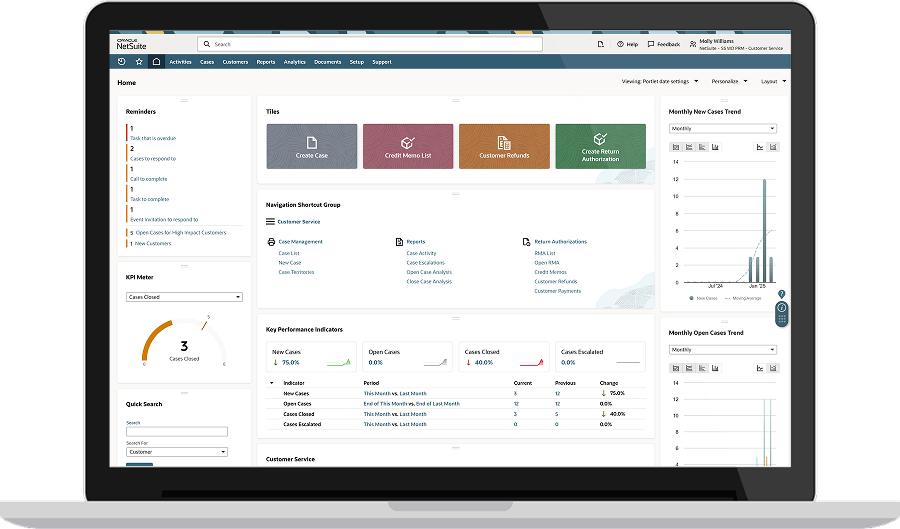
NetSuite CRM helps SaaS companies manage interactions with customers, partners, and suppliers in a single place. The cloud-based platform provides a consistent flow of information throughout the entire customer lifecycle from lead through opportunity, order, fulfillment, renewal, upsell, and support. Sales force automation gives teams visibility into every aspect of the customer relationship, including support cases and back-office information on contracts and inventory. Marketing automation takes the complexity out of lead qualification and conversion by tracking prospect activity and passing leads to sales when they meet predefined criteria. For SaaS and subscription businesses specifically, NetSuite integrates its CRM solution with NetSuite ERP for SaaS, Subscription, and Technology Companies to connect forecasted revenue with pipeline data, automate renewals, and track critical metrics, such as ARR, MRR, customer lifetime value, and churn.
Provide a Self-Service Customer Portal With NetSuite
CRM software built for the distinct operational needs of SaaS companies helps manage recurring revenue, track subscription lifecycles, and align sales, marketing, and customer success teams. The right platform unifies customer data, automates key workflows, and provides the information teams need to control churn and drive expansion. By selecting a CRM system that matches their go-to-market strategy and following implementation best practices, SaaS companies can lay a foundation for sustainable growth.
CRM for SaaS Companies FAQs
Which CRM features are most beneficial to SaaS companies?
The CRM features most beneficial to SaaS companies include contact and account management, recurring revenue and subscription tracking, lead management with scoring and nurturing, workflow automation, and customer self-service portals.
How can a CRM system drive upsell opportunities for SaaS businesses?
A CRM system can drive upsell opportunities for SaaS businesses by combining pipeline data, customer profiles, and product usage indicators to identify accounts ready for expansion and trigger targeted offers or playbooks. It can also automate renewal reminders and expansion campaigns.
What are the common challenges SaaS companies face when adopting CRM?
The common challenges SaaS companies face when adopting CRM include data overload from high volumes of behavioral information, integration complexity when connecting billing systems with product analytics, maintaining personalization at scale, and achieving user adoption across teams that have different workflows and priorities.