
Finance teams want to move faster, explain results earlier, and make decisions with more confidence. NetSuite 2026.2 is designed to meet the moment with new AI-driven insights and automation across core financial workflows, including close management, reconciliation, tax, payments, and reporting. The latest updates help teams spot what needs attention, understand what’s driving change, and act with greater speed, auditability, and control.
Enhanced intelligence accelerates bank reconciliation
Simplified transaction matching and clear reconciliation audit trails are essential for timely, confident cash management. NetSuite 2026.2 adds smarter bank matching and reconciliation capabilities designed to reduce manual effort, surface likely matches faster, and give finance teams more visibility and control.
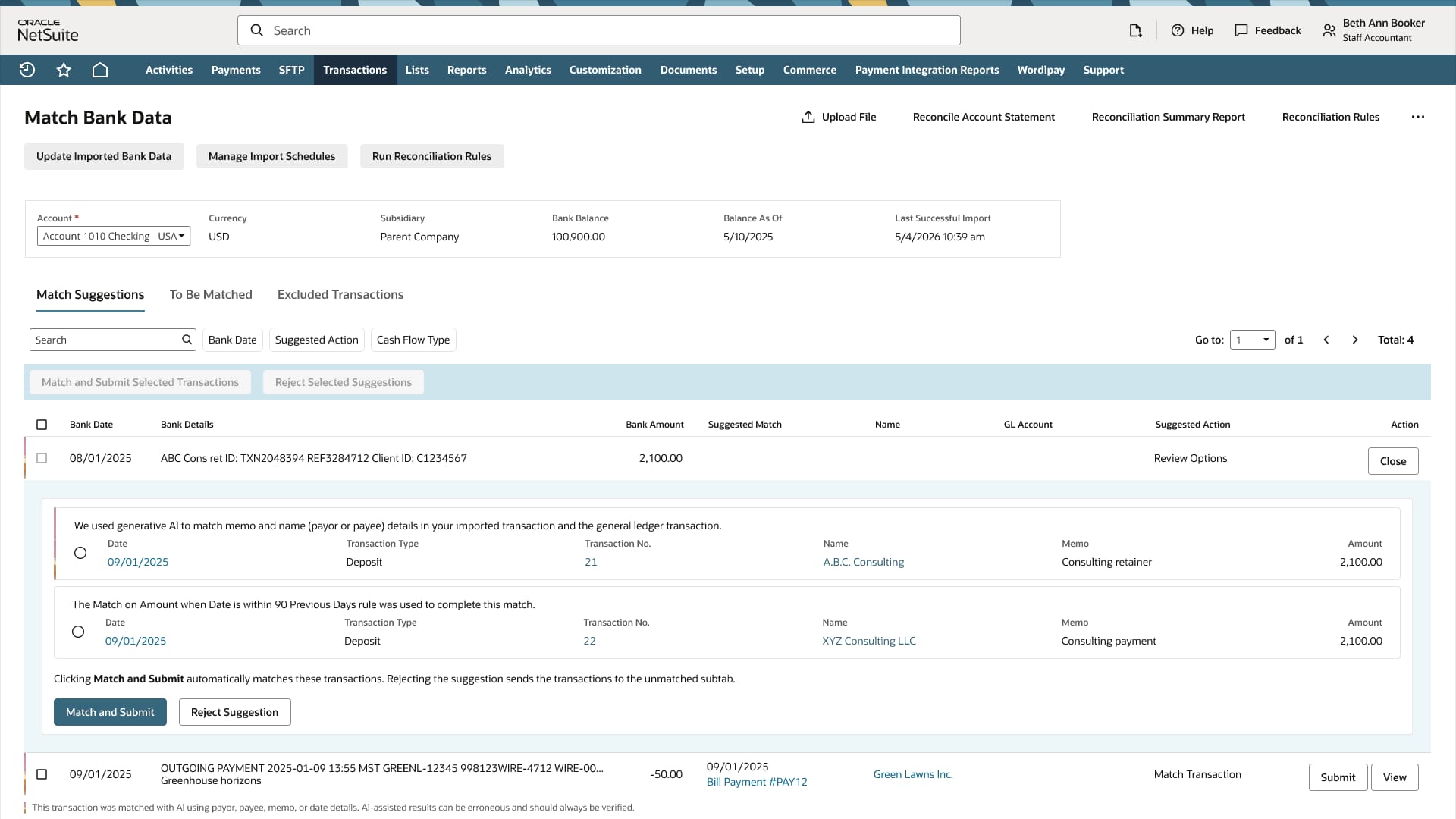
- An AI transaction matching assistant helps finance teams resolve
ambiguous matches by recommending a single likely GL transaction when multiple
suggestions remain. The assistant provides a rationale for its recommendations while
preserving the ability for humans to review suggestions before submission, which can
reduce the number of manual investigations during reconciliation.
- A new suggestions workspace gives teams a dedicated place to review
potential matches before reconciliation. Replacing the former Review tab, it uses
existing auto-match and auto-create rules to create reviewable suggestions and surfaces
ambiguous matches that were previously discarded, letting teams compare bank- and
GL-side details and select from as many as five likely options.
- Invoice and bill payment matching bring payment creation and
application directly into the reconciliation workflow. NetSuite suggests exact matches
between bank transactions and open customer invoices or vendor bills while still
allowing teams to manually select transactions for matching when needed. Once a match is
accepted, NetSuite creates and applies the related payment and matches it to the bank
transaction, reducing the need for separate data entry and follow-up steps.
- Reconciliation workflow improvements help teams move through matching
and review with fewer steps. Key actions appear at the top of the Transactions to Match
tab to reduce scrolling, manual matches and cleared transactions are submitted
automatically, and bank-side and GL-side details are shown together to give finance
teams clearer transaction context during review.
- Bank matching and reconciliation logs add Matched By and Submitted By
details, including user, system, date, and time context. Reconciliation status changes
are also recorded in System Notes, creating a stronger audit trail and helping teams
review prior matching and reconciliation activity.
- Payment adjustments let teams easily enter fees or other charges
connected to payment collection directly on customer payments or deposits. Examples
include bank fees, convenience fees, or losses from customer underpayment. Instead of
creating separate journals, teams can post the fees automatically with the
payment.
- Narrative insights provide AI-generated summaries of imported bank transactions and reconciliation work that may need attention. By highlighting unmatched bank and GL transactions, aging unmatched items, and flagging exceptions, teams can quickly focus on issues most likely to delay the close.
AI supports faster close management
A fast close depends on clear task ownership, timely exception review, and consistent explanations of financial results. NetSuite 2026.2 provides new intelligent close capabilities that improve visibility, reduce manual analysis, and help accounting teams keep the close process on track.
- NetSuite 2026.2 introduces NetSuite Intelligent Flux Analysis, which
helps accountants and controllers explain why account balances changed between reporting
periods. Available from the Comparative Income Statement and as a task from the NetSuite
Intelligent Close Manager portlet, this capability uses AI to draft explanations for
account balance variances, which can reduce manual report comparison, driver
investigation, and narrative drafting.
- In addition to the new flux analysis task, NetSuite Intelligent Close Manager adds a Calculate Consolidated Exchange Rate task to accounting tasks, helping teams manage key close activities from one place. Teams can also prioritize task records and assign tasks to employees, which can strengthen task ownership and keep the close process moving.
Simplified payment processing
Growing payment volumes, global vendor relationships, and disjointed payables workflows make payment processing more difficult to manage. In 2026.2, NetSuite Intelligent Payment Automation includes new capabilities that let teams manage payments better.
- International payment support means teams can now onboard and pay
international vendors from the same payment automation environment they already use.
Estimated exchange rates are displayed for better visibility into expected payment
impact before submission.
- The new personalized payables workspace lets teams customize the payables work area by selecting and saving relevant filters and data columns. Teams can quickly identify and manage transactions for payment processing across multiple vendors, with filter and column selections from sources such as vendors, bills, journals, and credits.
Greater insight into labor costs and profitability
Labor is a major expense for most organizations, but understanding how these costs affect profitability can be difficult when information is spread across payroll, finance, and operations systems. NetSuite 2026.2 brings that information together so finance teams can better understand labor trends, spot margin pressure, and make more informed decisions.
- New labor cost insights give CFOs focused reports and AI-generated
summaries for a clearer view of how workforce costs affect revenue and profitability. By
connecting labor cost data with NetSuite financial data, teams can more easily see where
costs are rising, how margins are changing, and where staffing decisions may influence
business performance.
- NetSuite time tracking makes Start Time and End Time available as native fields, giving teams access to more precise time data that can be entered, exported, and integrated across all interfaces for payroll and compliance use cases. This can improve billing accuracy, labor reporting, workforce analysis, and audit visibility without the extra work of custom fields or workarounds.
AI further automates and accelerates NetSuite EPM account reconciliations
Finance teams often spend significant time matching transactions, maintaining reconciliation attributes, managing exceptions, and enforcing consistent reconciliation policies. The latest enhancements in NetSuite Account Reconciliation automate these activities, letting teams focus more on analysis and exception resolution.
- Transaction matching assistance uses AI to identify likely transaction
matches based on historical matching activity. The solution provides prediction
confidence scores and is designed to improve over time as teams validate or reject
suggested matches. By reducing manual matching effort and improving efficiency for
complex matching scenarios, organizations can expand automation while maintaining
confidence in reconciliation results.
- Reconciliation assignment assistance uses AI to predict and assign reconciliation attributes based on historical actions and patterns. Confidence scores provide visibility into prediction accuracy, while automated training and prediction processes help keep assignments current over time. This can reduce manual maintenance, improve consistency, and accelerate reconciliation preparation and period-end close activities.
Additional enhancements further simplify the reconciliation process.
- Balance attributes let organizations incorporate additional
account-level information into reconciliations, improving visibility into account
activity and supporting more automated, data-driven processes.
- Global rules provide centralized rule management across reconciliation
activities to standardize processes, strengthen governance, and reduce administrative
effort.
- Automatic alerts simplify the creation, routing, and tracking of reconciliation exceptions, alerting both internal teams and external users to accelerate resolution while maintaining a complete audit trail.
Additional financials enhancements improve tax, e-invoicing, and compliance
- SuiteTax enhancements
give organizations more flexibility and automation in tax-related workflows.
Tax-inclusive pricing lets finance manage pricing where tax is either
included in the displayed price or calculated separately, while NetSuite calculates the
net and tax split. Tax on Term Discounts now supports purchase
transactions, automatically calculating tax on vendor payment discounts and generating
bill credit adjustments for both discount and tax amounts.
- NetSuite Compliance 360 adds a new Compliance Audit Approver role,
workflow-based audit control assignments, approvals, and updated audit status KPIs on
the dashboard. These updates can help organizations assign audit responsibilities,
manage approvals, and monitor audit progress more easily.
- NetSuite E-Invoicing enhancements simplify e-document approval, transaction response, inbound document conversion, template building, and entity identification, so teams can reduce manual work and address PEPPOL-related requirements across e-invoicing workflows.
Learn more about the updates in NetSuite 2026.2
This is just a summary of the notable features in NetSuite 2026.2. Read more about what’s in the release on our Sneak Peek page or review the details in the Release Notes (opens in new tab). Request your Release Preview (opens in new tab) test account for hands-on access and to explore how new features may work with your data, workflows, and customizations.
The preceding is intended to outline our general product direction. It is intended for
information purposes only and may not be incorporated into any contract. It is not a
commitment to deliver any material, code, or functionality, and should not be relied
upon in making purchasing decisions. The development, release, timing, and pricing of
any features or functionality described for Oracle’s products may change and remains at
the sole discretion of Oracle Corporation.