



Know your runway instantly.
See your cash, MRR, burn rate, and runway at a glance. Understand what’s driving your numbers before you make your next hiring or spending decision.

NetSuite QuickStart handles more of the routine finance work in the background, surfacing the decisions that need your judgment. Get started in minutes with the financial foundation your startup needs today and a clear path to NetSuite as your business grows.
Ready to see what it’s like to have AI-powered finance software work for you?
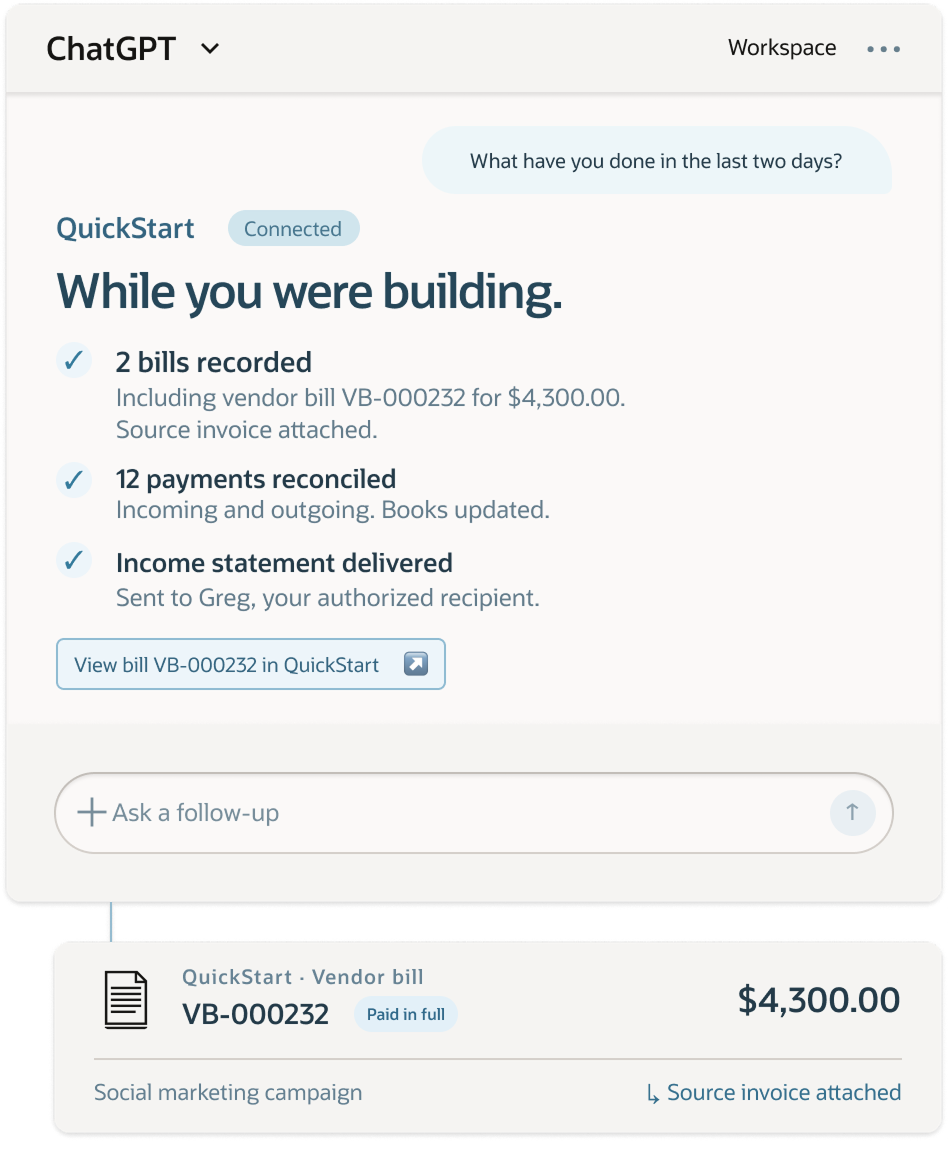
QuickStart handles routine financial work, keeps your records current, and surfaces what needs your judgment. And because your financial system shouldn't require another destination, you can access QuickStart through ChatGPT or Claude, work from Slack, or jump into the app when you want to review the details.
Inbox
Banks
Business tools
Connected
Capture
Business context
Act
Approved work
Reconcile
Financial records
Outcomes, evidence & decisions
Your AI workspace
ChatGPT or Claude
Your team channel
Slack
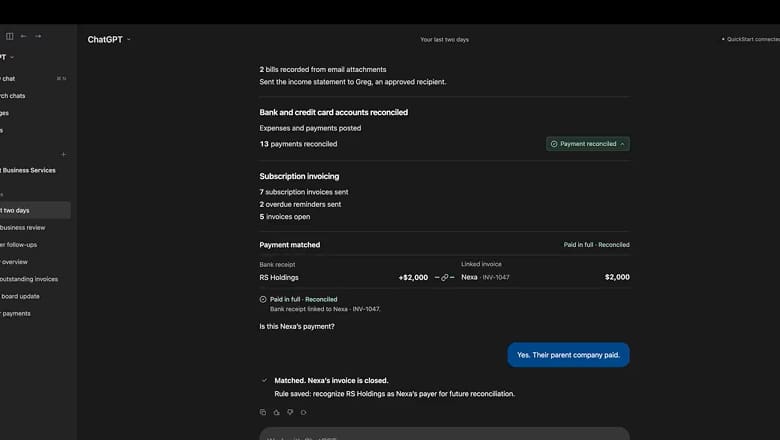
Ask ChatGPT what QuickStart has handled recently. Confirm a payment from a customer’s parent company, and QuickStart matches it to the invoice and remembers the connection.
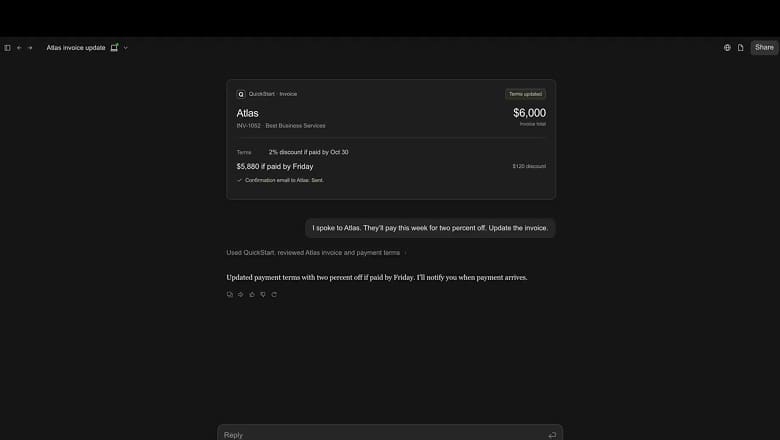
Tell Claude a customer agreed to pay early for a discount. QuickStart updates the invoice, sends a confirmation, and lets you know when payment arrives.
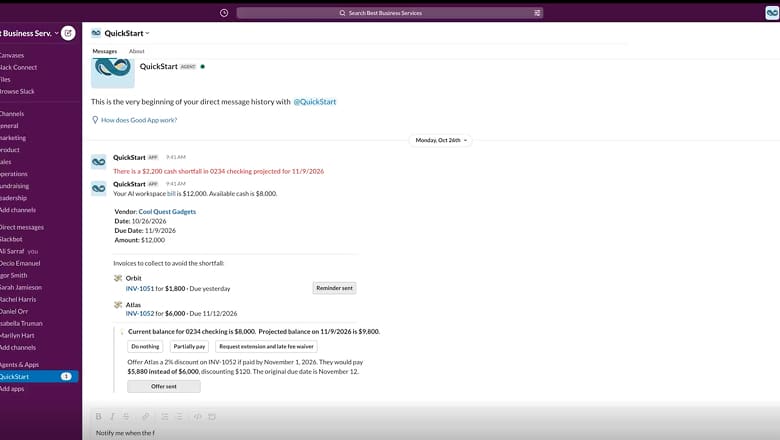
QuickStart flags the gap in Slack and shows which invoices could help cover it. Send reminders or an early payment offer, then let QuickStart watch for the funds.
Keep your business moving. We’ll help with the paperwork.
QuickStart handles routine finance
tasks,
explains what’s changing, and taps you on the
shoulder when a decision needs your judgment.
See your cash, MRR, burn rate, and runway at a glance. Understand what’s driving your numbers before you make your next hiring or spending decision.

Let QuickStart capture bills, categorize expenses, and reconcile payments in the background. Your records stay current without you managing every step.

Connect your bank, send your first invoice, and see your financial position in minutes. Spend your time building the business, not setting up software.

Ask why costs increased or what needs attention. Get answers grounded in your financial records, then let QuickStart carry out the next step—with your approval when needed.

Check your runway, request an update, or approve a decision in ChatGPT or Claude. QuickStart handles the financial work behind the conversations.

Connect the apps you use for banking, payments, billing, and running your business. QuickStart brings financial activity together, reducing manual data entry and keeping your numbers in sync.
Included NetSuite QuickStart features and functionality (subject to the usage limitations set forth below)
Self-service setup and account controls.
Self-service setup and account controls.
Core bookkeeping, bank feeds, tax, and financial statements.
Bill management and expense tracking.
Customer workflows from quote to cash.
Item, subscription, and multi-location inventory tracking.
Automate recurring billing and revenue.
* Monthly limits reset each month; unused capacity does not roll over to subsequent months.
QuickStart brings accounting, banking, subscriptions, payments, reporting, and SaaS metrics together around the needs of early-stage technology companies.
Activate, and get to work online, with AI guidance along the way. Move at your own pace, from connecting your bank to running your first financial workflows.
Let QuickStart capture bills, update your books, and reconcile payments. Step in when an approval or decision needs your judgment.
Built on Oracle Autonomous AI Database and Oracle Cloud Infrastructure (OCI), QuickStart brings Oracle’s enterprise AI foundation to your everyday financial workflows.
Get the financial system your startup needs today without creating tomorrow's migration problem. As your company becomes more complex, QuickStart provides a clear path to NetSuite. Your data, workflows, and financial history move with you, so you can scale without starting over.

QuickStart is purpose-built for early-stage U.S. technology startups that need a real financial foundation without hiring a finance team or taking on a traditional sales and implementation process.
If you already have a larger team, multiple legal entities, international operations, or need more advanced financial controls, NetSuite may be a better fit.
Explore NetSuiteDiscover the Oracle AI SMB Bundle, featuring QuickStart, ChatGPT, Codex, and OCI credits.
Yes. QuickStart is free for high-tech startups within usage limits, including 2,500 business records, 800 emails, and 175 new documents each month. QuickStart also includes up to 20GB of document storage, four (4) connected bank and credit card accounts, and as many as two (2) concurrent integration requests.
QuickStart includes the essentials to run finance for an early-stage, high-tech startup: accounting, banking, payments, subscriptions, inventory, SaaS KPIs, AI insights, and support, subject to the terms and usage limitations set forth in the Oracle NetSuite QuickStart Service Description.
QuickStart is built for early-stage, high-growth, high-tech startups. It distills NetSuite’s experience helping more than customers run their businesses into exactly what founders need: automated accounting, SaaS metrics, subscriptions, and AI-powered workflows.
Think minutes, not months. You can activate, onboard, and begin running core finance operations the same day. Our automated setup process and AI data import tools work to deliver a smooth transition with minimal disruption to your operations.
No. QuickStart is designed to help founders and lean teams manage their finances with confidence, even with little financial background. If you work with an accountant, they can use QuickStart’s financial management and automation capabilities to work more efficiently and give you better strategic advice.
QuickStart is designed so choosing the right system today doesn't mean starting over tomorrow. As your operations become more complex, QuickStart provides a path into NetSuite, carrying your financial foundation forward as you scale.
QuickStart connects to AI assistants like ChatGPT and Claude through MCP, so you can work with your financial data in the tool you choose. It also integrates with popular business tools—including payment processors, and communication platforms—to help keep your financial activity connected and reduce manual work.
QuickStart is supported by Oracle’s dedicated security organization, which monitors security infrastructure, reviews products and services, and responds to security incidents. Oracle uses strong cryptography and security protocols consistent with industry standards and handles personal information in accordance with the Oracle Services Privacy Policy (opens in a new tab).
We provide customer support through email. We also have an AI assistant to help answer QuickStart-related and other questions you may have.
Yes. AI is built into QuickStart to simplify setup, automate common financial tasks, provide insights, and help you spend less time managing finances and more time building your business.